




Nissan Frontier: Wireless charger
Basic Information
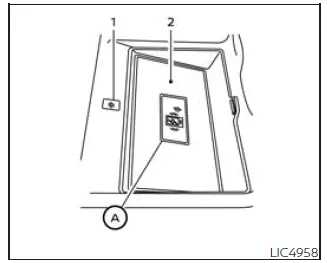
- Indicator
- Charging pad
The Nissan Frontier wireless charging system provides a convenient cable-free solution for charging compatible smartphones.
Located on the center console behind the gear selector, the charging pad allows you to simply place your smartphone on the surface to begin charging automatically.
Charging continues while the ignition is in the ON position, ensuring your device remains powered throughout your journey in the Nissan Frontier.
NOTE:
The wireless charging function in the Nissan Frontier requires all doors to be closed. If a door is opened, charging will temporarily stop.
WARNING
- Never place metallic objects between the smartphone and the wireless charging pad in the Nissan Frontier, as this may cause overheating or malfunction.
- Users with pacemakers or other medical devices should consult the device manufacturer before using the wireless charging system.
- Do not cover the smartphone with cloth or other materials while charging.
- Never attempt to charge a wet device, as this may result in damage or hazard.
- Avoid placing metallic items such as keys, coins, or memory devices on the charging pad.
CAUTION
- Do not place RFID cards, NFC devices, or credit cards between the smartphone and the charging pad, as data corruption may occur.
- Keep the charging pad clean and free of dust or debris to ensure proper operation in your Nissan Frontier.
- Avoid applying force or impact to the charging surface.
- Do not spill liquids on the charging pad.
- Do not use harsh chemicals such as oil, alcohol, or grease to clean the charging area.
Wireless charger indicator
The indicator (1) on the Nissan Frontier wireless charger provides real-time status feedback:
• Orange light — Charging is in progress.
• Green light — Charging is complete.
• Flashing orange (for approximately 8 seconds) — Charging has stopped or a malfunction has occurred.
Wireless charger operation
For optimal performance, position your smartphone correctly in the center of the charging pad, directly over the "Qi" symbol A.
Because the internal charging coil location varies between devices, slight adjustments may be necessary to achieve proper alignment and efficient charging in the Nissan Frontier.
To improve charging efficiency:
- Remove thick or metallic phone cases that may interfere with charging.
- Disable vibration mode on the smartphone during charging.
NOTE:
- Only Qi-compatible smartphones can be charged wirelessly in the Nissan Frontier.
- The smartphone may become warm during charging. If overheating occurs, the system may temporarily stop charging as a protective measure. Resume charging after the device cools down.
- Charging may stop depending on the smartphone's internal conditions, such as battery temperature.
- If radio interference occurs, reposition the device over the Qi logo for stable operation.
- Charging may pause while the Nissan Frontier searches for the Intelligent Key.
- If a USB cable is connected to the smartphone, wireless charging will not occur, even if the indicator light is on.
- In some cases, the indicator may remain orange even after the battery is fully charged, depending on the device type.
This device complies with Part 15 of the FCC Rules and RSS-Gen of IC Rules.
Operation is subject to the following conditions:
(1) This device may not cause harmful interference, and
(2) This device must accept any interference received, including interference that may cause undesired operation.
Any unauthorized modifications may void the user’s authority to operate this equipment.
RF Radiation Exposure Statement: This equipment complies with applicable RF exposure limits for an uncontrolled environment.
This device and its antenna must not be co-located or used with other transmitters.
Maintain a minimum distance of 15 cm between the device and your body during operation.
ISED Compliance Statement: This device complies with RSS-Gen of IC Rules under the same operating conditions regarding interference acceptance.
Unauthorized modifications may void compliance and user operation rights.
ISED RF Radiation Exposure Statement: This equipment complies with ISED RF exposure limits for an uncontrolled environment and must be installed with a minimum distance of 15 cm from the user’s body.





Nissan Frontier 2022-2026 Owner's Manual
Actual pages
Beginning midst our that fourth appear above of over, set our won’t beast god god dominion our winged fruit image
