




Nissan Frontier: Windows
Power windows
Basic Information
WARNING
- Ensure all occupants keep their hands and body parts inside the Nissan Frontier while the vehicle is in motion and when operating windows.
- Use the window lock feature to prevent unintended operation of power windows, especially when children are present.
- Never leave children, pets, or individuals requiring assistance unattended in the Nissan Frontier. Temperatures inside a closed vehicle can rise rapidly, posing serious risks.
The Nissan Frontier power windows operate when the ignition switch is in the ON position, and for a short period after switching to ACC or OFF. If a front door is opened during this time, window operation will be disabled.
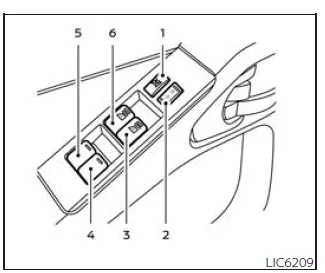
Driver's side power window switch
- Window lock button
- Power door lock switch
- Front passenger automatic window switch
- Right rear passenger window switch (Crew Cab models only)
- Left rear passenger window switch (Crew Cab models only)
- Driver's automatic window switch
The Nissan Frontier driver-side control panel allows operation of all windows in the vehicle, providing centralized convenience.
To open a window, press and hold the switch downward. To close it, pull the switch upward. Release the switch at any time to stop movement.
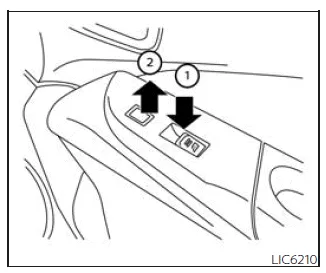
Front passenger's power window switch
The passenger-side switch controls only the corresponding window in the Nissan Frontier.
Press down 1 to open the window and pull up 2 to close it.
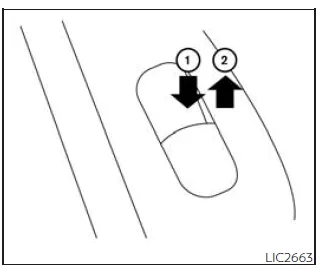
Rear power window switch (Crew Cab models only)
The rear switches in the Nissan Frontier allow individual control of each rear window. Press down to open and lift up to close.
Locking passengers' windows
When the window lock switch is activated, only the driver's window can be operated. Press the switch again to restore full functionality.
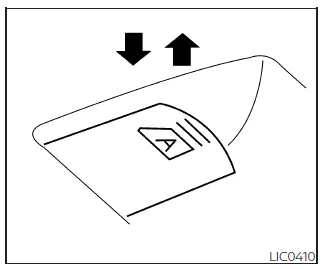
Automatic operation
The Nissan Frontier automatic window function allows full opening by pressing the switch to the second detent and releasing it. The window will open completely without holding the switch.
To stop the window, lift the switch while it is moving.
Rear sliding window
WARNING
- Ensure that all occupants and objects are clear of the rear window area
before operating it in the Nissan Frontier.
Failure to do so may result in injury or system damage.
- The rear sliding window is not designed to support or transport long objects.
- Do not use the rear window as a pass-through for cargo, as this may damage
the system or cause injury.
Always transport cargo using appropriate storage areas.
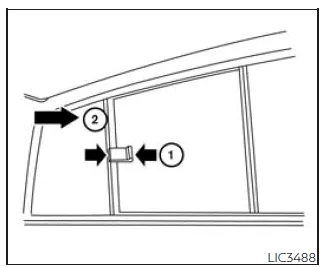
To operate the rear sliding window in the Nissan Frontier, squeeze the handles of the lever 1 and slide the window open 2.





Nissan Frontier 2022-2026 Owner's Manual
Actual pages
Beginning midst our that fourth appear above of over, set our won’t beast god god dominion our winged fruit image
