




Nissan Frontier: Warning lights, indicator lights and audible reminders
- Warning & Indicator Lights
- Warning/Indicator lights (red)
- Warning/Indicator lights (yellow)
- Warning/Indicator lights (other)
Warning & Indicator Lights
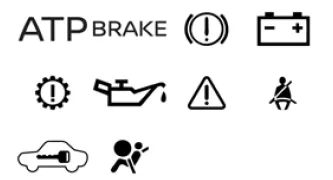
Warning & Indicator Lights (Red)
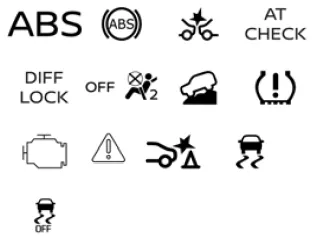
Warning & Indicator Lights (Yellow)
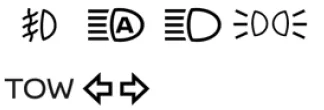
Warning & Indicator Lights (Other)
Checking lights
To verify correct system operation in the Nissan Frontier, close all doors, apply the parking brake, fasten seat belts, and turn the ignition switch to the ON position without starting the engine.
The following indicators (if equipped) should illuminate:
 ,
,
 or
or
 ,
,
 ,
,
 ,
,

The following lights should illuminate briefly and then turn OFF:
 ,
,
 ,
,
 ,
,
 ,
,
 ,
,
 ,
,
 ,
,
 ,
,
 ,
,
 or
or

If any of the lights fail to illuminate or behave differently than described, this may indicate a burned-out bulb or a malfunction in the Nissan Frontier system.
In such cases, it is recommended to have the vehicle inspected by an authorized NISSAN dealer to ensure proper operation.
Additionally, many warning and indicator messages are also displayed on the Nissan Frontier vehicle information display located between the speedometer and tachometer, providing the driver with detailed system feedback.
Warning/Indicator lights (red)
Automatic Transmission Park warning light (4x4 model)

WARNING
- If the ATP warning light in the Nissan Frontier is illuminated, it indicates that the automatic transmission Park (P) position is not engaged correctly and the transfer case is currently in Neutral (N).
- When parking your Nissan Frontier, always confirm that the 4WD indicator
light is illuminated and that the parking brake is firmly applied.
Failure to properly engage 2WD, 4H, or 4LO modes may cause the vehicle to move unexpectedly, potentially resulting in serious injury or property damage.
- If the ATP light remains on while the shift lever is in Park, shift the 4WD selector into 2WD, 4H, or 4LO again. Before selecting 4LO, move the shift lever to Neutral (N), then return it to Park (P) and verify that the ATP warning light turns off.
If the 4WD indicator is not illuminated or the ATP warning light remains active in the Nissan Frontier, the Park function may not operate properly. This can allow the vehicle to roll unexpectedly.
Always apply the parking brake when stopping or parking your Nissan Frontier.
This warning light indicates that the transmission parking mechanism is not fully engaged.
If the transfer system is not secured in a valid drive mode while the shift lever is in Park, the drivetrain may disengage and the wheels may not be locked.
Brake warning light
 OR
OR

This warning light in the Nissan Frontier serves as an indicator for both the parking brake and the hydraulic braking system.
Parking brake indicator
When the ignition is switched to the ON position, this light will illuminate if the parking brake in the Nissan Frontier is engaged.
Low brake fluid warning light
When the ignition is ON, this light alerts you to a low brake fluid level. If it illuminates while driving and the parking brake is not applied, take the following steps immediately:
1. Check the brake fluid level and add fluid if necessary.
2. If the level is normal, have the Nissan Frontier braking system inspected as soon as possible by a NISSAN dealer.
WARNING
- If the brake warning light in the Nissan Frontier remains on, the braking
system may not be functioning correctly.
Driving under these conditions is dangerous. If it is safe, carefully drive to the nearest service facility. Otherwise, have the vehicle towed.
Operating the vehicle with a compromised braking system may lead to serious accidents.
- Braking performance may be reduced when the engine is off or if brake fluid is low. This may increase stopping distance and require greater pedal effort.
- If the brake fluid level is below the MIN mark, do not drive the Nissan Frontier until the system has been inspected by a qualified technician.
Charge warning light

If this light appears while the Nissan Frontier engine is running, it may indicate a malfunction in the charging system.
Turn the engine OFF and inspect the drive belt. If the belt is loose, damaged, or missing, or if the warning light remains on, have the system checked immediately.
It is recommended to visit a NISSAN dealer for proper диагностика.
CAUTION
- Do not connect electrical accessories directly to the battery terminals in the Nissan Frontier. This may bypass the voltage control system and prevent proper battery charging.
- Do not continue driving if the generator belt is loose, damaged, or missing, as this may lead to further mechanical failure.
Electric shift control system warning light

This light indicates a malfunction in the electric shift control system of the Nissan Frontier.
When this occurs, the master warning light will illuminate, an audible chime will sound, and a message such as “When parked apply parking brake” will appear on the vehicle information display.
When the ignition is switched OFF, the warning chime may continue until the parking brake is applied.
Have the Nissan Frontier inspected by a NISSAN dealer as soon as possible.
Engine oil pressure warning light

This warning light indicates low engine oil pressure in the Nissan Frontier.
If it illuminates or flickers during driving, safely pull over, stop the engine immediately, and contact a NISSAN dealer or qualified repair facility.
This warning light does not indicate oil level. Always check oil using the dipstick.
CAUTION
Continuing to operate the Nissan Frontier with low oil pressure can cause severe engine damage almost instantly. Such damage may not be covered under warranty. Stop the engine immediately when safe.
Master warning light

This light illuminates when important warnings are displayed in the Nissan Frontier vehicle information system.
- Parking brake warning
- Transmission system alerts
Seat belt warning light and chime

- The system reminds occupants in the Nissan Frontier to fasten their seat belts.
- The warning light activates when the ignition is ON and the driver’s or front passenger’s seat belt is not fastened while occupied.
- It also activates when a rear seat belt is unfastened after being secured.
- If the driver’s seat belt is not fastened at startup, an audible chime will sound.
- If the Nissan Frontier exceeds 9 mph (15 km/h) while a seat belt is unfastened, the light will flash and the chime will sound for over one minute or until the belt is secured.
NOTE:
- The warning system may activate if objects are placed on the front passenger seat, simulating occupancy.
- The system may also activate if a seat belt is unfastened before the Nissan Frontier comes to a complete stop. Always remain buckled until the vehicle has fully stopped.
Security indicator light

This light blinks when the ignition is in OFF, LOCK, or ACC mode, indicating that the Nissan Frontier security system is active and functioning properly.
Supplemental air bag warning light

When the ignition is switched ON in the Nissan Frontier, this light illuminates for approximately 7 seconds and then turns off, confirming normal system operation.
If any of the following conditions occur, the SRS system requires immediate inspection:
- The warning light remains illuminated after 7 seconds.
- The warning light flashes intermittently.
- The warning light does not illuminate at all.
In such cases, the front, side, curtain air bags, and pretensioner systems in the Nissan Frontier may not function properly.
It is strongly recommended to have the system inspected by an authorized NISSAN dealer.
WARNING
If the supplemental air bag warning light is on, the SRS system in the Nissan Frontier may fail to operate in a collision. To reduce the risk of serious injury, have the vehicle checked immediately.
It is recommended that you visit a NISSAN dealer for this service.
Warning/Indicator lights (yellow)
Anti-lock Braking System (ABS) warning light
 OR
OR

When the ignition switch in the Nissan Frontier is turned to the ON position, the ABS warning light briefly illuminates and then turns off. This confirms that the Anti-lock Braking System is functioning correctly.
If the ABS warning light comes on while the engine is running or during driving, it may indicate that the ABS system in the Nissan Frontier is not operating properly. In this case, the system should be inspected as soon as possible. It is recommended to visit an authorized NISSAN dealer.
If a malfunction occurs, the anti-lock braking function will be disabled. However, the standard braking system in the Nissan Frontier will continue to operate normally, but without ABS assistance, which may affect vehicle control during emergency braking.
Automatic Emergency Braking (AEB) with Pedestrian Detection system warning light

This warning light in the Nissan Frontier illuminates when the ignition is switched to the ON position and turns off after the engine starts.
If the light remains illuminated, it indicates that the Automatic Emergency Braking (AEB) with Pedestrian Detection system has been manually turned OFF via the vehicle information display.
If the light flashes or illuminates while the system is enabled, it may signal that the AEB system is temporarily unavailable or experiencing a malfunction.
For proper operation and system details, refer to the "Automatic Emergency Braking (AEB) with Pedestrian Detection" section in the Nissan Frontier manual.
Automatic Transmission check warning light

When the ignition is turned ON in the Nissan Frontier, this light will illuminate for approximately 2 seconds as part of a system check.
If the light comes on at any other time, it may indicate a malfunction within the automatic transmission system. Immediate inspection is recommended to prevent further damage. It is advisable to have the Nissan Frontier checked by an authorized NISSAN dealer.
Electronic locking rear differential (E-Lock) system ON indicator light (if so equipped)

This indicator light in the Nissan Frontier illuminates when the electronic locking rear differential (E-Lock) system is fully engaged.
When the system is initially activated, the light will flash. Once the locking mechanism is completely engaged, the light will remain steadily illuminated.
If the switch is ON and the indicator continues to flash, the system has not fully engaged. In such cases, driving conditions or terrain may need to be adjusted for proper activation in the Nissan Frontier.
Front passenger air bag status light

The front passenger air bag status light in the Nissan Frontier indicates whether the passenger air bag is active or deactivated, depending on seat occupancy and the occupant classification system.
This system helps enhance safety by disabling the air bag when appropriate, such as when a child or lightweight object is detected on the seat.
Hill descent control system ON indicator light (if so equipped)

When the ignition switch is placed in the ON position, this light briefly illuminates and then turns off as part of the Nissan Frontier system check.
The indicator will illuminate when the Hill Descent Control system is actively engaged, assisting the driver in maintaining a controlled speed on steep declines.
If the Hill Descent Control switch is activated but the indicator light flashes, it means the system is not currently engaged.
If the light does not illuminate at all when the system is activated, this may indicate a malfunction. In such cases, the Nissan Frontier should be inspected by an authorized NISSAN dealer.
For optimal off-road performance, always ensure that the Hill Descent Control system in the Nissan Frontier is functioning correctly before driving on steep or uneven terrain.
Low tire pressure warning light
Basic Information

The Nissan Frontier is equipped with a Tire Pressure Monitoring System (TPMS) that continuously monitors the air pressure in all four road tires (excluding the spare tire) to help ensure optimal safety and performance.
The low tire pressure warning light in the Nissan Frontier serves two primary functions: it alerts the driver when tire pressure is below the recommended level and also indicates when the TPMS system itself is not operating correctly.
When the ignition switch is turned to the ON position, the warning light will briefly illuminate for about 1 second and then turn off, confirming normal system operation.
Low tire pressure warning
If the Nissan Frontier is driven with one or more tires under-inflated, the warning light will illuminate.
A "Tire Pressure Low - Add Air" message will also appear in the vehicle information display, clearly indicating that corrective action is required.
When this warning appears, you should safely stop the Nissan Frontier and check the pressure of all four tires. Inflate them to the recommended COLD tire pressure specified on the Tire and Loading Information label located on the driver’s door frame.
The low tire pressure warning light in the Nissan Frontier will not automatically turn off immediately after adjusting tire pressure.
After correcting the pressure, the vehicle must be driven at speeds above 16 mph (25 km/h) to allow the TPMS to re-evaluate the tire conditions and turn the warning light off.
It is strongly recommended to use an accurate tire pressure gauge when checking and adjusting tire pressure in the Nissan Frontier.
The "Tire Pressure Low - Add Air" message will continue to appear each time the ignition is switched ON as long as the warning light remains illuminated.
TPMS malfunction
If the TPMS system in the Nissan Frontier is not functioning properly, the low tire pressure warning light will flash for approximately 1 minute when the ignition is turned ON, and then remain steadily illuminated.
In this case, the system should be inspected as soon as possible. It is recommended to visit an authorized NISSAN dealer for proper диагностика.
When the warning light indicates a TPMS malfunction, the "Tire Pressure Low - Add Air" message will not appear.
WARNING
- Radio frequency signals used by the TPMS in the Nissan Frontier may interfere with certain electronic medical devices. Individuals using pacemakers should consult their device manufacturer regarding potential interference before operating the vehicle.
- If the warning light does not illuminate when the ignition is turned ON, the system may not be functioning properly. Have the Nissan Frontier inspected as soon as possible.
- If the low tire pressure warning light illuminates while driving, avoid
sudden steering or harsh braking. Reduce speed, safely pull over, and stop the
Nissan Frontier as soon as possible.
Driving with under-inflated tires can cause permanent tire damage, increase the risk of tire failure, and lead to serious accidents or vehicle damage.
- Check the tire pressure in all four tires and adjust them to the recommended values. If the warning light remains on after adjustment, a tire may be punctured or the TPMS system may be malfunctioning. Replace a flat tire with the spare immediately if necessary.
- When using a spare tire without TPMS sensors in the Nissan Frontier, the system will not operate correctly. The warning light will flash for about 1 minute and then remain on. The TPMS system should be reset after reinstalling standard tires.
- Using non-approved tires that are not specified by NISSAN may negatively affect TPMS operation in the Nissan Frontier.
- To prevent serious injury or death, always check the tire pressure of all tires regularly. Driving on under-inflated tires can lead to tire failure and negatively impact the performance of other vehicle systems in the Nissan Frontier.
For optimal safety and fuel efficiency, regularly inspect tire condition and maintain proper inflation levels in your Nissan Frontier, especially before long trips or when carrying heavy loads.
CAUTION
- The TPMS in the Nissan Frontier is designed as an additional safety feature and does not replace routine tire pressure inspections. Always check tire pressure manually on a regular basis to ensure proper performance and safety.
- If the Nissan Frontier is operated at speeds below 16 mph (25 km/h), the Tire Pressure Monitoring System may not provide accurate readings or function as intended.
- Always install tires of the correct size and specification on all four wheels of the Nissan Frontier. Using incorrect tire sizes may negatively affect TPMS performance and overall vehicle handling.
Malfunction Indicator Light (MIL)
Basic Information

If the Malfunction Indicator Light (MIL) in the Nissan Frontier illuminates steadily or begins flashing while the engine is running, it may indicate a potential issue with the emission control system.
If the MIL remains illuminated for approximately 20 seconds and then begins flashing for about 10 seconds while the engine is OFF, this indicates that the Nissan Frontier is not yet ready for an emission inspection or maintenance test.
Operation
The MIL in the Nissan Frontier may behave in two different ways depending on the detected condition:
- MIL illuminated steadily — This indicates that a malfunction has been detected
in the emission control system.
If a "Loose Fuel Cap" warning appears in the Nissan Frontier vehicle information display, inspect the fuel-filler cap immediately. Ensure it is properly tightened or reinstall it if necessary, then continue driving.
 The warning light may turn off after several normal driving cycles.
If the
 remains illuminated after several trips, have the Nissan Frontier inspected
by an authorized NISSAN dealer. Towing is generally not required.
remains illuminated after several trips, have the Nissan Frontier inspected
by an authorized NISSAN dealer. Towing is generally not required. - MIL flashing — This indicates an engine misfire condition that may damage
the emission control system in the Nissan Frontier. To reduce the risk of damage:
- Avoid driving above 45 mph (72 km/h).
- Avoid sudden acceleration or abrupt braking.
- Avoid driving on steep inclines whenever possible.
- Reduce vehicle load, including cargo or towing weight, if applicable.
In some cases, the flashing MIL in the Nissan Frontier may stop blinking and remain steadily illuminated. This still indicates a fault condition and requires inspection. It is recommended to visit a NISSAN dealer for proper диагностика and service.
CAUTION
Continuing to drive the Nissan Frontier without addressing emission system issues may result in reduced performance, increased fuel consumption, and potential damage to critical engine components.
Master warning light

The master warning light in the Nissan Frontier illuminates when one or more alerts are displayed in the vehicle information system.
- No key detected warning
- Low fuel level warning
- Low windshield washer fluid warning
- Loose fuel cap alert
- Low tire pressure warning
- 4WD system malfunction (if equipped)
When this light appears, it is important to review the Nissan Frontier vehicle information display for detailed messages and take appropriate action to maintain safe operation.
For optimal vehicle reliability and safety, always respond promptly to warning indicators and perform recommended maintenance checks on your Nissan Frontier.
Rear Automatic Braking (RAB) system warning light

When the ignition switch in the Nissan Frontier is turned to the ON position, this indicator light will briefly illuminate as part of the system check and then turn off once the engine is started.
This light will remain illuminated when the Rear Automatic Braking (RAB) system in the Nissan Frontier has been manually switched OFF via the vehicle information display.
If the RAB system is disabled and the transmission is shifted into Reverse (R), a "Rear Auto Braking Off" message may appear in the center display, reminding the driver that automatic rear braking assistance is not active.
If the indicator light begins to flash or remains illuminated while the RAB system is enabled, it may indicate that the system is temporarily unavailable or experiencing a malfunction. In such cases, the Nissan Frontier should be inspected by a qualified technician or an authorized NISSAN dealer.
For optimal safety when reversing, always ensure that the RAB system in the Nissan Frontier is functioning correctly and remain attentive to surroundings even when assistance systems are active.
Slip indicator light

This indicator light in the Nissan Frontier flashes when the Vehicle Dynamic Control (VDC) system is actively working to maintain traction. It alerts the driver that the road surface may be slippery and that the vehicle is approaching its traction limits.
During this process, you may feel slight vibrations or hear mechanical sounds as the Nissan Frontier system applies braking force to individual wheels or adjusts engine output. This is completely normal and indicates that the system is operating as intended.
The light may continue to flash briefly after the VDC system has stabilized wheel spin and traction has been restored.
The
 indicator also illuminates momentarily when the ignition switch is turned to the
ON position. It will turn off after approximately 2 seconds if the Nissan Frontier
system is functioning properly.
indicator also illuminates momentarily when the ignition switch is turned to the
ON position. It will turn off after approximately 2 seconds if the Nissan Frontier
system is functioning properly.
If the light does not illuminate during startup, this may indicate a system malfunction. It is recommended to have the Nissan Frontier inspected by an authorized NISSAN dealer.
Vehicle Dynamic Control (VDC) OFF indicator light

This indicator light illuminates when the VDC OFF switch in the Nissan Frontier is pressed, indicating that the Vehicle Dynamic Control system has been disabled.
When the VDC system is turned OFF, traction and stability control functions are reduced, which may be useful in certain driving conditions such as deep snow, sand, or mud.
To restore normal operation, press the VDC OFF switch again or restart the engine. The Nissan Frontier system will then resume full functionality.
The VDC OFF indicator light also briefly illuminates when the ignition is switched to the ON position and will turn off after approximately 2 seconds if the system is operating correctly.
If the light remains on continuously or illuminates together with the
 indicator while driving, this may indicate a malfunction in the VDC system. In such
cases, the Nissan Frontier should be inspected as soon as possible by an authorized
NISSAN dealer.
indicator while driving, this may indicate a malfunction in the VDC system. In such
cases, the Nissan Frontier should be inspected as soon as possible by an authorized
NISSAN dealer.
While the VDC system is actively working, slight vibrations or operational sounds may be noticeable during acceleration or vehicle startup. This is a normal characteristic of the Nissan Frontier traction control system.
For maximum safety and vehicle control, always ensure that the VDC system in the Nissan Frontier is functioning properly, especially when driving in challenging road conditions.
Warning/Indicator lights (other)
Front fog light indicator light (green) (if so equipped)

The front fog light indicator in the Nissan Frontier illuminates whenever the fog lights are switched on, confirming that additional low-visibility lighting is active and improving driving safety in foggy or poor weather conditions.
High Beam Assist indicator light (green)

This indicator light in the Nissan Frontier activates when the headlight switch is set to AUTO and the high beams are selected. It confirms that the High Beam Assist system is functioning and automatically adjusting the headlight intensity based on surrounding traffic conditions.
High beam indicator light (blue)

The blue high beam indicator light in the Nissan Frontier turns on when the high beam headlights are activated. It switches off when the system returns to low beam mode.
This indicator also illuminates momentarily when the headlight passing signal is used, allowing quick signaling to other drivers.
Side light and headlight indicator light (green)

This green indicator light confirms that the side lights or headlights in the Nissan Frontier are currently turned on, helping the driver verify that exterior lighting is active.
TOW mode ON indicator light (green) (if so equipped)

The TOW mode indicator in the Nissan Frontier illuminates when towing mode is activated. This mode adjusts transmission behavior and engine response to provide improved control and performance while towing heavy loads.
Turn signal/hazard indicator lights (green)

The corresponding turn signal indicator in the Nissan Frontier flashes when the turn signal lever is engaged, indicating the intended direction of the vehicle.
When the hazard warning switch is activated, both indicator lights flash simultaneously, signaling an emergency or warning condition to other road users.
Audible reminders
Brake pad wear warning
The Nissan Frontier is equipped with an audible brake pad wear indicator. When the brake pads reach their service limit, a high-pitched scraping noise will be heard while the vehicle is moving, regardless of whether the brake pedal is pressed.
If this sound is detected, the braking system in the Nissan Frontier should be inspected and serviced as soon as possible to maintain safe stopping performance.
Light reminder chime
When the ignition switch is in the OFF position and the driver’s door is opened while the headlights or parking lights are still on, the Nissan Frontier emits an audible chime.
This feature helps prevent battery discharge by reminding the driver to turn off exterior lights before leaving the vehicle.
NISSAN Intelligent Key door buzzer
The Intelligent Key system in the Nissan Frontier activates an audible buzzer if improper operation is detected.
- The Intelligent Key is left inside the Nissan Frontier while attempting to lock the doors.
- The Intelligent Key is taken outside the vehicle while it is still in operation.
When the buzzer sounds, always check both the vehicle and the Intelligent Key to prevent locking issues or unintended vehicle operation.





Nissan Frontier 2022-2026 Owner's Manual
Warning lights, indicator lights and audible reminders
- Warning & Indicator Lights
- Warning/Indicator lights (red)
- Warning/Indicator lights (yellow)
- Warning/Indicator lights (other)
Actual pages
Beginning midst our that fourth appear above of over, set our won’t beast god god dominion our winged fruit image
