




Nissan Frontier: Meters and gauges
Basic Information
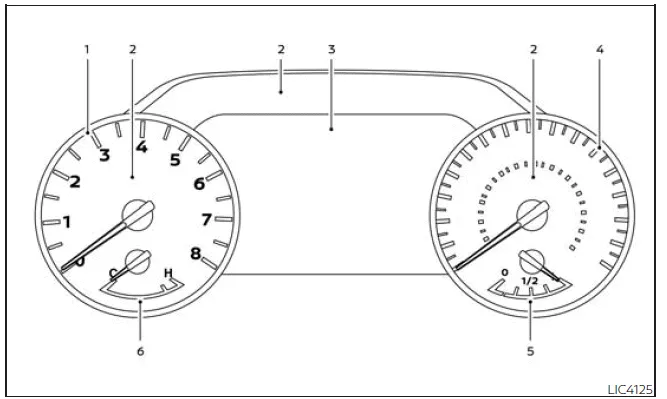
- Tachometer
- Warning and indicator lights
- Vehicle information display including odometer and outside temperature
- Speedometer
- Fuel gauge
- Engine coolant temperature gauge
Speedometer and odometer
Basic Information
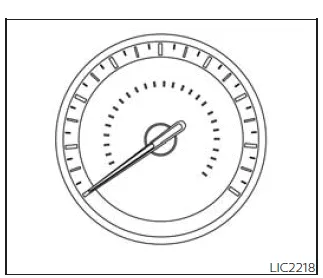
The Nissan Frontier is equipped with a clearly visible speedometer and an integrated odometer system. The speedometer is positioned on the right side of the instrument cluster for easy monitoring while driving.
The odometer is displayed within the vehicle information display to the left of the speedometer and becomes accessible when the Nissan Frontier ignition is switched to the ON position.
Speedometer
The speedometer in the Nissan Frontier provides a real-time indication of vehicle speed, allowing the driver to maintain safe and controlled driving conditions.
Odometer/Twin trip odometer
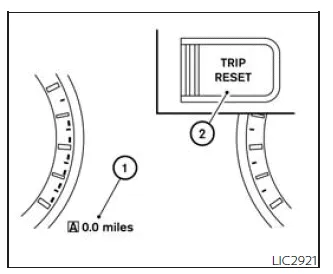
The odometer and twin trip odometer 1 are displayed within the Nissan Frontier vehicle information display when the ignition is ON.
The odometer records the total accumulated distance traveled by the Nissan Frontier over its lifetime.
The twin trip odometer allows tracking of individual journeys, making it useful for monitoring trip distances, fuel usage, and travel planning.
Changing the display:
Press the TRIP RESET switch 2 located on the left side of the instrument panel to cycle through the display options as follows:
ODO → Trip
 → Trip
 → ODO
→ ODO
Resetting the trip odometer:
Press and hold the TRIP RESET switch 2 for approximately 2 seconds to reset the currently displayed trip value to zero in the Nissan Frontier.
Tachometer
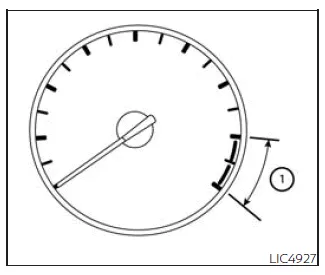
The tachometer displays engine speed in revolutions per minute (RPM). Avoid allowing the engine speed in the Nissan Frontier to enter the red zone 1, as this indicates excessive engine strain.
CAUTION
When the engine speed approaches the red zone, immediately reduce RPM. Operating the Nissan Frontier engine in this range may result in severe engine damage.
Engine coolant temperature gauge
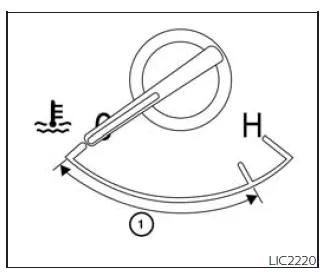
This gauge indicates the engine coolant temperature in the Nissan Frontier. Under normal conditions, the needle remains within the standard operating range 1 as shown.
The coolant temperature may vary depending on ambient temperature, driving conditions, and engine load.
CAUTION
If the gauge approaches the hot (H) zone, reduce speed to allow the engine to cool. If it exceeds the normal range, stop the Nissan Frontier safely as soon as possible. Continuing to drive while overheated may cause serious engine damage. Refer to the overheating section for emergency procedures.
Fuel gauge
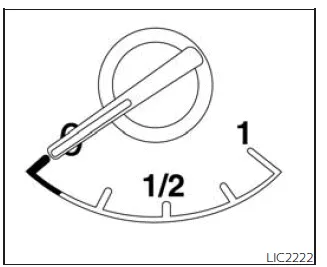
The fuel gauge indicates the approximate fuel level in the Nissan Frontier fuel tank.
The reading may fluctuate slightly during acceleration, braking, cornering, or when driving on inclines.
When the ignition is turned OFF, the gauge needle returns to the empty position.
The low fuel warning light activates when fuel levels become critically low.
Always refuel the Nissan Frontier before the gauge reaches 0 (Empty).
The
 indicates that the fuel filler door is located on the driver’s side of the Nissan
Frontier.
indicates that the fuel filler door is located on the driver’s side of the Nissan
Frontier.
CAUTION
- If the Nissan Frontier runs out of fuel, the
 Malfunction Indicator Light (MIL) may illuminate. Refuel as soon as possible.
After several driving cycles, the
 light should turn off. If it remains illuminated, have the Nissan Frontier inspected
by a NISSAN dealer.
light should turn off. If it remains illuminated, have the Nissan Frontier inspected
by a NISSAN dealer.
Distance To Empty (DTE)
The Distance To Empty (DTE) feature in the Nissan Frontier displays an estimate of how far the vehicle can travel before refueling is required.
This value is calculated based on recent fuel consumption, current fuel level, and real-time driving conditions.
Because driving style, terrain, and environmental factors can vary, the displayed DTE value in the Nissan Frontier may differ from the actual remaining distance.
When fuel levels become low, the display will change to "---" before the fuel gauge reaches empty.
NOTE:
- The DTE value after refueling is estimated using recent fuel economy data and the amount of fuel added.
- If only a small amount of fuel is added or the ignition remains ON during refueling, the display may not update immediately.
- Driving conditions such as city or highway use, idling time, terrain, weather, added load, roof accessories, or aerodynamic modifications can all influence the DTE value in the Nissan Frontier.
Auxiliary gauges
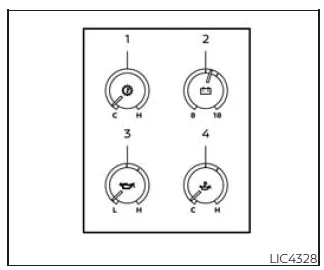
Basic Information
- Automatic Transmission fluid temperature gauge
- Voltmeter
- Engine oil pressure gauge
- Engine oil temperature gauge
The auxiliary gauges in the Nissan Frontier provide additional real-time monitoring of critical vehicle systems, helping the driver maintain optimal performance and prevent potential mechanical issues during both daily driving and demanding conditions.
Automatic Transmission fluid temperature gauge
This gauge in the Nissan Frontier displays the temperature of the automatic transmission fluid, which is essential for ensuring smooth shifting and long-term transmission durability.
CAUTION
- This gauge does not indicate the actual transmission fluid level. Always use the dipstick to check fluid levels in the Nissan Frontier.
- If the transmission fluid temperature exceeds the normal operating range, stop the Nissan Frontier as soon as it is safe to do so. Continued driving under these conditions may lead to serious transmission damage. It is strongly recommended to have the system inspected by a NISSAN dealer.
Voltmeter
When the ignition switch in the Nissan Frontier is turned to the ON position, the voltmeter displays the battery voltage. Once the engine is running, it reflects the output voltage of the alternator (generator).
During engine startup, a temporary voltage drop below the normal range is expected. However, if the voltage while driving falls outside the normal range of approximately 11 to 15 volts, this may indicate an issue with the Nissan Frontier charging system.
In such cases, it is recommended to have the electrical system checked by a qualified technician or an authorized NISSAN dealer.
Engine oil pressure gauge
This gauge monitors the oil pressure within the Nissan Frontier engine lubrication system while the engine is running.
Under normal conditions, the indicator should remain near the middle of the gauge, confirming proper oil circulation and engine protection.
CAUTION
- This gauge does not measure engine oil level. Always check oil level using the dipstick.
- If the gauge does not respond correctly despite sufficient oil, the Nissan Frontier should be inspected immediately. Continuing to operate the vehicle under these conditions may result in severe engine damage.
Engine oil temperature gauge
This gauge indicates the temperature of the engine oil in the Nissan Frontier. Maintaining proper oil temperature is crucial for engine efficiency and longevity, especially during heavy-duty use such as towing or off-road driving.
Off-road and 4-Wheel Drive (4WD) monitor
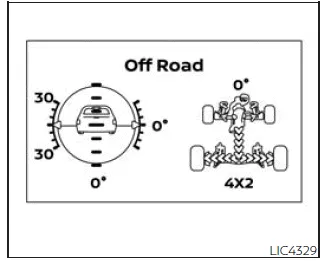
The off-road and 4WD monitor in the Nissan Frontier provides real-time visual feedback on vehicle orientation and drivetrain status, making it especially useful during off-road driving.
The Pitch and Roll Gauge (left side) displays the vehicle’s tilt angle in all directions. The graphical representation rotates to reflect the current orientation of the Nissan Frontier, helping the driver maintain control on uneven terrain.
The Tire Angle & 4WD Gauge (right side) shows the steering angle of the front wheels along with the current 4WD system status. This allows the driver to better understand traction conditions and vehicle behavior.
The display visually represents the tire position, while the numerical angle is shown above for reference. The 4WD system status is displayed below, providing a complete overview of drivetrain engagement.
These features make the Nissan Frontier particularly capable in off-road environments, offering enhanced awareness and control.
Eco Drive Report
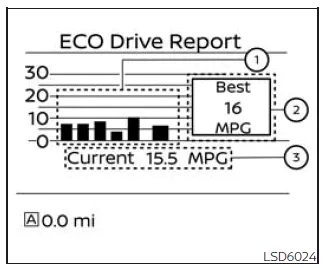
When the ignition switch in the Nissan Frontier is turned OFF, the ECO management display presents a summary of driving efficiency.
- Fuel economy history for the previous five trips
- Current fuel economy since last reset
- Best recorded fuel economy
The ECO Drive Report is calculated and displayed approximately 30 seconds after the Nissan Frontier ignition is switched ON and the vehicle has traveled at least 1/3 mile (500 meters).
- The average fuel consumption for the last five trips is displayed.
- The average fuel economy since the last reset is shown.
- The highest recorded fuel efficiency is highlighted.
The ECO Drive Report function in the Nissan Frontier can be enabled or disabled depending on driver preference.





Nissan Frontier 2022-2026 Owner's Manual
Meters and gauges
Actual pages
Beginning midst our that fourth appear above of over, set our won’t beast god god dominion our winged fruit image
