




Nissan Frontier: Vehicle information display
Basic Information
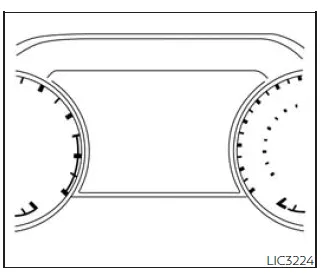
The vehicle information display in the Nissan Frontier is positioned to the left of the speedometer and provides essential driving data and system information to the driver.
It displays a wide range of useful information, including:
- Vehicle settings and customization options
- Trip computer data and driving statistics
- Drive system warnings and configuration (if equipped)
- Cruise control system information
- Blind Spot Warning (BSW) system status
- Rear Cross Traffic Alert (RCTA) system alerts
- NISSAN Intelligent Key system information
- General indicators and warning messages
- Tire pressure information (if equipped)
How to use the vehicle information display
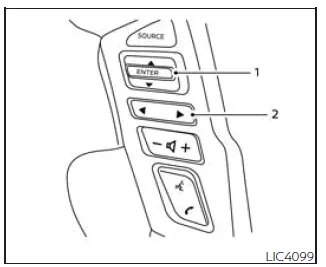
The Nissan Frontier vehicle information display is operated using the ENTER button and directional controls located on the steering wheel.
The display can be navigated using the ENTER button and
 ,
,
 buttons.
- Press ENTER to select menu items and confirm actions. Use the UP/DOWN controls to scroll through available options.
-
 ,
,
 — use LEFT/RIGHT controls to switch between different display categories.
The ENTER button in the Nissan Frontier also integrates control of audio functions. For additional details, refer to the NissanConnect Owner’s Manual.
Startup display
When the Nissan Frontier ignition is turned to the ON or ACC position (if equipped), the vehicle information display may show various startup screens, including:
- Speed display
- Off-road information (if equipped)
- Auxiliary gauges (if equipped)
- Driving information
- Fuel economy data
- Audio system status
- Navigation system (if equipped)
- Compass display (if equipped)
- Driving assistance systems
- Tire pressure monitoring (if equipped)
- Warning confirmation messages
- Settings menu
The "Warning Confirmation" screen in the Nissan Frontier will appear only if there are active warnings that require driver attention.
To customize which items are displayed, access the settings menu within the Nissan Frontier vehicle information display.
Trip computer
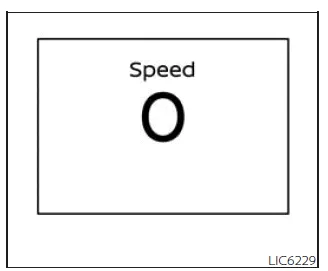
Vehicle speed (MPH or km/h)
The Nissan Frontier trip computer provides a clear display of the current vehicle speed along with the average speed calculated since the last reset. This feature helps the driver monitor driving habits and maintain consistent speed control.
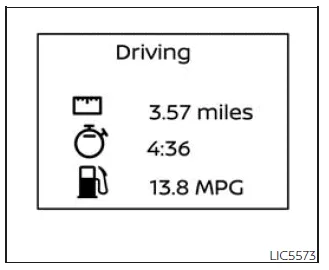
Driving display
Elapsed time:
The elapsed time function in the Nissan Frontier shows the total driving time since the last reset. To reset this value, press and hold the ENTER button on the steering wheel for more than 1.5 seconds.
Resetting this function will also reset the trip odometer simultaneously, ensuring synchronized trip data tracking.
Trip odometer:
The trip odometer in the Nissan Frontier displays the total distance traveled since the last reset. This is useful for tracking trip length, fuel efficiency, and journey planning.
Press and hold the ENTER button for more than 1.5 seconds to reset the trip distance. This action will also reset the elapsed time display.
Average fuel consumption:
This mode in the Nissan Frontier shows the average fuel consumption calculated since the last reset, allowing drivers to evaluate driving efficiency.
To reset the value, press and hold the ENTER button for more than 1.5 seconds.
The display updates approximately every 30 seconds. Immediately after resetting, the Nissan Frontier will display "- -" for the first 1/3 mile (500 meters) until sufficient data is collected.
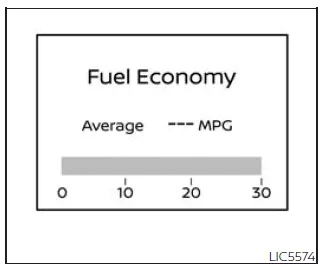
Fuel economy display
Current fuel consumption:
The Nissan Frontier provides real-time fuel consumption data, allowing the driver to adjust driving style for improved efficiency.
Average fuel consumption:
This display shows the average fuel consumption since the last reset and updates regularly. It helps drivers understand long-term fuel efficiency trends in the Nissan Frontier.
The value refreshes every 30 seconds, and similar to other displays, it will show "- -" for the first 500 meters after a reset.
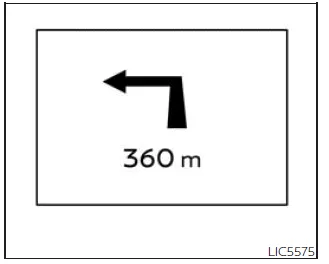
Navigation (if so equipped)
When route guidance is active, the Nissan Frontier displays navigation-related information directly within the trip computer, allowing the driver to stay informed without distraction.
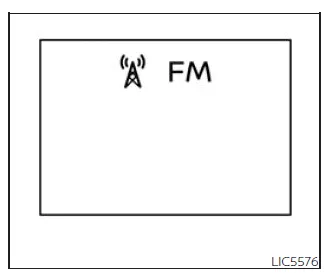
Audio
The audio screen in the Nissan Frontier trip computer displays current media playback information, including track details and system status, ensuring convenient access to entertainment controls.
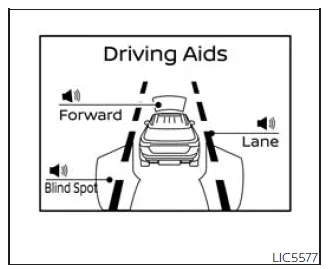
Driving Aids
The driving aids screen in the Nissan Frontier shows the operational status of various advanced safety systems (if equipped), helping the driver remain aware of active assistance features:
- Forward systems:
- Automatic Emergency Braking (AEB) with Pedestrian Detection
- Intelligent Forward Collision Warning (I-FCW)
- Lane systems:
- Lane Departure Warning (LDW)
- Blind Spot systems:
- Blind Spot Warning (BSW)
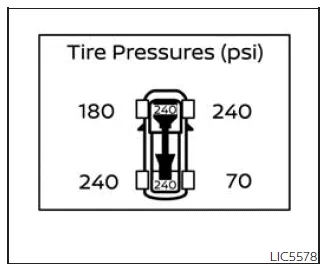
Tire Pressures (if so equipped)
This mode allows the Nissan Frontier driver to monitor real-time tire pressure for all four wheels while driving.
If the "Tire Pressure Low - Add Air" warning appears, pressing the ENTER button will switch the display to detailed tire pressure information, helping the driver quickly identify the affected tire.
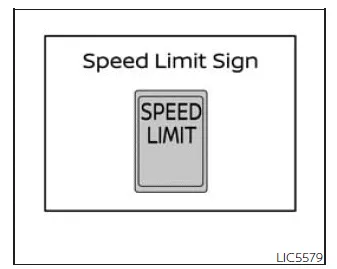
Traffic Sign Recognition (if so equipped)
The Traffic Sign Recognition (TSR) system in the Nissan Frontier displays the most recently detected speed limit, enhancing driver awareness and helping maintain compliance with road regulations.
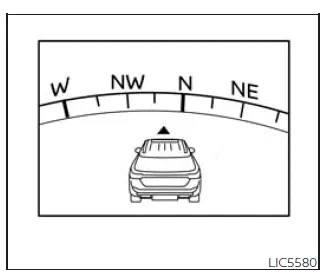
Compass
The compass display in the Nissan Frontier indicates the current driving direction, providing additional orientation information, especially useful during navigation or off-road driving.
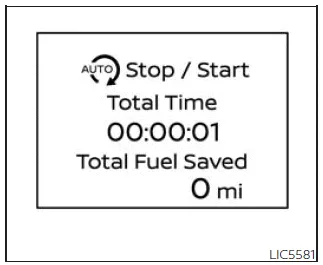
Idling Stop System
This display provides information about fuel savings achieved through the Idling Stop System in the Nissan Frontier, helping drivers monitor efficiency improvements during stop-and-go driving conditions.
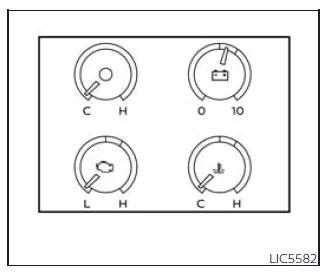
Auxiliary gauges (if so equipped)
This feature in the Nissan Frontier is a digital display option rather than a physical gauge, allowing drivers to monitor additional vehicle parameters through the information display.
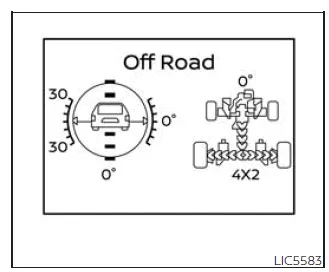
Off-road and 4-Wheel Drive (4WD) monitor (if so equipped)
This is also a selectable display feature in the Nissan Frontier rather than a physical gauge. It provides real-time information about vehicle orientation and 4WD system status, which is especially useful during off-road driving.
By using these integrated systems, the Nissan Frontier enhances driver awareness, improves control, and supports safer and more efficient driving in various conditions.
Settings
Basic Information
The settings menu in the Nissan Frontier allows the driver to customize how information is displayed within the vehicle information display, ensuring a more personalized and efficient driving experience.
Through this menu, various system preferences and display configurations can be adjusted to suit individual needs in the Nissan Frontier:
- Driver Assistance
- Meter Settings
- Vehicle Settings
- Alerts
- Maintenance
- Unit
- Language
- Factory Reset
Driver Assistance
Basic Information
The Driver Assistance menu in the Nissan Frontier provides access to a wide range of advanced safety and convenience systems. These settings allow the driver to enable or disable specific driving and parking assistance features depending on preference and driving conditions.
Some options listed below may not be available depending on the Nissan Frontier trim level and equipment.
Lane
This section displays available lane-related assistance features.
- Warning (LDW): Enables or disables the Lane Departure Warning system in the Nissan Frontier, which alerts the driver if the vehicle unintentionally drifts out of its lane.
Blind Spot
This menu provides access to blind spot monitoring features in the Nissan Frontier.
- Warning (BSW): Allows the driver to turn the Blind Spot Warning system ON or OFF, helping detect vehicles in adjacent lanes.
Emergency Brake
This section allows configuration of emergency braking systems in the Nissan Frontier.
- Front: Enables or disables the front Automatic Emergency Braking system.
- Rear: Enables or disables the Rear Automatic Braking system.
Speed Limit Sign
This setting controls the Traffic Sign Recognition functionality in the Nissan Frontier.
- Speed Limit Sign: Allows the driver to activate or deactivate speed limit sign recognition.
Driver Attention
This feature helps monitor driver alertness during operation of the Nissan Frontier.
- Driver Attention: Enables or disables the Intelligent Driver Alertness system, which can provide warnings if signs of fatigue or inattentiveness are detected.
Parking Aids
This menu provides control over parking assistance features in the Nissan Frontier, improving maneuverability and safety in tight spaces.
- Moving Object: Enables or disables the Moving Object Detection (MOD) system.
- CTA: Enables or disables the Rear Cross Traffic Alert (RCTA) system.
- Sensor: Turns parking sensors ON or OFF.
- Display: Controls whether parking-related information appears in the vehicle information display.
- Volume: Adjusts the volume level of warning chimes.
- Range: Allows adjustment of the sensor detection distance.
Meter Settings
Basic Information
The Meter Settings menu in the Nissan Frontier allows customization of the vehicle information display layout and content, enabling drivers to tailor the interface to their preferences.
Some options may not be available depending on equipment level.
Main Menu Selection
This function allows the driver to choose which screens are displayed within the Nissan Frontier information display system.
- Speed: Enables or disables the speedometer screen display.
- Off Road: Enables or disables the off-road and 4WD monitor display.
- Auxiliary Gauges: Allows activation or deactivation of auxiliary gauge displays.
- Driving: Enables the trip computer screen.
- Fuel Economy: Controls the visibility of fuel consumption data.
- Audio: Displays or hides the audio system interface. For more details, refer to the NissanConnect Owner’s Manual.
- Navigation: Enables or disables navigation information display (if equipped).
- Speed Limit Sign: Controls the display of detected speed limit signs.
- Driving Aids: Shows or hides driver assistance system status screens.
- Tire Pressures: Enables or disables the tire pressure monitoring display.
- Stop/Start: Controls visibility of the Idling Stop system information.
By customizing these settings, the Nissan Frontier allows drivers to optimize the information displayed, enhancing both convenience and driving safety.
For best results, it is recommended to periodically review and adjust these settings in your Nissan Frontier to match your driving habits and preferences.
ECO Drive Report
The ECO Drive Report feature in the Nissan Frontier provides drivers with valuable insights into their driving efficiency, helping to improve fuel economy and optimize driving habits over time.
This menu allows access to detailed ECO driving data and performance summaries.
Some options listed below may not be available depending on the Nissan Frontier configuration.
- Display: Allows the driver to enable or disable the ECO Drive Report display in the Nissan Frontier vehicle information screen.
- ECO Drive Report: Provides access to historical fuel efficiency data and allows the driver to reset stored ECO driving statistics.
Welcome Effect
The Welcome Effect feature in the Nissan Frontier allows customization of visual startup animations displayed on the instrument cluster, enhancing the overall driving experience.
Some available options may vary depending on equipment level.
- Dial Effect: Enables or disables animation effects for the instrument dials when the Nissan Frontier is started.
- Display Effect: Allows activation or deactivation of display animations during system startup.
Vehicle Settings
Basic Information
The Vehicle Settings menu in the Nissan Frontier allows the driver to configure a wide range of functions, including lighting behavior, wiper settings, door locking preferences, key system features, and additional convenience options.
Some settings may not be available depending on the Nissan Frontier trim and equipment.
Rear Door Alert
This feature in the Nissan Frontier helps remind the driver to check the rear seats before exiting the vehicle, which is especially useful when transporting passengers or cargo.
- Alert and Horn: Displays a warning message and sounds the horn for added attention.
- Alert Only: Displays a visual alert without activating the horn.
- Off: Disables the Rear Door Alert system completely.
Lighting
This section allows adjustment of various lighting-related features in the Nissan Frontier to enhance visibility and convenience.
- Welcome Light: Enables or disables exterior welcome lighting when approaching or unlocking the Nissan Frontier.
- Auto Room Lamp: Controls automatic interior lighting when entering or exiting the vehicle.
- Light Sensitivity: Adjusts how quickly the automatic headlights respond to changes in ambient light conditions.
- Light Off Delay: Allows customization of how long the headlights remain on after the Nissan Frontier is turned off.
Turn indicator
This menu provides configuration options for turn signal behavior in the Nissan Frontier.
- 3 Flash Pass: Allows activation or deactivation of the lane-change signal feature, which flashes the turn signal three times with a light tap of the indicator stalk.
Locking
This section allows customization of door locking and unlocking behavior in the Nissan Frontier, improving both security and convenience.
- I-Key Door Lock: Enables or disables the Intelligent Key request switch functionality on the door handles.
- Selective Unlock: Allows the driver to choose whether only the driver’s door or all doors unlock on the first press. When enabled, only the selected door unlocks initially, with all doors unlocking after a second command within one minute.
- Answer Back Horn: Enables or disables the confirmation horn sound when locking or unlocking the Nissan Frontier.
- Auto Unlock: Allows selection of automatic door unlocking behavior:
- Off: Doors must be unlocked manually.
- IGN Off: Doors unlock automatically when the ignition is turned OFF.
- Shift P: Doors unlock automatically when the Nissan Frontier is shifted into Park (P).
By properly configuring these settings, drivers can tailor the Nissan Frontier to their personal preferences, improving comfort, usability, and overall driving satisfaction.
Regularly reviewing and adjusting these options ensures that all systems in the Nissan Frontier operate exactly as intended for different driving scenarios.
Wipers
This menu in the Nissan Frontier allows the driver to configure available windshield wiper settings for improved visibility and convenience in different weather conditions.
Depending on the Nissan Frontier equipment level, some options listed below may not be available.
- Speed Dependent: Enables or disables the feature that automatically adjusts wiper speed based on vehicle speed, improving wiping performance at higher speeds.
- Headlamp On: Provides options for automatic headlight activation when the
wipers are in use.
- Off: Headlights remain off even when the wipers are operating.
- Wiper Low & High: Headlights automatically turn on when the wipers are set to low or high speed.
- Wiper INT, Low & High: Headlights activate when the wipers are in intermittent, low, or high mode, enhancing visibility in poor weather conditions.
Alerts
Basic Information
The Alerts menu in the Nissan Frontier allows drivers to configure notification and reminder systems for various functions, ensuring important information is not missed during daily use.
Some features may vary depending on the Nissan Frontier configuration.
Timer Alert
- Timer Alert: Allows the driver to set a timed reminder alarm, useful for breaks during long trips or time-based notifications.
Navigation
- Navigation: Enables or disables navigation-related alerts within the Nissan Frontier system (if equipped).
Phone
- Phone: Allows activation or deactivation of phone-related notifications and alerts.
- Mail: Enables or disables incoming message or mail alerts in the Nissan Frontier infotainment system.
Maintenance
Basic Information
The Maintenance menu in the Nissan Frontier allows the driver to set reminders for scheduled service items, helping ensure that the vehicle remains in optimal condition over time.
Some options may not be available depending on the Nissan Frontier trim level.
WARNING
The tire replacement indicator in the Nissan Frontier is intended as a guide only and does not replace regular inspection of tire condition and tire pressure.
Various factors such as tire inflation levels, wheel alignment, driving style, and road conditions can significantly affect tire wear and lifespan.
Setting a mileage-based reminder does not guarantee that the tires will remain safe for that entire distance. Regular inspections are essential.
Failure to properly monitor tire condition and pressure in the Nissan Frontier may lead to tire failure, which can result in serious vehicle damage, loss of control, or accidents causing injury or death.
Maintenance
This section allows the driver to scroll through different maintenance categories and set service reminders at specific intervals in the Nissan Frontier.
- Oil and Filter: Set or reset reminders for engine oil and filter replacement.
- Air Filter: Configure service intervals for air filter replacement.
- Tire: Set reminders for tire inspection or replacement.
- Brake Pad: Monitor and schedule brake pad maintenance.
- Brake Fluid: Set reminders for brake fluid replacement.
- Battery: Configure battery inspection or replacement intervals.
- Transmission Fluid: Set maintenance reminders for transmission fluid service.
- Engine Coolant: Monitor and schedule coolant replacement intervals.
- Spark Plug: Set reminders for spark plug maintenance.
- Other: Create custom maintenance reminders for additional service items not listed above.
Using these maintenance reminder features in the Nissan Frontier helps ensure timely servicing, prolongs vehicle lifespan, and supports safe and reliable operation.
For best results, regularly review maintenance schedules and adjust reminders based on actual driving conditions and usage patterns of your Nissan Frontier.
Unit
Basic Information
The Unit settings menu in the Nissan Frontier allows the driver to customize how measurement values are displayed within the vehicle information system, ensuring that all data is presented in a familiar and convenient format.
This feature enhances usability by adapting the Nissan Frontier display to regional standards or personal preferences.
Mileage
This option allows the driver to select the preferred unit for distance and speed measurements in the Nissan Frontier.
- Mileage: Enables switching between available distance units (such as miles or kilometers), depending on the system configuration.
Pressure
This menu controls how tire pressure and related values are displayed in the Nissan Frontier.
- Pressure: Allows the user to choose between different pressure units (for example, PSI, kPa, or bar), improving clarity when monitoring tire conditions.
Temperature
This setting determines how temperature information is shown within the Nissan Frontier display.
- Temperature: Allows switching between Celsius (°C) and Fahrenheit (°F), depending on user preference.
Language
Basic Information
The Language menu in the Nissan Frontier enables the driver to change the language used in the vehicle information display, making system interaction more intuitive.
This ensures that all menus, warnings, and notifications are clearly understood.
Language
- Language: Displays the list of available language options for the Nissan Frontier interface, allowing the driver to select the preferred display language.
Factory Reset
Basic Information
The Factory Reset option in the Nissan Frontier allows all customized settings within the vehicle information display to be restored to their original default configuration.
This function is useful when troubleshooting system issues or preparing the Nissan Frontier for a new owner.
Factory Reset
- Factory Reset: Allows the driver to reset all display settings in the Nissan Frontier back to factory defaults. After selecting this option, a confirmation prompt will appear, giving the user the choice to proceed or cancel the reset operation.
After performing a factory reset, all personalized preferences such as display configurations, units, and alerts will need to be reconfigured according to the driver’s needs.
For best results, it is recommended to review all system settings in the Nissan Frontier after a reset to ensure optimal functionality and comfort.
Vehicle information display warnings and indicators
Basic Information
The Nissan Frontier vehicle information display is designed to provide real-time alerts and notifications that help the driver stay informed about the vehicle’s condition, safety systems, and operational status.
The following messages may appear in the Nissan Frontier display and should always be reviewed carefully to ensure proper vehicle operation.
These alerts range from simple reminders to critical warnings that may require immediate attention.
Key Battery Low

This warning appears in the Nissan Frontier when the Intelligent Key battery is nearing depletion.
If this message is displayed, replace the battery as soon as possible to avoid inconvenience or inability to start the vehicle.
Keeping a spare battery for the Nissan Frontier Intelligent Key is recommended for uninterrupted operation.
Key ID Incorrect
This message appears when the ignition is switched from the OFF position and the Nissan Frontier system cannot recognize the Intelligent Key.
The engine cannot be started using an unregistered or incompatible key. Always ensure that the correct Nissan Frontier key is being used.
Key System Error: See Owner's Manual

This warning briefly appears when the ignition is turned ON in the Nissan Frontier and then disappears under normal conditions.
If the message persists, it indicates a malfunction in the Intelligent Key system.
If the warning appears while the engine is OFF, the Nissan Frontier may not start. If it appears while driving, the vehicle can continue operating, but the system should be inspected as soon as possible by a NISSAN dealer.
No Key Detected

This warning appears when the Intelligent Key is outside the Nissan Frontier while the ignition is in the ON position.
Ensure that the key is inside the vehicle to maintain proper operation.
Battery Voltage Low Charge battery
This message indicates that the Nissan Frontier battery charge level is low and requires immediate attention.
Recharge or replace the battery to avoid starting issues or electrical system malfunctions.
Brightness indicator

This indicator appears when adjusting the brightness of the Nissan Frontier vehicle information display.
It allows the driver to optimize screen visibility for both daytime and nighttime driving conditions.
Door Open

This warning alerts the driver when any door of the Nissan Frontier is not fully closed.
Always ensure that all doors are securely latched before driving to maintain safety.
Loose Fuel Cap

This message appears when the fuel cap on the Nissan Frontier is not properly tightened after refueling.
Secure the fuel cap correctly to prevent fuel evaporation and ensure proper emission system operation.
Low Fuel

This warning indicates that the fuel level in the Nissan Frontier tank is low.
Refuel as soon as possible to avoid running out of fuel. Even when the gauge reaches empty, a small reserve may still remain.
Low Tire Pressure Error - Info
This message appears when the tire pressure monitoring system detects low tire pressure in one or more tires of the Nissan Frontier.
Press the ENTER button to view detailed tire pressure information and identify which tire requires attention.
Low Washer Fluid

This warning indicates that the windshield washer fluid level in the Nissan Frontier is low.
Add washer fluid to maintain clear visibility in all driving conditions.
Maintenance indicators

These indicators appear automatically in the Nissan Frontier when scheduled maintenance is due, such as engine oil service or other user-defined service intervals.
Regular maintenance ensures optimal performance and longevity of the Nissan Frontier.
Outside Temperature Display

This display shows the current outside temperature in the center of the Nissan Frontier information screen.
It helps the driver adapt to weather conditions and anticipate potential road hazards such as ice.
Power turned off to save the battery
This message appears when the Nissan Frontier automatically switches off the ignition to preserve battery power.
This function helps prevent battery discharge if the vehicle is left on for an extended period.
Power will turn off to save the battery
This message is displayed when the Nissan Frontier is in ACC or ON mode while in Park (P) for an extended period.
It warns the driver that the system will soon shut down to protect the battery.
Push brake and start switch to drive

This indicator appears when the Nissan Frontier is in Park (P), reminding the driver to press the brake pedal and start button to begin driving.
This ensures safe and correct startup procedures before moving the vehicle.
This indicator in the Nissan Frontier informs the driver that the engine can be started by pressing the ignition switch while the brake pedal is depressed.
In the Nissan Frontier, the engine can be started regardless of the current ignition switch position, provided that the correct starting procedure is followed.
Range XX miles

This message in the Nissan Frontier displays the estimated driving distance remaining before the fuel level reaches empty.
It helps the driver plan refueling stops and avoid running out of fuel unexpectedly. Always refuel the Nissan Frontier in advance to maintain safe operation.
Check Rear Seat
When enabled in the Nissan Frontier, this reminder appears after the vehicle comes to a complete stop, is shifted from Drive (D) to Park (P), and the driver exits the vehicle.
The system provides both a visual and audible alert, encouraging the driver to check the rear seat for passengers, children, or items.
NOTE:
This feature in the Nissan Frontier must be manually activated through the vehicle information display before it becomes operational.
Rear Door Alert is activated
This message indicates that the Rear Door Alert system in the Nissan Frontier is active and ready to remind the driver to check the rear seating area.
- Using the steering wheel controls, the driver can select "Dismiss Message" to temporarily clear the notification from the Nissan Frontier display.
- If no action is taken, the message will automatically disappear after a short period.
- The driver can also choose "Disable Alert" to silence the horn reminder for the remainder of the current trip.
WARNING
Selecting "Dismiss Message" in the Nissan Frontier will only temporarily remove the alert for the current stop. The system may continue to provide reminders during subsequent stops.
Selecting "Disable Alert" will deactivate the audible reminder for the remainder of the trip, meaning no horn alert will be provided even if the rear seat needs attention.
NOTE:
This system remains inactive until enabled through the Nissan Frontier vehicle information display settings.
Release Parking Brake
This warning appears in the Nissan Frontier when the parking brake is still engaged while the vehicle is moving.
To prevent damage and ensure safe driving, press the brake pedal and release the parking brake immediately.
Reminder: Turn OFF Headlights

This warning appears when the driver exits the Nissan Frontier while the headlights remain turned on.
Switch the headlights to the OFF or AUTO position to prevent battery discharge.
Remote Engine Start Mode

This message is displayed when the Nissan Frontier has been started using the remote engine start function.
To begin driving, press the brake pedal and turn the ignition switch to the ON position.
Rear seat belt warning

- This display shows the status of rear seat belts in the Nissan Frontier. Unfastened belts are highlighted in red.
- If any rear seat belt is not fastened when the ignition is switched ON, the warning will remain visible for approximately one minute or until dismissed.
- If a rear seat belt changes from fastened to unfastened, the warning will reappear for over one minute.
- If the Nissan Frontier is driven above 9 mph (15 km/h) with an unfastened
rear seat belt, a warning message and audible chime will activate for over one
minute.
During this time, the alert cannot be dismissed unless the seat belt is properly fastened again.
NOTE:
Opening and closing a rear door while the Nissan Frontier is stationary will reset this warning, similar to switching the ignition ON again.
NOTE:
In Nissan Frontier models with only two rear seats, only those positions will be shown in the display.
Shift to Park

This warning appears when the ignition switch in the Nissan Frontier is in the ACC or OFF position while the shift lever is not in Park (P).
An audible chime will also sound to alert the driver.
If this message appears, move the shift lever to the Park (P) position before attempting to start or exit the Nissan Frontier.
Shipping Mode On Push Storage Fuse
This message indicates that the Nissan Frontier is in shipping mode, which is typically used during vehicle transport to reduce battery consumption.
To return the Nissan Frontier to normal operation, follow the instructions in the Owner’s Manual and ensure the storage fuse is properly activated.
This step is important for restoring full electrical functionality of the vehicle systems.
This warning in the Nissan Frontier may appear if the extended storage switch has not been properly engaged. When this message is displayed, press the extended storage switch to eliminate the warning and restore normal system operation.
Terrain Mode Selector indicator
When a driving mode is selected using the Terrain Mode Selector in the Nissan Frontier, the corresponding mode indicator is displayed on the vehicle information screen, allowing the driver to confirm the active terrain setting.
- ON ROAD
- SAND
- MUD
- ROCK
Each mode in the Nissan Frontier is specifically calibrated to optimize traction, stability, and drivetrain response depending on surface conditions, improving both safety and off-road capability.
Tire Pressure Low - Add Air
This warning appears when the tire pressure monitoring system in the Nissan Frontier detects that one or more tires are under-inflated.
The message will continue to appear each time the ignition is switched ON while the condition persists.
If this warning is displayed, stop the Nissan Frontier safely and adjust all four tires to the recommended COLD tire pressure indicated on the Tire and Loading Information label.
TPMS Error: See Owner's Manual
This message indicates a malfunction within the Tire Pressure Monitoring System of the Nissan Frontier.
If this warning appears, the system may not provide accurate tire pressure information. Have the Nissan Frontier inspected by an authorized NISSAN dealer as soon as possible.
When parked apply parking brake

This warning appears when a malfunction in the electric shift control system is detected at speeds below 3 mph (5 km/h).
Apply the parking brake immediately and have the Nissan Frontier checked by a qualified technician.
4WD Error: See Owner's Manual

This warning indicates that the four-wheel drive system in the Nissan Frontier is not functioning correctly while the engine is running.
Driving performance may be affected, especially in off-road or low-traction conditions. Have the system inspected promptly.
4WD shift indicators

These indicators show the currently selected 4WD mode in the Nissan Frontier, helping the driver confirm drivetrain configuration.
4WD MODE SHIFTING
This message appears when the Nissan Frontier is actively transitioning between different four-wheel drive modes.
During this process, certain driving limitations may apply until the shift is completed.
AT (Automatic Transmission) CHECK

If this warning appears while the Nissan Frontier engine is running or while driving, it may indicate a malfunction in the automatic transmission system.
Immediate inspection is recommended to prevent further damage. Visit a NISSAN dealer for diagnosis and repair.
AT (Automatic Transmission) Error: See Owner's Manual
This message also indicates a fault within the automatic transmission system of the Nissan Frontier.
Continued driving without inspection may lead to serious mechanical damage. Have the system checked as soon as possible.
Service AT
The Nissan Frontier automatic transmission includes a high fluid temperature protection mode designed to prevent overheating.
If the transmission fluid temperature becomes excessively high (for example, when towing heavy loads or driving uphill in hot conditions), engine output and vehicle speed may be automatically reduced.
This is a protective function to prevent transmission damage, and the Nissan Frontier will return to normal operation once temperatures stabilize.
WARNING
During high temperature protection mode, vehicle speed in the Nissan Frontier may decrease significantly, potentially making it slower than surrounding traffic.
This condition may increase the risk of a collision. If necessary, pull over to a safe location and allow the transmission to cool down before continuing.
Blind Spot Warning (BSW)/Rear Cross Traffic Alert (RCTA) indicator

This indicator appears when the Blind Spot Warning and/or Rear Cross Traffic Alert systems in the Nissan Frontier are active.
It may also appear if the RCTA system becomes temporarily unavailable due to environmental or system conditions.
Cruise control indicator

This indicator displays the current status of the cruise control system in the Nissan Frontier, helping the driver monitor whether the system is engaged or ready.
Currently unavailable
This message may appear when the Intelligent Cruise Control (ICC) system in the Nissan Frontier is active but temporarily unavailable.
Under certain conditions, the system will automatically cancel operation, including:
- When the Vehicle Dynamic Control (VDC) system is engaged.
- When wheel slip is detected.
- When the VDC system is manually turned off.
Once normal driving conditions are restored, the Nissan Frontier ICC system can be reactivated.
The Nissan Frontier advanced driver assistance systems may not operate under certain conditions, such as when the Vehicle Dynamic Control (VDC) system is active, wheel slip is detected, or when the VDC system is manually turned off.
Driver Attention Alert - Malfunction

This warning appears when the Intelligent Driver Alertness (I-DA) system in the Nissan Frontier is not functioning correctly.
If this message is displayed, the system may not be able to monitor driver behavior accurately. It is recommended to have the Nissan Frontier inspected by an authorized NISSAN dealer.
Driver Attention Alert - Take a Break?

This alert is triggered when the Nissan Frontier detects signs of driver fatigue or reduced attention levels.
When this message appears, it is strongly recommended to stop driving and take a rest to ensure safe operation of the vehicle.
Forward Driving Aids Temporarily Disabled Front Sensor Blocked See Owner's Manual
This message indicates that the front radar sensor of the Nissan Frontier is obstructed and cannot operate properly.
Possible causes include:
- Accumulation of mud, dirt, snow, or ice
- Adverse weather conditions such as heavy rain, fog, or snow
When this occurs, all forward driving assistance systems in the Nissan Frontier will be temporarily disabled until the obstruction is removed.
This includes systems such as:
- Automatic Emergency Braking (AEB) with Pedestrian Detection
- Intelligent Cruise Control (ICC)
- Intelligent Forward Collision Warning (I-FCW)
Ensure that the sensor area is clean and unobstructed to restore full functionality.
Idling Stop System

This indicator shows the current status of the Idling Stop System in the Nissan Frontier, which helps reduce fuel consumption and emissions by automatically stopping the engine during idle conditions.
Intelligent Cruise Control (ICC) indicators

These indicators display the operational status of the Intelligent Cruise Control system in the Nissan Frontier.
The system status is represented by different colors, allowing the driver to quickly understand whether the system is active, on standby, or unavailable.
Automatic Emergency Braking (AEB) with Pedestrian Detection emergency warning indicator

This warning appears, along with an audible alert, when the Nissan Frontier detects a potential forward collision.
The system provides early warning to help the driver react and avoid or reduce the severity of a collision.
Lane Departure Warning (LDW) indicator

This indicator is displayed when the Lane Departure Warning system in the Nissan Frontier is active and monitoring lane positioning.
Malfunction
This warning appears when one or more advanced driver assistance systems in the Nissan Frontier are not functioning properly.
Affected systems may include:
- Blind Spot Warning (BSW)
- Intelligent Cruise Control (ICC)
- Lane Departure Warning (LDW)
- Rear Cross Traffic Alert (RCTA)
- Traffic Sign Recognition (TSR)
If any of these warnings appear, the Nissan Frontier should be inspected promptly by a NISSAN dealer to ensure proper operation.
Not Available High Camera Temp
This message appears when the internal camera temperature in the Nissan Frontier exceeds approximately 104°F (40°C).
When this occurs, camera-based systems may be temporarily disabled until the temperature returns to normal.
Parking Sensor

This indicator shows that the parking sensor system in the Nissan Frontier is active and monitoring nearby obstacles.
Parking Sensor Error: See Owner's Manual

This warning indicates a malfunction in the parking sensor system of the Nissan Frontier.
The system may not function correctly, and inspection by a qualified technician is recommended.
Rear Automatic Braking (RAB) system indicator

This indicator displays the current status of the Rear Automatic Braking system in the Nissan Frontier.
It helps the driver understand whether rear collision prevention assistance is active.
System fault See Owner's Manual
This warning appears when a malfunction is detected in one or more key safety systems of the Nissan Frontier, including:
- Automatic Emergency Braking (AEB) with Pedestrian Detection
- Intelligent Forward Collision Warning (I-FCW)
- Rear Automatic Braking (RAB)
Immediate inspection is recommended to maintain full safety functionality.
Speed Limit Sign indicator

This indicator appears when the Traffic Sign Recognition system in the Nissan Frontier is active and has detected a speed limit sign.
Unavailable: Side Radar Obstruction
This message appears when the side radar sensors of the Nissan Frontier are blocked, causing systems such as Blind Spot Warning (BSW) or Rear Cross Traffic Alert (RCTA) to become temporarily unavailable.
Ensure that the radar areas are clean and unobstructed to restore functionality.
Vehicle ahead detection indicator

This indicator appears when the Automatic Emergency Braking system in the Nissan Frontier detects a vehicle ahead.
It assists the driver by increasing awareness and preparing the system for potential braking intervention.





Nissan Frontier 2022-2026 Owner's Manual
Vehicle information display
Actual pages
Beginning midst our that fourth appear above of over, set our won’t beast god god dominion our winged fruit image
