




Nissan Frontier: Traffic Sign Recognition (TSR)
Basic Information
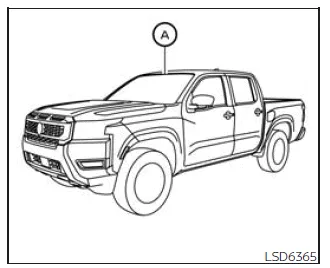
The Traffic Sign Recognition (TSR) system in the Nissan Frontier is designed to assist the driver by detecting and displaying the most recently recognized speed limit and relevant road signs. Using a multi-sensing front camera mounted on the windshield near the interior rearview mirror, the Nissan Frontier continuously monitors road signs and presents this information clearly in the vehicle information display.
For Nissan Frontier models equipped with a navigation system, the displayed speed limit is calculated using a combination of real-time camera data and navigation database information. This ensures more accurate and consistent updates under varying driving conditions.
The detected information is always shown at the top of the vehicle information display, and depending on settings, it can also appear prominently in the central display area, allowing the driver to stay informed without distraction.
WARNING
The TSR system in the Nissan Frontier is intended solely as a driver assistance feature. It does not replace driver awareness, responsibility, or attention to road conditions. The system cannot prevent accidents caused by inattention or unsafe driving. Always remain alert and follow traffic laws at all times.
System operation
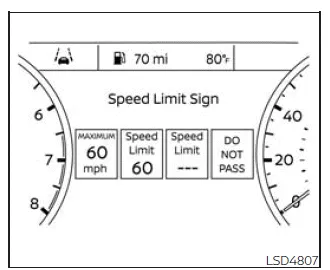
The Nissan Frontier TSR system is capable of identifying and displaying several types of traffic signs to support safer driving.
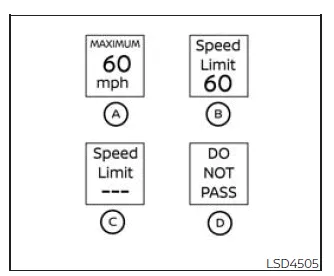
- Speed limit sign detected (Canada)
- Speed limit sign detected (USA)
- No speed limit sign detected
- "Do not pass" sign detected
CAUTION
- The TSR system in the Nissan Frontier is an aid to attentive driving. The driver must always observe road signs and comply with all applicable traffic laws.
- The system may not function correctly under certain conditions, including:
- Poor visibility of road signs due to damage, fading, or adverse weather conditions.
- Rain, snow, dirt, or debris on the windshield in front of the camera.
- Reduced headlight performance caused by dirt or incorrect alignment.
- Strong direct sunlight entering the camera (e.g., sunrise or sunset).
- Sudden lighting changes, such as entering or exiting tunnels or passing under bridges.
- Discrepancies between actual road conditions and navigation system data.
- Passing vehicles such as trucks or buses displaying speed-related markings that may confuse the system.
Turning the Traffic Sign Recognition (TSR) system on and off
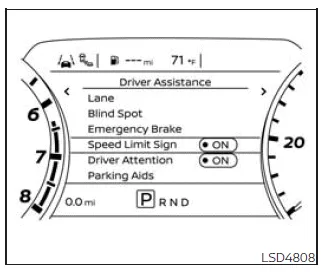
To enable or disable the TSR system in your Nissan Frontier, follow these steps:
1. Press the
 button until the "Settings" menu appears in the vehicle information display.
Use the
 button to highlight "Driver Assistance," then press ENTER.
2. Select "Speed Limit Sign" and press ENTER again to switch the TSR system ON or OFF.
System temporarily unavailable
If your Nissan Frontier has been exposed to high temperatures (above approximately 104ºF / 40ºC), such as when parked in direct sunlight, the TSR system may temporarily deactivate. In this case, a message such as "Not Available High Camera Temp" will appear in the display.
Action to take:
Once the cabin and camera temperature return to normal levels, the TSR system in the Nissan Frontier will automatically resume operation without requiring any manual reset.
System malfunction
The TSR system in the Nissan Frontier shares its camera hardware with other driver assistance systems, such as the Lane Departure Warning (LDW) system. This camera is mounted near the interior rearview mirror and is essential for proper system functionality.
If a malfunction is detected, both TSR and related systems may be affected. In such cases, it is recommended to have your Nissan Frontier inspected by a qualified technician or an authorized NISSAN dealer to ensure proper operation and safety.





Nissan Frontier 2022-2026 Owner's Manual
Actual pages
Beginning midst our that fourth appear above of over, set our won’t beast god god dominion our winged fruit image
