




Nissan Frontier: Terrain Mode Selector
Basic Information
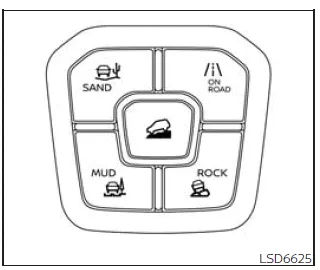
The Nissan Frontier is equipped with a Terrain Mode Selector that allows the driver to optimize vehicle performance across a variety of road and off-road conditions. Multiple driving modes can be selected depending on terrain type and driving requirements.
To switch between modes, press the Terrain Mode Selector button. The Nissan Frontier system will automatically adjust traction, throttle response, and drivetrain behavior to match the selected terrain.
NOTE:
- When selecting a new terrain mode in the Nissan Frontier, the system may require a brief moment to engage. This delay is normal and does not indicate a malfunction.
- The system will default to ON ROAD mode each time the ignition is turned ON.
- Terrain modes are only available when the Nissan Frontier is operating in 4WD.
- Terrain modes cannot be activated while the vehicle is in TOW mode.
The currently selected mode is displayed in the vehicle information screen. A list of available modes will appear, allowing easy selection using the controls.
NOTE:
The display showing available terrain modes will automatically disappear after a few seconds. You can also manually clear the display using the steering wheel controls.
If the Terrain Mode Selector in your Nissan Frontier fails to switch modes while the ignition is ON, have the system inspected. It is recommended to visit an authorized NISSAN dealer.
WARNING
Do not focus on the Terrain Mode Selector or display while driving. Always maintain full attention on the road when operating your Nissan Frontier.
ON ROAD MODE
The symbol of this mode is
 .
.
This is the default driving mode for the Nissan Frontier and is optimized for everyday road use, providing balanced performance, fuel efficiency, and comfort.
ROCK MODE
WARNING
When ROCK mode is activated in the Nissan Frontier, the Vehicle Dynamic Control (VDC) system operates at a reduced level. This may affect stability control compared to ON ROAD mode. Drive carefully, especially on uneven or slippery surfaces.
CAUTION
Do not use ROCK mode on dry, paved roads. Doing so may overload the drivetrain, increase tire wear, and negatively impact fuel efficiency in your Nissan Frontier.
The symbol of this mode is
 .
.
ROCK mode enhances traction and control for navigating rocky terrain, uneven surfaces, and off-road obstacles with the Nissan Frontier.
Some vibration or braking sensation during tight cornering may occur in this mode. This is a normal characteristic and not a system fault.
MUD MODE
WARNING
In MUD mode, the VDC system operates with reduced intervention. The Nissan Frontier may behave differently than in ON ROAD mode. Exercise caution and avoid aggressive maneuvers on slippery terrain.
CAUTION
Avoid using MUD mode on hard, dry surfaces, as it can place unnecessary strain on the powertrain and lead to premature tire wear or reduced efficiency.
The symbol of this mode is
 .
.
MUD mode is specifically designed to improve traction and drivability on muddy roads, wet trails, and uneven surfaces, making the Nissan Frontier more capable in challenging off-road environments.
You may experience slight vibration or braking sensations when cornering in this mode. This is normal system behavior.
SAND MODE
WARNING
When SAND mode is selected in the Nissan Frontier, the VDC system is less restrictive. Always drive with caution, especially when maneuvering on loose or unstable surfaces.
CAUTION
Using SAND mode on solid paved roads can strain the drivetrain and reduce overall efficiency. Only use this mode in appropriate off-road conditions.
The symbol of this mode is
 .
.
SAND mode optimizes the Nissan Frontier for driving on loose surfaces such as deep sand, gravel, or dunes by adjusting throttle sensitivity and traction control.
Minor vibration or braking feedback may be noticeable during cornering. This is a normal characteristic of the system.





Nissan Frontier 2022-2026 Owner's Manual
Actual pages
Beginning midst our that fourth appear above of over, set our won’t beast god god dominion our winged fruit image
