




Nissan Frontier: Lane Departure Warning (LDW)
Basic Information
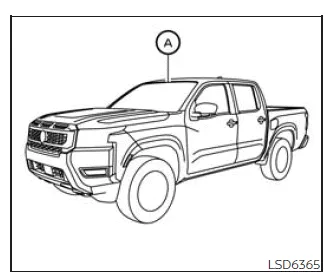
WARNING
Failure to properly follow the instructions and safety guidelines for the LDW system in the Nissan Frontier may result in serious injury or even fatal accidents.
- The Lane Departure Warning (LDW) system in the Nissan Frontier is designed strictly as a driver assistance feature. It provides alerts when an unintentional lane departure is detected, but it does not actively steer the vehicle or prevent loss of control. The driver must remain attentive at all times, maintain proper lane positioning, and retain full control of the Nissan Frontier under all driving conditions.
The LDW system in the Nissan Frontier becomes active when driving at speeds of approximately 37 mph (60 km/h) or higher, and only when clear and visible lane markings are present on the road surface.
Using a forward-facing camera mounted above the interior rearview mirror, the Nissan Frontier continuously monitors lane markings and evaluates vehicle position relative to the lane boundaries.
If the system detects that the Nissan Frontier is unintentionally drifting out of its lane, it immediately alerts the driver through a visual indicator and a tactile steering wheel vibration, helping to prompt corrective action.
LDW system operation
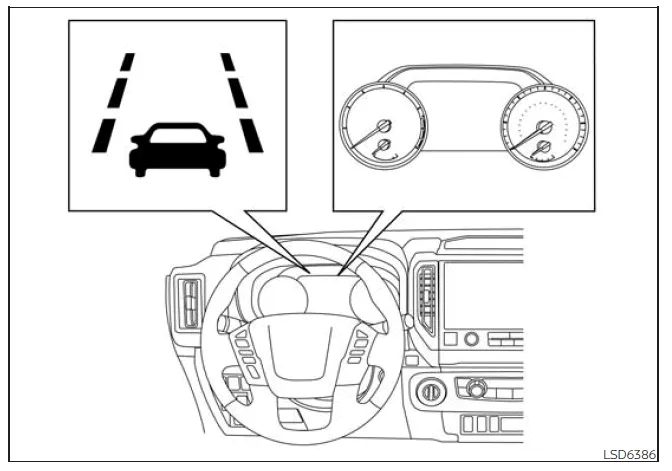
The LDW system in the Nissan Frontier actively monitors lane boundaries and provides real-time warnings when the vehicle begins to deviate from its lane at speeds above approximately 37 mph (60 km/h), provided the lane markings are clearly visible.
When the Nissan Frontier approaches either the left or right edge of the lane, the system will trigger a steering wheel vibration and the LDW indicator will flash on the instrument panel to alert the driver.
Once the Nissan Frontier is safely returned to the center of the lane, the warning signals will automatically cease.
This feature is particularly helpful during long highway drives, where driver fatigue may increase the risk of unintended lane departure.
How to enable/disable the LDW system
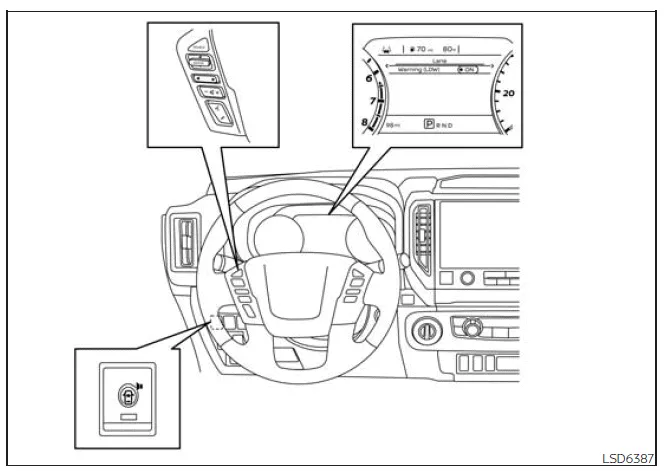
When the LDW system is enabled in the Nissan Frontier vehicle information display, it can be temporarily turned off using the warning systems switch.
To enable or disable the LDW system, follow these steps:
1. Press the
 button until "Settings" appears in the vehicle information display.
Use the
 button to select "Driver Assistance," then press the ENTER button.
2. Select "Lane" and confirm by pressing ENTER.
3. Choose "Warning (LDW)" and press ENTER again.
4. Use the Warning systems switch to turn the LDW system ON or OFF according to your preference.
NOTE:
- The Nissan Frontier will retain the current LDW settings even after the engine is turned off and restarted, ensuring consistent driver preferences.
- When the LDW system is activated, a white LDW indicator will illuminate in the vehicle information display, confirming that the system is ready for operation.
LDW system limitations
WARNING
The following outlines important limitations of the LDW system in the Nissan Frontier. Ignoring these warnings or misusing the system may result in serious injury or even fatal accidents.
- The Lane Departure Warning system in the Nissan Frontier does not function at speeds below approximately 37 mph (60 km/h), and it will not operate if lane markings cannot be clearly detected by the system.
- Avoid relying on the LDW system in the Nissan Frontier under the following
conditions, as performance may be reduced or inaccurate:
- In adverse weather conditions such as heavy rain, fog, or snow, where visibility is significantly reduced.
- When driving on slippery surfaces like ice, snow, or wet roads that may affect vehicle stability.
- On winding, uneven, or irregular road surfaces where lane markings are inconsistent.
- In construction zones or areas with temporary lane changes or closures.
- When traveling through temporary or poorly defined lanes.
- On roads with unusually narrow lanes that may confuse the detection system.
- When tire conditions are not optimal, such as worn tires, incorrect tire pressure, use of a spare tire, tire chains, or non-standard wheels installed on the Nissan Frontier.
- When the vehicle is fitted with non-original suspension or braking components that may alter handling characteristics.
- While towing a trailer or another vehicle, as this can affect system accuracy and vehicle behavior.
- The LDW system in the Nissan Frontier may also behave unpredictably or
provide incorrect alerts under the following situations:
- On roads with multiple lane markings, faded or poorly painted lines, non-standard markings, or lane markers obscured by water, dirt, or snow.
- Where old or partially removed lane markings remain visible and may confuse the system.
- On roads with sharp curves where lane tracking becomes more complex.
- In areas with high visual contrast, such as shadows, standing water, snow patches, wheel ruts, or seams from road repairs, which may be mistakenly detected as lane lines.
- When lanes merge, split, or change direction unexpectedly.
- When the Nissan Frontier is not aligned properly within the lane or is traveling at an angle relative to the lane markers.
- When following another vehicle too closely, which may block the camera’s view of the lane markings.
- If the windshield area in front of the camera is obstructed by rain, snow, dirt, or any foreign objects.
- When the headlights are dim due to contamination or improper alignment, reducing visibility for the system.
- When intense light enters the camera lens, such as direct sunlight during sunrise or sunset.
- When rapid changes in lighting occur, for example when entering or exiting tunnels or passing under bridges.
Understanding these limitations is essential for safe operation of the Nissan Frontier. The LDW system is designed to assist—not replace—the driver, and should always be used in combination with attentive and responsible driving habits.
System temporarily disabled
Under certain environmental conditions, the Lane Departure Warning system in the Nissan Frontier may be temporarily unavailable. For example, if the Nissan Frontier is parked for an extended period in direct sunlight and the interior temperature rises above approximately 104ºF (40ºC), the system may automatically deactivate to protect its components. In this case, the LDW indicator will flash in white and a message such as "Not Available High Camera Temp." will be displayed in the vehicle information screen. Once the cabin temperature decreases to a normal range, the LDW system in your Nissan Frontier will automatically resume normal operation without requiring any driver intervention.
In addition, the LDW system in the Nissan Frontier is intentionally designed not to issue warnings in specific situations, including:
- When the turn signal is activated and the vehicle is deliberately changing lanes in the indicated direction. The system will automatically reactivate approximately 2 seconds after the turn signal is switched off.
- When the vehicle speed drops below approximately 37 mph (60 km/h), at which point the LDW system is not active.
Once these conditions are no longer present and all required operating parameters are met, the LDW system in the Nissan Frontier will resume its normal monitoring and warning functionality.
System malfunction
If a malfunction is detected in the LDW system of the Nissan Frontier, the system will automatically deactivate to prevent incorrect warnings. In such cases, the LDW indicator will blink in yellow and a "Malfunction" message will appear in the vehicle information display. If this occurs, safely pull over to a secure location, bring the vehicle to a complete stop, shift into P (Park), and turn the ignition OFF. Then restart the engine. If the warning message persists, the system should be inspected as soon as possible. For optimal reliability and safety of your Nissan Frontier, it is strongly recommended to have the system checked by an authorized NISSAN dealer.
System maintenance
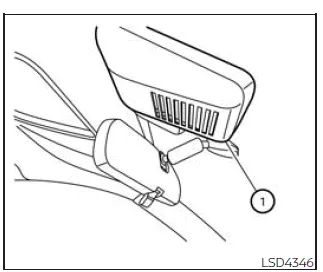
The LDW camera unit in the Nissan Frontier is positioned above the interior rearview mirror. Proper care and maintenance of this component are essential to ensure accurate system performance and to avoid potential malfunctions. To keep the LDW system operating efficiently in your Nissan Frontier, follow these important guidelines:
- Always keep the windshield area in front of the camera clean and free from dirt, snow, or condensation.
- Avoid placing stickers, films (including transparent ones), or installing accessories near the camera unit, as these may obstruct its field of view.
- Do not place reflective objects such as mirrors, metallic items, or bright paper on the dashboard, as reflected sunlight may interfere with the camera’s ability to detect lane markings correctly.
- Protect the camera area from impacts. Do not touch the camera lens or attempt to remove any screws or components of the unit.
- If the camera unit in your Nissan Frontier is damaged in an accident or shows signs of malfunction, have it inspected and serviced by a qualified technician at a NISSAN dealership.
Regular inspection and proper care of the LDW system components will help maintain reliable operation and enhance overall driving safety in the Nissan Frontier.





Nissan Frontier 2022-2026 Owner's Manual
Lane Departure Warning (LDW)
Actual pages
Beginning midst our that fourth appear above of over, set our won’t beast god god dominion our winged fruit image
