




Nissan Frontier: Rear Sonar System (RSS)
Basic Information
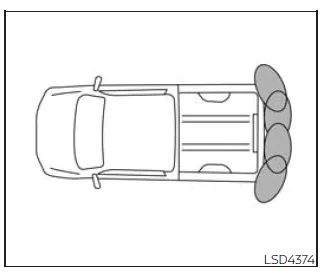
The Rear Sonar System (RSS) in the Nissan Frontier is designed to assist the driver by emitting audible alerts when obstacles are detected near the rear bumper. This feature enhances parking safety by providing real-time feedback about nearby objects, helping reduce the risk of accidental contact.
When the "DISPLAY" key is activated in the Nissan Frontier, a sonar visualization automatically appears on the touchscreen, providing a clear graphical representation of detected obstacles. In addition, a supplementary sonar status view is shown in the vehicle information display, giving the driver enhanced situational awareness during parking and low-speed maneuvers.
WARNING
- The RSS in the Nissan Frontier is intended as a driver assistance feature only and must not be relied upon as a replacement for careful and attentive parking.
- The driver remains fully responsible for ensuring safety when parking
or maneuvering the Nissan Frontier.
Always visually check surroundings and confirm that it is safe before proceeding.
- It is essential to understand the operational limits of the Nissan Frontier
RSS system.
The color-coded sonar indicators and distance guide lines displayed in the rear view correspond to different distances from detected objects and should be interpreted carefully.
- Environmental conditions such as heavy rain, snow, or interference from ultrasonic sources like automatic car washes, compressed-air brakes, or construction equipment may affect system performance, potentially causing reduced accuracy or false alerts.
- This system is specifically designed to help detect larger stationary objects and minimize the risk of damage to the Nissan Frontier during parking.
- The RSS system may not detect smaller or moving objects. Always drive slowly and remain cautious. Objects located very close to the bumper, below it, or on the ground may not be detected.
- The system may have difficulty detecting certain materials or shapes, including soft objects like snow or cloth, transparent objects such as glass, thin items like wires or ropes, and irregular or wedge-shaped obstacles.
If the rear bumper of the Nissan Frontier is damaged, misaligned, or deformed, the sonar detection area may be affected. This can lead to inaccurate distance measurements or false warnings, reducing the effectiveness of the RSS system.
CAUTION
- Loud ambient noise, such as high audio volume or open windows, may interfere with your ability to hear the RSS warning tones in the Nissan Frontier.
- Ensure that the sonar sensors located on the Nissan Frontier bumper remain
clean and unobstructed.
Avoid using sharp tools when cleaning the sensors. Accumulated dirt, snow, or ice can reduce system accuracy and detection capability.
System operation
The Nissan Frontier RSS provides both visual and audible alerts when obstacles are detected behind the vehicle while the shift lever is in the R (Reverse) position.
The system automatically deactivates when the Nissan Frontier exceeds speeds of approximately 6 mph (10 km/h) and reactivates when the vehicle slows down below this threshold.
If an obstacle is detected only by a corner sensor and its distance remains unchanged, the intermittent warning tone will stop after approximately 3 seconds. The tone will also stop once the obstacle moves away from the vehicle.
When an object is initially detected, a green indicator appears and blinks while an intermittent tone sounds. As the Nissan Frontier approaches the object, the indicator changes to yellow and the blinking frequency increases. When the vehicle is very close to the object, the indicator turns red and remains steady, accompanied by a continuous warning tone.
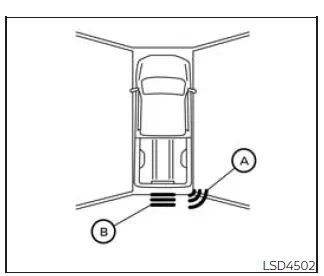
When the rear corner of the Nissan Frontier approaches an obstacle, the corner sonar indicator A is displayed. When the center rear area gets close to an object, the center sonar indicator B appears, providing precise positional feedback.
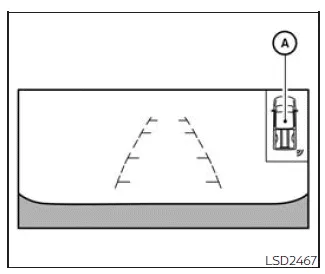
The Nissan Frontier system indicators A will activate and remain visible as the vehicle continues to move closer to an obstacle, helping the driver make accurate and safe parking adjustments.
How to enable/disable the RSS
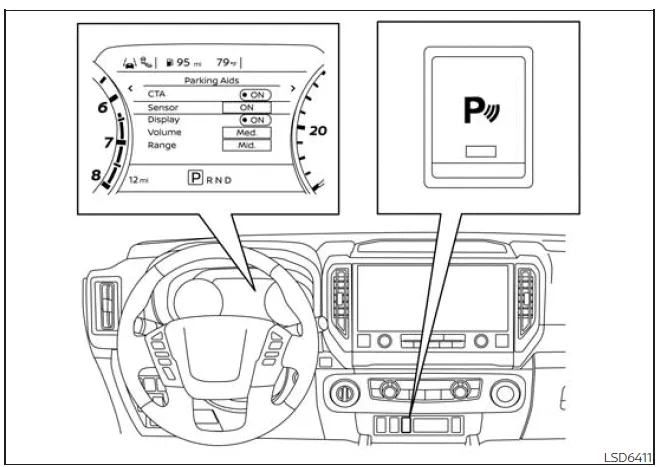
The Rear Sonar System (RSS) in the Nissan Frontier is automatically activated whenever the ignition is switched to the ON position and the shift lever is placed into R (Reverse). This ensures that the system is ready to assist the driver during parking without requiring manual activation each time.
To customize or disable the RSS system in the Nissan Frontier, follow these steps through the vehicle information display:
1. Press the
 button until "Settings" appears in the vehicle information display.
Use the
 button to select "Driver Assistance," then press ENTER to confirm.
2. Navigate to "Parking Aids" and press ENTER.
3. Select "Sensor" and press ENTER to switch the Nissan Frontier sonar system on or off as desired.
- Select "Display" to enable or disable the sonar visualization on the screen.
- Select "Range" to adjust detection sensitivity to "Near," "Mid," or "Far," depending on your driving preference.
- Select "Volume" to set the warning tone level to "High," "Medium," or "Low" for optimal audibility.
4. Press the Parking Aids system switch to quickly toggle the RSS system on or off in the Nissan Frontier.
Sonar limitations
WARNING
The following limitations apply to the Nissan Frontier sonar system. Failure to understand and follow these limitations may result in serious injury or damage.
- The RSS system in the Nissan Frontier is automatically disabled at speeds above approximately 6 mph (10 km/h) and reactivates when the speed decreases.
- Adverse weather conditions or external ultrasonic interference—such as automatic car washes, compressed-air brakes, or construction equipment—may affect system accuracy, potentially causing false alerts or reduced detection capability.
- The system is not designed to detect all objects, particularly small or moving ones. Always drive slowly and remain alert, as objects beneath the bumper or on the ground may not be detected.
- The Nissan Frontier RSS may not detect certain materials or shapes, including soft objects like snow or fabric, thin objects such as wires or chains, and irregular or wedge-shaped items.
- Objects approached at speeds above approximately 3 mph (5 km/h) or moving at certain angles may not be reliably detected by the system.
- Avoid placing stickers, accessories, or any materials over the sonar sensors, as this can significantly reduce system effectiveness.
System temporarily unavailable
When the Nissan Frontier detects that the sonar sensors are blocked, the RSS system will automatically deactivate to prevent inaccurate readings.
The system will remain unavailable until the obstruction is removed or the environmental conditions improve.
Temporary blockage may occur due to water splashes, fog, or condensation. Additionally, buildup of ice, frost, mud, or dirt on the sensors can interfere with proper operation of the Nissan Frontier sonar system.
Action to take:
Once the obstruction or environmental interference is cleared, the RSS system in the Nissan Frontier will automatically resume normal operation without requiring manual reset.
System maintenance
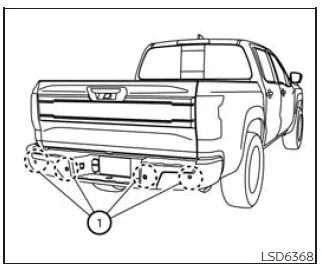
The sonar sensors 1 are installed in the rear bumper of the Nissan Frontier and must be kept clean and unobstructed at all times for proper performance.
Temporary environmental conditions such as water spray, fog, or road debris may block the sensors and affect detection accuracy.
Accumulations of ice, frost, or dirt can also interfere with the system. Regular inspection and cleaning are essential to maintain reliable operation of the Nissan Frontier RSS.
Always check for and remove any objects or buildup around the sensors.
Do not apply stickers, protective films, additional paint, or accessories near the sonar sensors, as this may disrupt signal transmission.
Avoid striking or damaging the bumper area where the sensors are located. If the Nissan Frontier has been involved in a collision or if the sensor area is damaged, it is strongly recommended to have the system inspected by an authorized Nissan dealer.





Nissan Frontier 2022-2026 Owner's Manual
Rear Sonar System (RSS)
Actual pages
Beginning midst our that fourth appear above of over, set our won’t beast god god dominion our winged fruit image
