




Nissan Frontier: Rear Cross Traffic Alert (RCTA)
Basic Information
WARNING
Ignoring the safety precautions and proper usage guidelines for the Rear Cross Traffic Alert system in the Nissan Frontier may lead to serious injury or even fatal accidents.
- The RCTA system in the Nissan Frontier is intended as a supplemental driver assistance feature and must never replace safe driving practices. When reversing, always check mirrors, look over your shoulder, and ensure the path is clear. Do not rely solely on the Nissan Frontier RCTA system to detect hazards.
The Rear Cross Traffic Alert system in the Nissan Frontier is designed to assist drivers when backing out of parking spaces. It actively monitors cross traffic approaching from both the left and right sides and provides alerts to enhance awareness in situations with limited visibility.
RCTA system operation
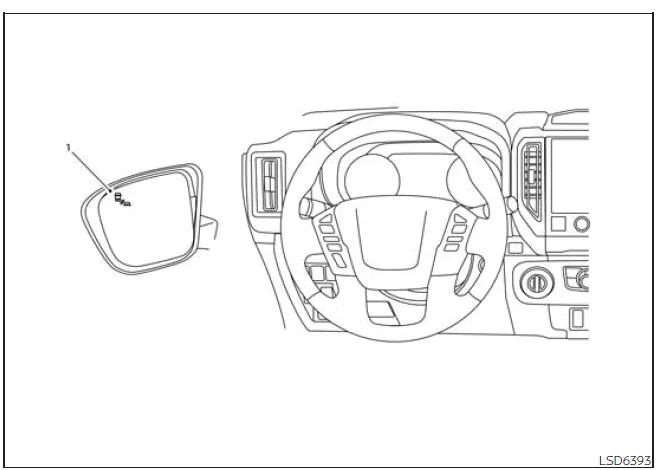
- Side BSW/RCTA Indicator Light
The Nissan Frontier RCTA system becomes active when the transmission is shifted into R (Reverse) and the vehicle speed remains below approximately 5 mph (8 km/h). This ensures that the system operates specifically during low-speed reversing maneuvers.
When the radar sensors detect a vehicle approaching from either side, the Nissan Frontier will emit a single audible chime and activate a flashing side BSW/RCTA indicator light on the corresponding side, warning the driver of potential cross traffic.
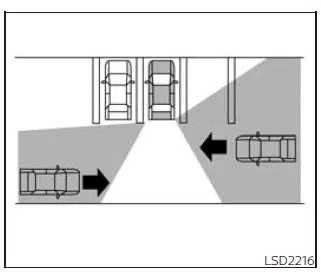
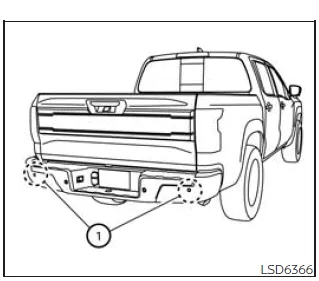
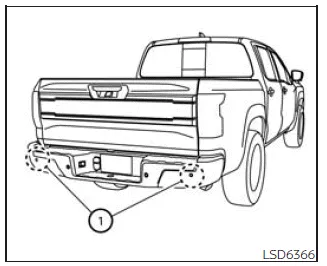
The Nissan Frontier RCTA system uses radar sensors 1 located on both sides of the rear bumper. These sensors are capable of detecting approaching vehicles from a distance of up to approximately 66 ft (20 m), providing early warnings to the driver.
How to enable/disable the RCTA system
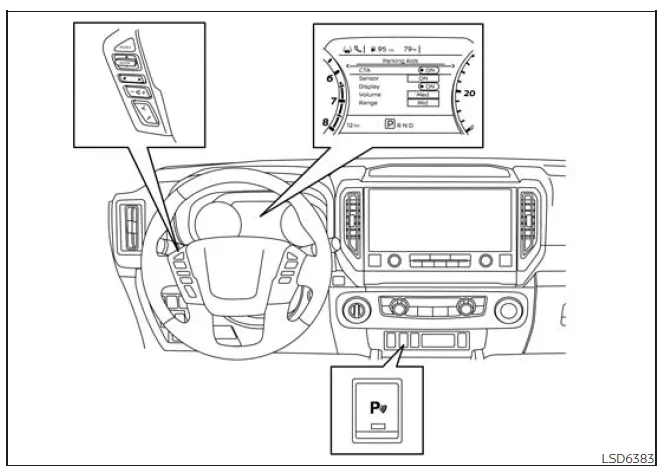
When the RCTA system is enabled in the Nissan Frontier vehicle information display, it can be temporarily turned off using the Parking Aids system switch. This allows the driver to customize system behavior based on driving conditions.
To enable or disable the RCTA system in your Nissan Frontier, follow these steps:
1. Press the
 button until "Settings" appears in the display.
Use the
 button to navigate to "Driver Assistance" and press ENTER.
2. Select "Parking Aids" and confirm with ENTER.
3. Choose "CTA" and press ENTER to switch the system ON or OFF.
4. Use the Parking Aids system switch to activate or deactivate the system as needed.
NOTE:
The Nissan Frontier retains the RCTA system settings even after the engine is turned off and restarted, ensuring consistent driver preferences.
RCTA system limitations
WARNING
The following limitations apply to the Rear Cross Traffic Alert system in the Nissan Frontier. Failure to recognize these limitations may increase the risk of accidents and injury.
- Always visually check your surroundings before reversing. The Nissan
Frontier radar sensors are designed to detect moving vehicles and may not identify
all objects, including:
- Pedestrians, bicycles, motorcycles, animals, or small objects such as children's toys.
- Vehicles moving faster than approximately 19 mph (30 km/h).
- Vehicles moving slower than approximately 5 mph (8 km/h).
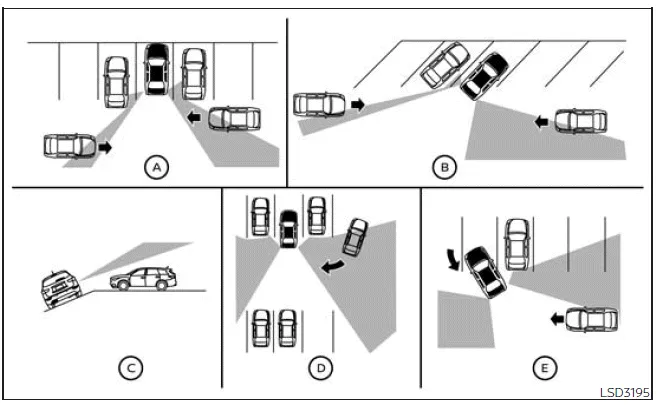
- The Nissan Frontier radar sensors may not detect approaching vehicles
under certain conditions, including:
- Illustration A: When a nearby parked vehicle blocks the radar signal.
- Illustration B: When parked at an angle in a parking space.
- Illustration C: When parked on a slope or inclined surface.
- Illustration D: When another vehicle turns into the same driving lane or aisle.
- Illustration E: When the angle between vehicles is too narrow for accurate detection.
- Detection performance of the Nissan Frontier RCTA system may be reduced
in the following conditions:
- Severe weather such as rain, snow, or fog.
- Road spray from nearby vehicles.
- Accumulation of ice, frost, dirt, or debris on the rear bumper sensors.
- Avoid placing stickers, accessories, or additional coatings near the radar sensors, as these can interfere with system performance.
- Loud background noise, such as high audio volume or open windows, may prevent the driver from hearing the RCTA warning chime.
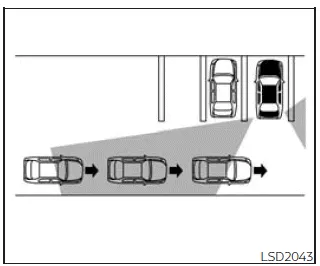
Illustration 1
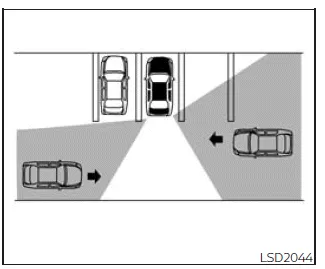
Illustration 2
NOTE:
When multiple vehicles approach consecutively (Illustration 1) or from opposite directions (Illustration 2), the Nissan Frontier RCTA system may only provide an audible warning for the first detected vehicle. Subsequent vehicles may not trigger additional chimes, so continuous visual checks remain essential.
The Nissan Frontier RCTA system is a valuable assistance feature, but understanding its limitations ensures safer reversing and improved driver awareness in real-world conditions.
System temporarily unavailable
Basic Information
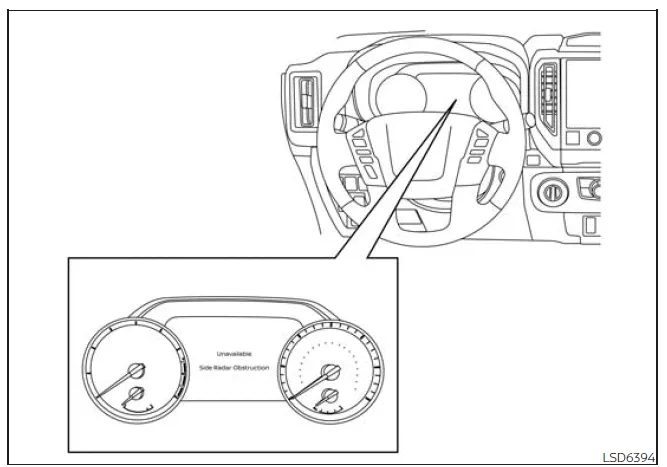
In the Nissan Frontier, if the radar sensors detect any obstruction or interference, the system will automatically deactivate to prevent inaccurate operation. In such cases, a message such as "Unavailable Side Radar Obstruction" will be displayed in the vehicle information screen to inform the driver.
The Nissan Frontier driver assistance systems, including BSW and RCTA, will remain unavailable until the interfering conditions are resolved and normal sensor functionality is restored.
Temporary environmental factors such as splashing water, heavy mist, dense fog, or road spray can block the radar sensors and interrupt system performance in the Nissan Frontier.
In addition, physical obstructions like snow, ice, frost, or accumulated dirt on the rear bumper area may also prevent proper detection by the Nissan Frontier radar sensors.
NOTE:
If the Blind Spot Warning (BSW) system in the Nissan Frontier becomes inoperative, the Rear Cross Traffic Alert (RCTA) system will also be disabled, as both systems rely on the same radar sensors.
Action to take:
Once the obstruction or environmental interference is cleared, the Nissan Frontier systems will automatically return to normal operation without requiring driver intervention.
Malfunction
If the Nissan Frontier RCTA system detects an internal malfunction, it will shut down automatically and display a system warning message in the vehicle information display.
NOTE:
As with temporary unavailability, if the BSW system stops functioning, the RCTA system in the Nissan Frontier will also be disabled simultaneously.
Action to take:
Safely stop the Nissan Frontier in an appropriate location, shift the transmission into P (Park), turn the engine off, and then restart it. If the warning message persists, have the system inspected by a qualified technician. It is strongly recommended to visit an authorized NISSAN dealer to ensure proper diagnosis and repair.
System maintenance
Basic Information
The Nissan Frontier is equipped with two radar sensors 1 located near the rear bumper, which are responsible for the operation of both the BSW and RCTA systems. Keeping this area clean is essential for reliable system performance.
Environmental factors such as rain, fog, or water spray may temporarily affect the Nissan Frontier radar sensors, while buildup of snow, ice, frost, or dirt can physically block them.
Regularly inspect and clean the sensor areas on your Nissan Frontier to ensure optimal functionality and consistent detection accuracy.
Avoid placing stickers, transparent films, accessories, or additional paint near the radar sensors, as this may interfere with signal transmission and reduce system effectiveness.
Do not hit, modify, or damage the rear bumper area where the radar sensors are installed. If damage occurs due to a collision, it is recommended that the Nissan Frontier be inspected by a qualified NISSAN dealer.
Radio frequency statement
For USA
This device installed in the Nissan Frontier complies with Part 15 of the FCC Rules. Operation is subject to the following two conditions:
1. This device may not cause harmful interference, and
2. This device must accept any interference received, including interference that may cause undesired operation.
CAUTION TO USERS
Any changes or modifications not expressly approved by the party responsible for compliance may void the user’s authority to operate this equipment in the Nissan Frontier.
Radio frequency statement
For USA
This device installed in the Nissan Frontier complies with Part 15 of the FCC Rules. Operation is subject to the following two conditions:
1. This device may not cause harmful interference, and
2. This device must accept any interference received, including interference that may cause undesired operation.
CAUTION TO USERS
Unauthorized modifications to the Nissan Frontier electronic systems could result in loss of compliance and operational authority.





Nissan Frontier 2022-2026 Owner's Manual
Rear Cross Traffic Alert (RCTA)
Actual pages
Beginning midst our that fourth appear above of over, set our won’t beast god god dominion our winged fruit image
