




Nissan Frontier: Intelligent Cruise Control (ICC)
- Basic Information
- Vehicle-to-vehicle distance control mode
- Vehicle-to-vehicle distance control mode switches
- Vehicle-to-vehicle distance control mode limitations
- System temporarily unavailable
- System maintenance
- Conventional (fixed speed) cruise control mode
Basic Information
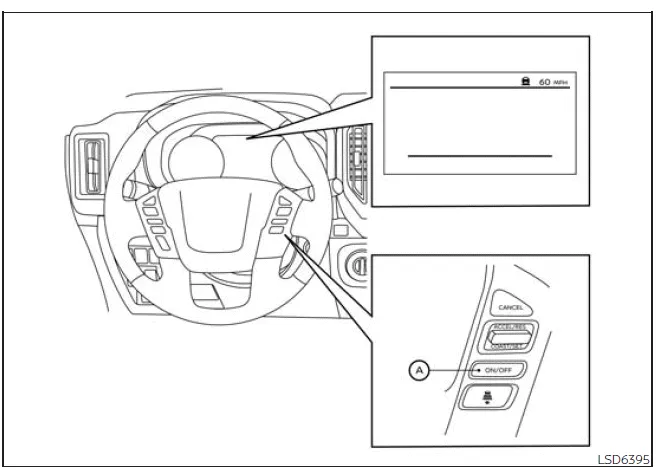
- ICC switch
WARNING
Ignoring the safety precautions and proper usage guidelines for the ICC system in the Nissan Frontier may lead to serious injury or even fatal accidents.
- The Intelligent Cruise Control (ICC) system in the Nissan Frontier is designed solely as a driver assistance feature. It does not replace attentive driving and is not intended to prevent collisions. The driver must remain fully alert, maintain control of the vehicle, and continuously monitor traffic conditions.
- Always follow posted speed limits when operating the Nissan Frontier and never set the cruise speed higher than legally permitted or safe for road conditions.
- Use the ICC system in the Nissan Frontier only under appropriate traffic
and road conditions.
Carefully read and understand the Owner’s Manual before using this feature. Relying entirely on the ICC system instead of active driving can lead to dangerous situations. The system is not capable of reacting to all emergency scenarios.
The driver must always be prepared to brake or steer as necessary, especially in unpredictable traffic situations.
- When using the conventional (fixed speed) cruise control mode in the Nissan Frontier, the system does not provide warnings if you approach another vehicle too closely. It is essential to maintain a safe following distance at all times to avoid potential collisions.
The Intelligent Cruise Control system in the Nissan Frontier is engineered to automatically maintain a selected following distance from the vehicle ahead within a speed range of approximately 0 to 90 mph (0 to 144 km/h), depending on conditions, while respecting the preset speed selected by the driver.
The driver can set the desired cruising speed between approximately 20 and 90 mph (30 to 144 km/h), allowing the Nissan Frontier to adapt smoothly to highway and traffic conditions.
When no vehicle is detected ahead, the Nissan Frontier will maintain the preset cruising speed, providing a comfortable and consistent driving experience.
The Nissan Frontier ICC system offers two distinct operating modes:
- Vehicle-to-vehicle distance control mode: This mode automatically adjusts speed to maintain a safe distance from the vehicle ahead while driving up to the selected speed.
- Conventional (fixed speed) cruise control mode: This mode allows the Nissan Frontier to travel at a constant speed without automatically adjusting for traffic ahead.
Use the ICC switch A in the Nissan Frontier to toggle between these two cruise control modes based on your driving needs.
Once a specific cruise control mode is activated in the Nissan Frontier, it cannot be switched directly to another mode. To change modes, first turn the system off by pressing the ICC switch A, then turn it back on and select the desired mode again.
Always verify the active mode and settings using the Nissan Frontier instrument display before driving to ensure proper system operation.
How to select the cruise control mode
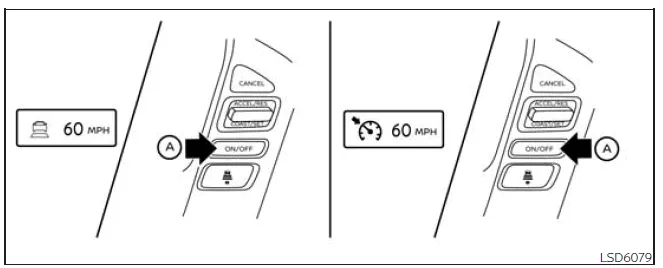
Selecting the vehicle-to-vehicle distance control mode: To activate this mode in the Nissan Frontier, briefly press and release the ICC switch A.
Selecting the conventional (fixed speed) cruise control mode: To switch to this mode in the Nissan Frontier, press and hold the ICC switch A for more than approximately 1.5 seconds.
For optimal performance of the Nissan Frontier ICC system, always ensure that sensors are clean and unobstructed, and be ready to intervene manually whenever necessary.
Vehicle-to-vehicle distance control mode
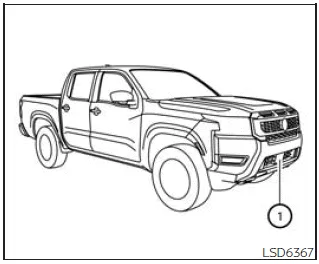
In the Nissan Frontier, the vehicle-to-vehicle distance control mode of the Intelligent Cruise Control (ICC) system is designed to automatically maintain a preset following distance from the vehicle ahead. The system continuously adapts to the speed of the leading vehicle and adjusts your Nissan Frontier accordingly, or maintains the selected cruising speed when the lane ahead is clear.
This advanced feature enhances driving comfort in the Nissan Frontier by assisting the driver during steady highway travel or moderate traffic conditions, particularly when following vehicles moving in the same direction and lane.
If the front radar sensor 1 in the Nissan Frontier detects a slower-moving vehicle ahead, the system will automatically reduce speed to maintain the selected distance, ensuring smoother and safer following behavior.
The Nissan Frontier ICC system controls engine throttle and can apply braking force (up to approximately 40% of total braking capacity) when necessary to regulate speed and maintain spacing.
Vehicle-to-vehicle distance control mode operation
The vehicle-to-vehicle distance control mode in the Nissan Frontier is engineered to automatically adjust speed based on traffic flow and maintain a consistent gap between your vehicle and the one ahead. It can reduce speed as needed and, if the leading vehicle comes to a stop, the Nissan Frontier will decelerate to a complete stop within system limits.
However, it is important to note that the ICC system in the Nissan Frontier is limited to approximately 40% of the total braking force. This means that in situations requiring rapid deceleration, the driver must intervene by braking manually.
The Nissan Frontier ICC system is most effective in conditions where traffic moves at relatively stable speeds or changes gradually. If another vehicle suddenly cuts into your lane or the vehicle ahead brakes sharply, the system may not react quickly enough to maintain a safe distance.
In such situations, the Nissan Frontier will alert the driver with an audible warning and visual indicators on the display, prompting immediate driver action to ensure safety.
The system will automatically cancel operation and sound a warning if the vehicle speed drops below approximately 15 mph (25 km/h) and no vehicle is detected ahead. It will also deactivate if the vehicle exceeds the maximum set cruise speed.
The following functions are managed by the vehicle-to-vehicle distance control mode in the Nissan Frontier:
- When no vehicle is detected ahead, the Nissan Frontier maintains the driver-selected cruising speed. The adjustable speed range typically falls between approximately 20 and 90 mph (30 to 144 km/h).
- When a vehicle is detected ahead, the Nissan Frontier automatically adjusts speed to maintain the selected following distance. If the leading vehicle slows down or stops, the system will decelerate your vehicle accordingly, potentially bringing it to a complete stop within system capabilities.
For optimal safety and performance, always monitor traffic conditions when using the Nissan Frontier ICC system and be prepared to take control whenever necessary.
If the Nissan Frontier ICC system determines that the vehicle has come to a complete stop, it will automatically cancel operation and emit a warning chime to notify the driver.
The Intelligent Cruise Control (ICC) system in the Nissan Frontier is not designed to detect or respond effectively to stationary objects or very slow-moving vehicles. Therefore, drivers must remain attentive and manually control the vehicle when approaching situations such as traffic congestion, toll booths, or stopped traffic.
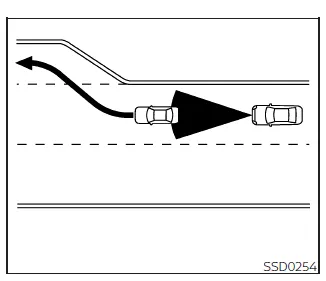
While driving the Nissan Frontier on highways at a preset speed, if a slower vehicle is detected ahead, the ICC system will automatically reduce speed to maintain the selected following distance. Once the lane ahead becomes clear—such as when the leading vehicle exits or changes lanes—the Nissan Frontier will accelerate back to the preset speed.
During this automatic acceleration, the driver should stay alert and maintain full control of the Nissan Frontier, as rapid changes in traffic conditions may require immediate intervention.
On winding roads or steep inclines, the Nissan Frontier may not consistently maintain the preset speed due to system limitations. In such cases, manual speed control by the driver is necessary to ensure safe operation.
Under normal conditions, the ICC system in the Nissan Frontier continuously adjusts speed—either accelerating or decelerating—based on the behavior of the vehicle ahead, providing a smoother and more relaxed driving experience.
However, the driver must take over when additional acceleration is needed, such as during lane changes. Press the accelerator pedal to safely increase speed when required.
Likewise, if the vehicle ahead brakes suddenly or another vehicle merges into your lane, you must apply the brakes manually to maintain a safe following distance. The Nissan Frontier ICC system is a supportive feature, but it cannot replace driver awareness and quick decision-making.
Always remain vigilant and ready to react when using the Nissan Frontier Intelligent Cruise Control system, especially in dynamic or unpredictable traffic environments.
Vehicle-to-vehicle distance control mode switches
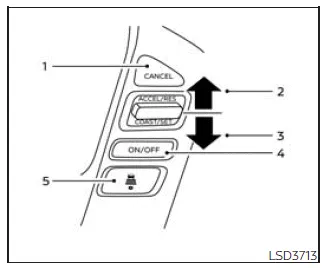
Basic Information
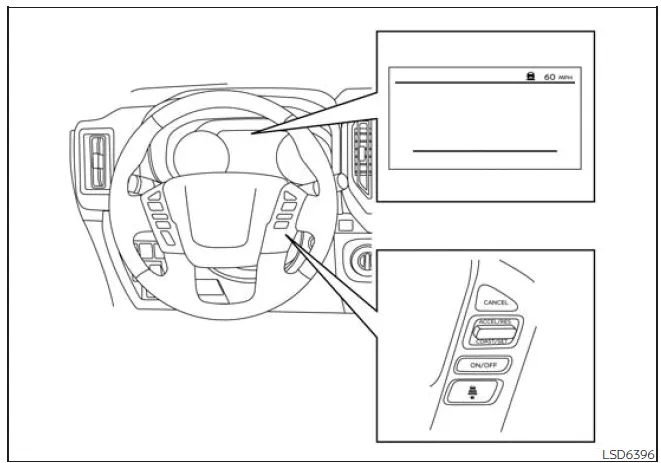
The Intelligent Cruise Control (ICC) system in the Nissan Frontier is conveniently operated using the ICC main switch and four dedicated control buttons, all ergonomically positioned on the steering wheel for easy access while driving.
1. CANCEL switch:
Instantly deactivates the ICC system in the Nissan Frontier, allowing the driver to regain full manual control.
2. ACCEL/RES switch:
Restores the previously set cruising speed or gradually increases the set speed in small increments for fine adjustments.
3. COAST/SET switch:
Sets the desired cruising speed or reduces the current speed step-by-step for precise control.
4. ICC switch:
Acts as the master control to activate or deactivate the Nissan Frontier Intelligent Cruise Control system.
5. DISTANCE switch:

This control allows the driver to adjust the following distance between the Nissan Frontier and the vehicle ahead:
- Long – for increased safety margin
- Middle – for balanced driving conditions
- Short – for closer following in steady traffic
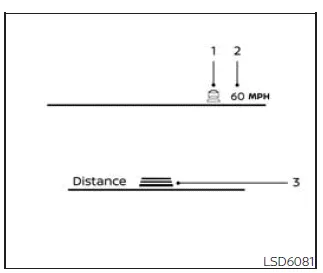
Vehicle-to-vehicle distance control mode display and indicators
The Nissan Frontier ICC system information is displayed in the instrument cluster, positioned between the speedometer and tachometer for clear visibility.
1. This indicator shows the current ICC system status based on color:
- ICC system ON indicator (gray): Confirms that the Nissan Frontier ICC system is activated but not yet set.
- ICC system SET indicator (green): Indicates that a cruising speed has been selected and the system is actively controlling the vehicle.
- ICC system warning (yellow): Alerts the driver to a malfunction or issue requiring attention.
2. Set vehicle speed indicator: Displays the selected cruising speed.
In Nissan Frontier Canadian models, this value is shown in km/h for regional compliance.
3. Set distance indicator: Shows the currently selected following distance using the distance control switch.
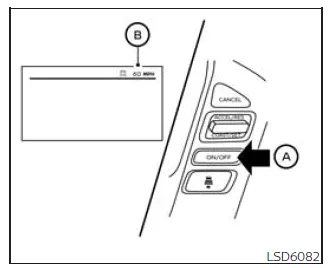
Operating vehicle-to-vehicle distance control mode
To activate cruise control in the Nissan Frontier, briefly press and release the ICC switch A. The ICC system ON indicator (gray), along with the set distance and speed indicators B, will illuminate, indicating standby mode.
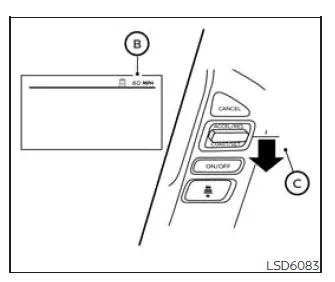
To set the desired cruising speed in the Nissan Frontier, accelerate to the preferred speed, then press and release the COAST/SET switch C. The ICC system SET indicator (green), along with the vehicle detection indicator, set distance indicator, and speed display B, will activate. Once set, remove your foot from the accelerator—the Nissan Frontier will maintain the selected speed automatically.
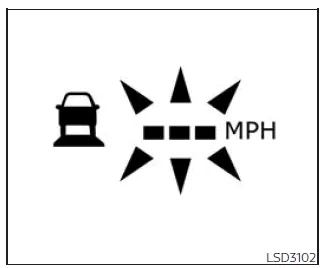
If the COAST/SET switch is pressed under the following conditions, the Nissan Frontier ICC system cannot be activated, and the set speed indicator will flash for approximately 2 seconds:
- Vehicle speed is below approximately 20 mph (30 km/h) and no vehicle is detected ahead
- The shift lever is not in D (Drive) or Manual mode
- The parking brake is engaged
- The brake pedal is being pressed
If the Nissan Frontier ICC system is unable to activate due to the following conditions, a warning message will be displayed:
- The Vehicle Dynamic Control (VDC) system is turned off (to use ICC, enable VDC and reset the system by turning ICC off and on again)
- The VDC system is actively operating
- Wheel slip is detected (ensure stable traction before activating ICC)
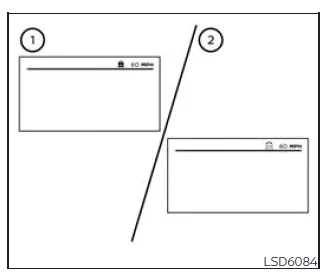
- System set display with vehicle ahead
- System set display without vehicle ahead
For optimal performance of the Nissan Frontier ICC system, ensure proper driving conditions and always monitor system indicators to confirm correct operation.
The driver of the Nissan Frontier selects the desired cruising speed according to current road and traffic conditions. Once set, the Intelligent Cruise Control (ICC) system maintains this speed in a manner similar to traditional cruise control, provided no vehicle is detected ahead in the same lane. The selected speed is clearly displayed in the Nissan Frontier instrument cluster for continuous driver awareness.
Vehicle detected ahead
When the Nissan Frontier detects a vehicle traveling ahead, the ICC system automatically adjusts speed by reducing engine power and applying braking as needed. This allows the Nissan Frontier to match the speed of the leading vehicle while maintaining the driver-selected following distance for improved safety and comfort.
NOTE:
- When the ICC system in the Nissan Frontier applies braking, the brake lights will illuminate to alert vehicles behind you.
- During automatic braking, you may notice operational sounds. This is a normal characteristic of the Nissan Frontier system and does not indicate a malfunction.
When a vehicle is detected ahead, the vehicle detection indicator will illuminate, confirming that the Nissan Frontier ICC system is actively tracking traffic.
At the same time, the Nissan Frontier display will show both the set cruising speed and the selected following distance, providing clear feedback to the driver.
Vehicle ahead not detected
If the vehicle ahead is no longer detected, the Nissan Frontier ICC system will smoothly accelerate the vehicle back to the previously set cruising speed. Once the target speed is reached, the system will maintain it automatically.
When no vehicle is detected, the vehicle detection indicator in the Nissan Frontier will turn off, signaling open road conditions.
If another vehicle enters the lane while the Nissan Frontier is accelerating or operating under ICC control, the system will immediately adjust speed to maintain the appropriate distance.
If no vehicle is detected and the Nissan Frontier speed drops below approximately 15 mph (25 km/h), the ICC system will automatically cancel operation.
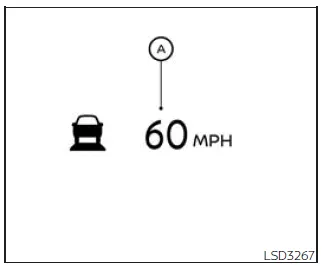
While overtaking another vehicle in the Nissan Frontier, the set speed indicator A may flash if the actual vehicle speed temporarily exceeds the preset value. Once the lane ahead is clear, the vehicle detection indicator will turn off. After releasing the accelerator pedal, the Nissan Frontier will return to the previously set cruising speed.
Even when the Nissan Frontier ICC system is active, the driver can press the accelerator pedal at any time to achieve quicker acceleration when needed, such as during overtaking maneuvers.
How to change the set vehicle speed
To cancel the preset cruising speed in the Nissan Frontier, use one of the following methods:
- Press the CANCEL switch. The set speed indicator will change to gray.
- Lightly press the brake pedal. The set speed indicator will turn gray and the system will deactivate.
- Press the ICC switch to turn the system off. All Nissan Frontier ICC indicators will switch off.
To increase the cruising speed in the Nissan Frontier, use one of the following methods:
- Press the accelerator pedal until reaching the desired speed, then press and release the COAST/SET switch.
- Press and hold the ACCEL/RES switch.
The set speed will increase in increments of approximately 5 mph (5 km/h).
- Press and quickly release the ACCEL/RES switch. Each press increases the speed by approximately 1 mph (1.6 km/h).
To decrease the cruising speed in the Nissan Frontier, use one of the following methods:
- Lightly apply the brake pedal until reaching the desired speed, then press and release the COAST/SET switch.
- Press and hold the COAST/SET switch.
The set speed will decrease by approximately 5 mph (5 km/h).
- Press and quickly release the COAST/SET switch. Each press reduces the speed by approximately 1 mph (1.6 km/h).
To resume the previously set speed in the Nissan Frontier, press and release the ACCEL/RES switch. The system will restore the last stored cruising speed once the vehicle exceeds approximately 20 mph (30 km/h).
For best results, always monitor traffic conditions and be prepared to manually adjust speed when using the Nissan Frontier Intelligent Cruise Control system.
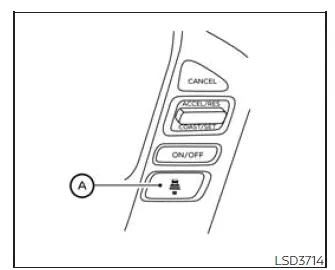
How to change the set distance to the vehicle ahead
In the Nissan Frontier, the following distance to the vehicle ahead can be adjusted at any time—either while the Intelligent Cruise Control (ICC) system is in standby mode or actively controlling speed—depending on current traffic and driving conditions. This flexibility allows the Nissan Frontier driver to tailor the driving experience for both comfort and safety.
Each time the distance
 switch A is pressed, the selected following distance will cycle through three preset
levels: long, medium, and short, before returning to long again. This intuitive
system in the Nissan Frontier ensures quick adjustments without distraction.
switch A is pressed, the selected following distance will cycle through three preset
levels: long, medium, and short, before returning to long again. This intuitive
system in the Nissan Frontier ensures quick adjustments without distraction.
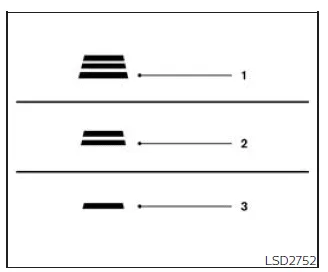
Approximate distance at 60 mph (100 km/h) [ft (m) ]
1. Distance: Long
- 200 (60)
2. Distance: Middle
- 150 (45)
3. Distance: Short
- 90 (30)
- The following distance in the Nissan Frontier dynamically adjusts according
to vehicle speed.
At higher speeds, the system automatically increases the gap to enhance safety and provide sufficient braking distance.
- The selected distance setting remains stored even after the Nissan Frontier engine is turned off and restarted, ensuring consistent driver preferences.
Approach warning
If the Nissan Frontier approaches a vehicle ahead too quickly—such as when that vehicle brakes suddenly or another vehicle merges into your lane—the ICC system will alert the driver with an audible chime and a visual warning on the display. In such situations, the driver must immediately reduce speed by applying the brake pedal to maintain a safe distance.
- The warning chime is activated.
- The vehicle ahead detection indicator flashes.
However, in certain situations, the Nissan Frontier ICC warning chime may not activate even when the distance is short. Examples include:
- When both vehicles are traveling at similar speeds and the distance remains constant.
- When the vehicle ahead accelerates, increasing the gap.
- When another vehicle merges very close to your Nissan Frontier.
The warning chime will also not sound under the following conditions:
- When approaching stationary or very slow-moving vehicles.
- When the driver presses the accelerator pedal, temporarily overriding the Nissan Frontier ICC system.
NOTE:
The Nissan Frontier ICC system may occasionally detect roadside objects or vehicles in adjacent lanes, which can trigger warnings or cause slight speed adjustments. This behavior is more likely on winding roads, narrow lanes, hills, or when entering and exiting curves. In such cases, the driver should maintain full control and manually manage the distance to the vehicle ahead.
Additionally, sensor performance in the Nissan Frontier may be influenced by driving behavior (such as steering input or lane positioning) as well as environmental or vehicle conditions (for example, if the vehicle has sustained damage or is operating in heavy traffic).
Automatic cancellation
The Nissan Frontier ICC system will automatically deactivate and emit a warning chime under the following conditions:
- When no vehicle is detected ahead and the Nissan Frontier speed drops below approximately 15 mph (25 km/h).
- When the system determines that the vehicle has come to a complete stop.
- When the shift lever is moved out of the D (Drive), Manual mode, or L (Low) range.
- When the parking brake is engaged.
- When the Vehicle Dynamic Control (VDC) system is turned off.
- When the VDC system is actively intervening.
- When sensor visibility is impaired due to dirt, snow, or other obstructions.
- When wheel slip is detected.
- When the radar signal is temporarily interrupted.
For optimal performance of the Nissan Frontier ICC system, always ensure sensors are clean and remain attentive to surrounding traffic conditions.
Vehicle-to-vehicle distance control mode limitations
WARNING
The following section outlines important limitations of the Intelligent Cruise Control (ICC) system in the Nissan Frontier. Ignoring these limitations or relying too heavily on the system may lead to dangerous situations, including serious injury or fatal accidents.
- The Nissan Frontier ICC system is designed primarily for use on straight, dry highways with light and steady traffic. It is not intended for use in dense urban environments, stop-and-go traffic, or highly congested roads where constant manual intervention is required.
- The system does not automatically adapt to changing road conditions. For safe operation in the Nissan Frontier, use ICC only in stable driving environments. Avoid activating the system on roads with sharp curves, slippery surfaces such as ice or snow, or during adverse weather conditions like heavy rain or fog.
- Due to inherent system limitations, the Nissan Frontier ICC must never be relied upon as a substitute for attentive driving. It cannot compensate for driver distraction, poor visibility, or sudden hazards. Always be prepared to reduce speed manually using the brake pedal to maintain a safe following distance.
- If the vehicle ahead comes to a complete stop, the Nissan Frontier will
decelerate and may stop within system limits.
Once a full stop is detected, the system will cancel and emit a warning chime. The driver must immediately press the brake pedal to keep the vehicle stationary and maintain control.
- Always stay attentive and ready to take over vehicle control. In certain driving situations, the Nissan Frontier ICC system may not maintain the selected speed or distance accurately due to environmental or traffic variables.
- The system may fail to detect vehicles ahead under specific conditions.
To reduce the risk of accidents, do not use the Nissan Frontier ICC system in
the following situations:
- Heavy traffic or roads with sharp curves
- Slippery surfaces such as snow, ice, or wet roads
- Severe weather conditions including rain, fog, or snow
- When non-recommended tires or wheels are installed
- When dirt, snow, or debris covers the radar sensor area
- On steep downhill slopes where vehicle speed may exceed the set speed and braking may overheat
- On roads with frequent elevation changes (uphill/downhill)
- When traffic flow is inconsistent with frequent acceleration and braking
- In areas with interference from other radar sources
- Do not use the Nissan Frontier ICC system while towing a trailer, as detection capability may be compromised.
- Unexpected objects or vehicles entering the sensor detection zone may trigger sudden automatic braking. Always remain alert and avoid using ICC in environments where unpredictable conditions are likely.
The radar sensor in the Nissan Frontier ICC system may not detect the following:
- Stationary or very slow-moving vehicles
- Pedestrians or obstacles in the roadway
- Oncoming traffic within the same lane
- Motorcycles or vehicles traveling offset within the lane
The system relies on reflected signals from vehicles ahead. If these signals are weak or absent, the Nissan Frontier ICC system may fail to maintain the correct following distance.
Examples of situations where detection may be reduced include:
- Snow, spray, or dirt affecting sensor visibility
- Towing a trailer or additional equipment
- Heavy cargo loading in the rear of the Nissan Frontier affecting vehicle angle
The Nissan Frontier ICC system continuously monitors sensor functionality. If the radar sensor becomes blocked or contaminated, the system may deactivate automatically.
If the sensor is obstructed by ice, dirt, or transparent materials, the system may fail to detect objects correctly and may not cancel as expected. In such cases, the vehicle may not maintain a safe following distance.
Regular inspection and cleaning of the radar sensor area is essential to ensure proper operation of the Nissan Frontier ICC system.
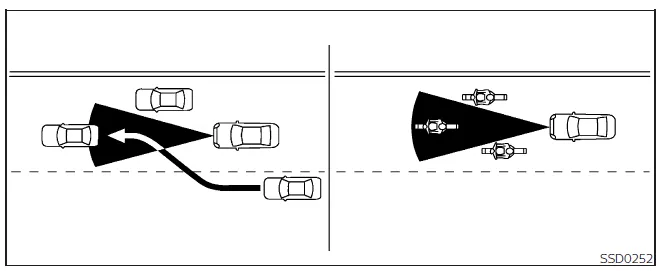
The detection range of the radar sensor is limited. For accurate operation, the vehicle ahead must remain within the detection zone.
Vehicles may temporarily leave this zone due to lane positioning. Motorcycles or smaller vehicles may not be detected if they are not centered within the lane. Similarly, vehicles merging into your lane may not be detected until they are fully aligned.
If this occurs, the Nissan Frontier ICC system may issue a warning by flashing indicators and sounding a chime. The driver must immediately take control and adjust the following distance manually.
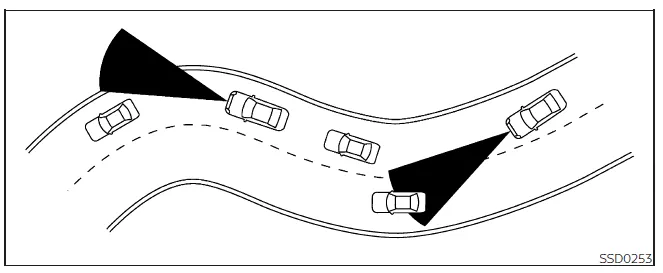
On winding, narrow, hilly, or construction-affected roads, the Nissan Frontier radar system may detect vehicles in adjacent lanes or temporarily lose detection of the vehicle ahead. This may result in unexpected acceleration or deceleration.
Sensor performance may also vary depending on driving behavior, such as steering input or lane positioning, as well as vehicle condition.
If such behavior occurs, the Nissan Frontier ICC system may generate unexpected warnings. The driver must remain attentive and manually control the distance to ensure safe driving at all times.
System temporarily unavailable
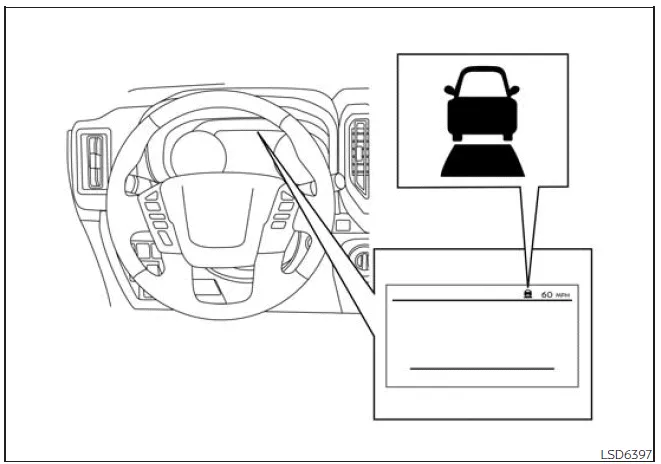
The following situations describe when the Intelligent Cruise Control (ICC) system in the Nissan Frontier may become temporarily unavailable. In these cases, the Nissan Frontier ICC system may not disengage as expected and may be unable to maintain the selected following distance from the vehicle ahead, requiring immediate driver attention.
Condition A
Under the following circumstances, the Nissan Frontier ICC system will automatically cancel operation. A warning chime will sound, and the system cannot be reactivated until the issue is resolved:
- When the Vehicle Dynamic Control (VDC) system is switched off
- When the VDC system is actively intervening
- When no vehicle is detected ahead and the Nissan Frontier speed drops below approximately 15 mph (25 km/h)
- When the system determines that the vehicle has come to a complete stop
- When the shift lever is not in D (Drive), Manual mode, or L (Low) range
- When the parking brake is engaged
- When wheel slip is detected
- When specialized terrain modes such as ROCK, MUD, or SAND are selected (if equipped)
- When the radar signal is temporarily disrupted
Action to take
Once normal conditions are restored, switch the Nissan Frontier ICC system off using the ICC control, then reactivate it to resume normal operation.
Condition B
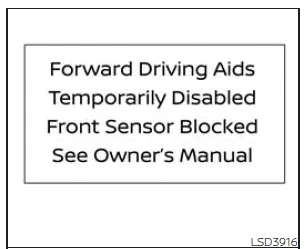
In adverse weather conditions such as heavy rain, fog, or snowfall, the front radar sensor of the Nissan Frontier may become obstructed. In such cases, the ICC system will automatically deactivate.
A warning chime will sound and the message:
"Forward Driving Aids Temporarily Disabled Front Sensor Blocked See Owner's
Manual"
will appear in the vehicle information display.
Action to take
Once visibility improves and the obstruction is removed, the Nissan Frontier ICC system will automatically resume operation. If the warning message remains visible, have the system inspected by a qualified technician. Visiting an authorized Nissan service center is recommended.
Condition C
If the radar sensor area located on the front bumper or emblem of the Nissan Frontier is covered with dirt, snow, ice, or other debris, the ICC system will deactivate automatically to prevent inaccurate operation.
A warning chime will sound, and the same system warning message will be displayed.
Action to take
Safely stop the Nissan Frontier, shift into P (Park), and turn off the engine. Carefully clean the radar sensor area to remove any obstruction, then restart the vehicle. If the warning persists, professional inspection is required.
Condition D
While driving in areas with minimal roadside features—such as long bridges, open desert terrain, snow-covered regions, or roads bordered by long walls—the Nissan Frontier radar system may have difficulty detecting objects accurately. This may trigger a temporary system shutdown.
A warning chime will sound and the system message will appear.
Action to take
Once normal driving conditions return, turn the Nissan Frontier ICC system off and then back on to restore operation.
Condition E
If the Nissan Frontier ICC system detects an internal malfunction, a warning chime will sound, and the ICC system warning light (orange) will illuminate. The system message will also appear in the vehicle information display.
Action to take
Park the Nissan Frontier in a safe location, turn off the engine, and restart it. Attempt to reactivate the ICC system. If the system cannot be set or the warning indicator remains illuminated, the system may be malfunctioning.
If this occurs, the vehicle can still be driven normally; however, it is strongly recommended to have the Nissan Frontier inspected by an authorized service center to ensure safe operation.
NOTE:
When the Nissan Frontier ICC system is temporarily unavailable, the conventional cruise control mode may still be used as an alternative for maintaining speed on suitable roads.
System maintenance
Basic Information
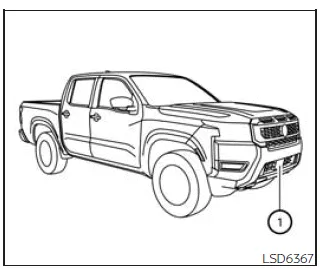
The Intelligent Cruise Control (ICC) sensor in the Nissan Frontier is mounted at the front of the vehicle, typically integrated into the front bumper or emblem area. This sensor plays a critical role in detecting vehicles ahead and maintaining a safe following distance, so proper care is essential for reliable system performance.
To ensure the Nissan Frontier ICC system operates accurately and consistently, follow these important maintenance guidelines:
- Always keep the sensor area on the front bumper/emblem clean and free of dirt, snow, ice, or debris. Even minor contamination can reduce detection accuracy.
- Avoid any impact or physical damage to the sensor area. Even small dents or misalignment may affect the functionality of the Nissan Frontier ICC system.
- Do not place stickers, including transparent films, or install aftermarket accessories near the sensor. These may interfere with radar signals and cause malfunction.
- Avoid mounting metallic objects such as brush guards, grille guards, or decorative accessories near the sensor area, as they may disrupt radar operation.
- Do not modify, repaint, or remove the front bumper without proper guidance. Any customization of the Nissan Frontier front bumper should be performed by qualified technicians. It is strongly recommended to consult a NISSAN dealer before making modifications.
Regular inspection of the Nissan Frontier sensor area is highly recommended, especially after driving in harsh weather or off-road conditions, to maintain optimal ICC system performance and safety.
Radio frequency statement
FCC Notice
USA
This device installed in the Nissan Frontier complies with Part 15 of the FCC Rules and applicable Industry Canada licence-exempt RSS standards.
Operation is subject to the following two conditions:
1. This device may not cause harmful interference, and
2. This device must accept any interference received, including interference that may cause undesired operation.
Radio frequency radiation exposure information:
This equipment complies with FCC and IC radiation exposure limits established for an uncontrolled environment.
This equipment should be installed and operated with a minimum distance of 30 cm between the radiator and the human body.
This transmitter must not be co-located or operated in conjunction with any other antenna or transmitter.
FCC Notice
Any changes or modifications not expressly approved by the party responsible for compliance may void the user's authority to operate this equipment.
CANADA
This device installed in the Nissan Frontier also complies with Industry Canada licence-exempt RSS standards.
Operation is subject to the following two conditions:
1. This device may not cause interference, and
2. This device must accept any interference, including interference that may cause undesired operation.
Radio frequency radiation exposure information:
This equipment complies with applicable radiation exposure limits for an uncontrolled environment.
A minimum distance of 30 cm must be maintained between the Nissan Frontier sensor system and any person.
This transmitter must not be co-located or operated together with any other antenna or transmitter.
FCC Notice
Unauthorized modifications to this Nissan Frontier system may void the user's authority to operate the equipment.
Conventional (fixed speed) cruise control mode
Basic Information
The conventional (fixed speed) cruise control mode in the Nissan Frontier allows the driver to maintain a constant driving speed within a range of approximately 25 to 90 mph (40 to 144 km/h) without the need to continuously press the accelerator pedal. This feature is especially useful for long highway journeys, helping reduce driver fatigue and providing a smoother driving experience in the Nissan Frontier.
WARNING
- In the conventional cruise control mode of the Nissan Frontier, the system does not monitor the distance to the vehicle ahead and does not provide any warning if you are approaching another vehicle too closely.
- It is essential to constantly monitor the distance to vehicles ahead. Failure to do so may result in a collision, as the Nissan Frontier system will not automatically react to traffic conditions in this mode.
- Always verify the current settings in the ICC display before and during use to ensure the Nissan Frontier cruise control is operating as intended.
- Do not activate the conventional cruise control mode in the Nissan Frontier
under the following conditions:
- When it is difficult to maintain a steady speed
- In heavy traffic or traffic with frequent speed changes
- On winding, curvy, or steep roads
- On slippery surfaces such as rain, snow, or ice
- In areas with strong crosswinds
- Using cruise control in unsuitable conditions may lead to loss of vehicle control and increase the risk of an accident.
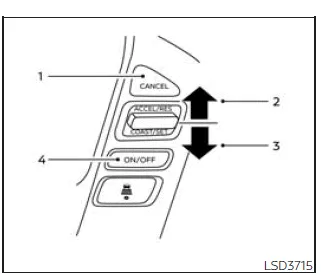
Conventional (fixed speed) cruise control switches
1. CANCEL switch:
Instantly deactivates the Nissan Frontier cruise control system.
2. ACCEL/RES switch:
Resumes the previously set speed or increases the speed in small increments for
precise control.
3. COAST/SET switch:
Sets the desired cruising speed or gradually decreases the speed.
4. ICC switch:
Main control switch used to activate or deactivate the cruise control system in
the Nissan Frontier.
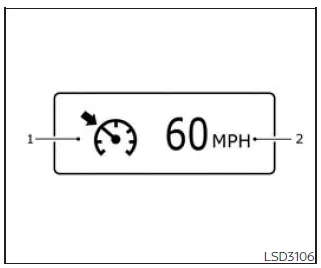
Conventional (fixed speed) cruise control mode display and indicators
The Nissan Frontier displays cruise control information in the vehicle information display, providing clear feedback about system status.
1. Cruise indicator:
Indicates the current state of the system using different colors:
- Cruise control ON indicator (gray): Shows that the Nissan Frontier cruise control system is activated but not yet set.
- Cruise control SET indicator (green): Confirms that a cruising speed has been successfully set.
- Cruise control warning (yellow): Indicates a malfunction or issue with the system that requires attention.
2. Set vehicle speed indicator:
Displays the currently selected cruising speed. In Canadian Nissan Frontier models,
this value is shown in km/h.
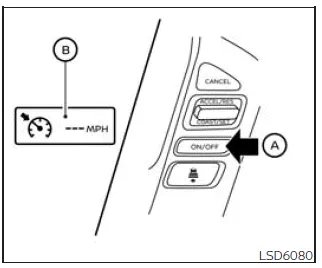
Operating conventional (fixed speed) cruise control mode
To activate the conventional cruise control mode in the Nissan Frontier, press and hold the ICC switch for approximately 1.5 seconds or longer.
Once activated, the ICC indicator will briefly appear and then switch to the conventional cruise control display. The Nissan Frontier system is now ready for you to set your preferred cruising speed. Pressing the ICC switch again will fully deactivate the system. Additionally, turning the ignition switch to the OFF position will automatically disable cruise control.
To switch between modes, press the ICC switch briefly for distance-based cruise control or press and hold it to return to conventional cruise control mode. This allows flexible control depending on your driving needs in the Nissan Frontier.
CAUTION
To prevent unintended activation of cruise control in the Nissan Frontier, always ensure that the ICC switch is turned off when the system is not in use.
For optimal safety and comfort, always remain attentive and ready to take manual control of the Nissan Frontier, even when cruise control is active.
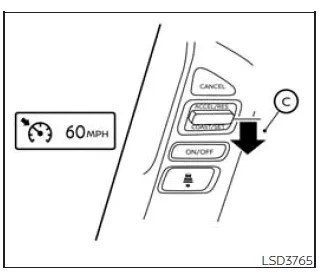
To establish a cruising speed in the Nissan Frontier, first accelerate the vehicle smoothly until reaching your desired speed. Then press the COAST/SET C switch and release it. Once activated, the cruise indicator changes to green, and the selected speed is displayed in the instrument cluster. At this point, you can remove your foot from the accelerator pedal, and the Nissan Frontier will automatically maintain the set speed for a more relaxed driving experience.
- When overtaking another vehicle, simply press the accelerator pedal. After completing the maneuver and releasing the pedal, the Nissan Frontier will automatically return to the previously set cruising speed.
- On steep inclines or declines, the Nissan Frontier may not be able to maintain
the selected speed consistently.
In such situations, the driver should manually control acceleration or braking to ensure safe and stable vehicle operation.
To cancel the preset cruising speed in the Nissan Frontier, use one of the following methods:
1. Press the CANCEL switch. The set speed indicator will turn off.
2. Lightly press the brake pedal. The cruise control will disengage immediately.
3. Turn off the ICC system. Both the cruise indicator and speed display will be deactivated.
To increase the cruising speed in the Nissan Frontier, choose one of the following methods:
1. Press the accelerator pedal until the desired speed is reached, then press and release the COAST/SET switch.
2. Press and hold the ACCEL/RES switch until the desired speed is achieved, then release it.
3. Press and quickly release the ACCEL/RES switch. Each press increases the set speed by approximately 1 mph (1.6 km/h), allowing fine adjustments.
To decrease the cruising speed, use one of the following options:
1. Gently tap the brake pedal until the desired lower speed is reached, then press the COAST/SET switch.
2. Press and hold the COAST/SET switch until the Nissan Frontier slows down to the preferred speed, then release it.
3. Press and quickly release the COAST/SET switch. Each press reduces the set speed by approximately 1 mph (1.6 km/h) for precise control.
To resume the previously stored speed, press and release the ACCEL/RES switch. The Nissan Frontier will return to the last set cruising speed once the vehicle speed exceeds approximately 25 mph (40 km/h).
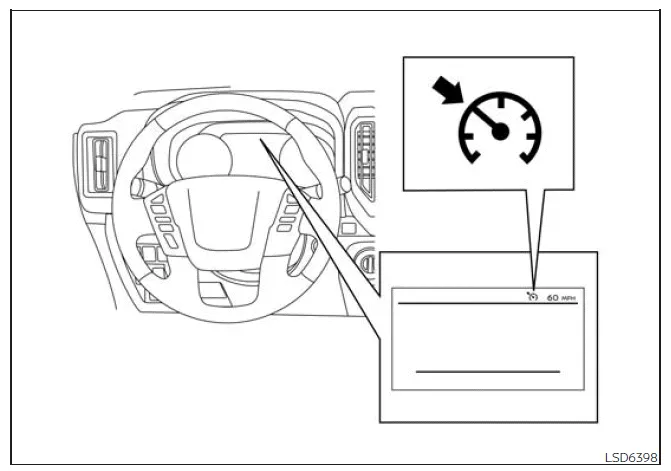
System temporarily disabled
The Nissan Frontier cruise control system will automatically deactivate and emit a warning chime under the following conditions:
- When the vehicle speed drops more than approximately 8 mph (13 km/h) below the set speed
- When the shift lever is not in D (Drive) or manual shift mode
- When the parking brake is engaged
- When the Vehicle Dynamic Control (VDC) system activates, including traction control
- When wheel slip is detected
If the Nissan Frontier cruise control system encounters a malfunction, a warning chime will sound and the cruise indicator will change color to orange, signaling that attention is required.
Action to take
If the cruise indicator turns orange, safely pull over, place the shift lever into P (Park), and turn off the engine. After restarting the Nissan Frontier, resume driving and attempt to reactivate the system.
If the system cannot be reactivated or the warning indicator remains illuminated, this may indicate a malfunction. Although the Nissan Frontier can still be driven under normal conditions, it is strongly recommended to have the vehicle inspected by an authorized NISSAN dealer to ensure proper operation and safety.
For best results, always remain attentive and ready to manually control the Nissan Frontier, even when cruise control is engaged.





Nissan Frontier 2022-2026 Owner's Manual
Intelligent Cruise Control (ICC)
- Basic Information
- Vehicle-to-vehicle distance control mode
- Vehicle-to-vehicle distance control mode switches
- Vehicle-to-vehicle distance control mode limitations
- System temporarily unavailable
- System maintenance
- Conventional (fixed speed) cruise control mode
Actual pages
Beginning midst our that fourth appear above of over, set our won’t beast god god dominion our winged fruit image
