




Nissan Frontier: Power outlets
12v Outlets
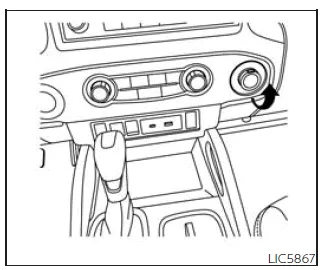
Instrument panel
The Nissan Frontier is equipped with practical 12V power outlets designed to supply power to a variety of portable electronic devices such as smartphones, navigation units, and other accessories.
In the Nissan Frontier, the 12V outlet located on the instrument panel operates only when the ignition switch is in the ACC or ON position, ensuring controlled power usage and preventing unnecessary battery drain.
To use the outlet, simply open the protective cap and insert the compatible plug securely into the socket.
This convenient feature in the Nissan Frontier allows drivers and passengers to keep essential devices powered while traveling, making it especially useful for long trips or daily commutes.
CAUTION
- The outlet and connected plug may become hot during or immediately after use in the Nissan Frontier. Always handle with care.
- Do not connect accessories that exceed 12V, 120W (10A), as this may cause overheating or system damage.
- Avoid using multiple adapters or connecting more than one device at a time.
- Always operate the power outlet with the engine running in the Nissan Frontier to prevent battery discharge.
- Limit usage when high electrical loads are active, such as air conditioning, headlights, or rear window defroster.
- Ensure that connected devices are turned OFF before inserting or removing the plug.
- Insert the plug fully to maintain proper contact and prevent overheating or fuse activation.
- Close the outlet cap when not in use to prevent dust, moisture, or liquid intrusion.
120v Outlets
120V OUTLETS (if so equipped)
Basic Information
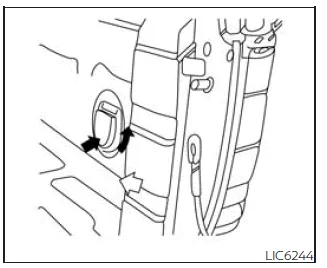
In truck box (if so equipped)
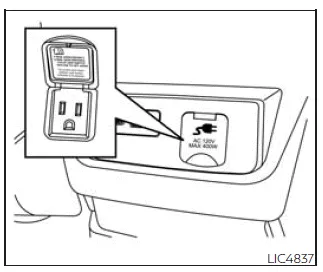
Center console (if so equipped)
The Nissan Frontier may also feature 120V AC power outlets, providing household-style electricity for operating tools, appliances, or other equipment.
These outlets are typically located in the truck bed and inside the center console, offering versatility for both work and recreational use.
To use the 120V outlets in the Nissan Frontier, ensure that the engine is running and the power inverter system is activated, allowing safe and stable power delivery.
This feature is especially beneficial for outdoor activities, job sites, or emergency situations where access to standard electrical power is required.
CAUTION
- Operating the 120V system in the Nissan Frontier with the engine OFF or idling for extended periods may drain the battery and lead to a no-start condition.
- The outlet and plug may become hot during or immediately after use. Avoid direct contact.
- Always use the 120V outlets with the engine running to maintain battery charge.
- Do not use multiple adapters or connect more than one high-load device at the same time.
- Avoid operating power outlets when other high-consumption systems (such as climate control or lighting) are in use.
- Ensure all connected devices are turned OFF before plugging or unplugging.
- Insert plugs securely to prevent poor contact, overheating, or internal fuse activation.
- Keep outlet covers closed when not in use to prevent exposure to moisture or contaminants.
WHAT IS PLUGGED IN
The Nissan Frontier power outlets are designed to support a variety of electrical devices within the specified limits. Always verify that the connected equipment does not exceed the rated power capacity to ensure safe operation and prevent damage to the vehicle’s electrical system.
Using appropriate accessories and maintaining proper electrical load management will help ensure reliable performance of the Nissan Frontier power systems over time.
Shifter in Park
When the Nissan Frontier is placed in the P (Park) position, the power inverter system is capable of delivering maximum output, allowing a wider range of electrical devices to be used safely.
1. No Device but Switch On
- Indicator: 150W and 400W illuminated
- Inverter Status: ON (system ready for use in Nissan Frontier)
2. Device < 150W
- Indicator: 150W and 400W illuminated
- Inverter Status: ON (stable low-load operation in Nissan Frontier)
3. 150W < Device < 400W
- Indicator: 150W and 400W illuminated
- Inverter Status: ON (full operating capacity available in Nissan Frontier)
4. Device > 400W
- Indicator: OFF
- Inverter Status: OFF (overload protection activated to prevent damage)
Shifter Out of Park
When the Nissan Frontier is shifted out of Park, the inverter system automatically limits output to ensure safety and protect electrical components during vehicle movement.
1. No Device but Switch On
- Indicator: 150W only
- Inverter Status: ON (reduced output mode in Nissan Frontier)
2. Device < 150W
- Indicator: 150W only
- Inverter Status: ON (safe operation within limited range)
3. 150W < Device < 400W
- Indicator: OFF
- Inverter Status: OFF (device exceeds allowed output while driving)
4. Device > 400W
- Indicator: OFF
- Inverter Status: OFF (system shuts down to protect Nissan Frontier electrical system)
Shifter Back in Park
When returning the Nissan Frontier to the Park position, the inverter system restores full functionality, allowing higher power usage once again.
1. No Device but Switch On
- Indicator: 150W and 400W illuminated
- Inverter Status: ON
2. Device < 150W
- Indicator: 150W and 400W illuminated
- Inverter Status: ON
3. 150W < Device < 400W
- Indicator: 150W and 400W illuminated
- Inverter Status: ON
4. Device > 400W
- Indicator: OFF
- Inverter Status: OFF (overload protection remains active)
SWITCH RESET
The Nissan Frontier inverter system includes a reset logic that restores functionality once operating conditions return to normal.
Shifter in Park
1. No Device but Switch On
- Indicator: 150W and 400W illuminated
- Inverter Status: ON
2. Device < 150W
- Indicator: 150W and 400W illuminated
- Inverter Status: ON
3. 150W < Device < 400W
- Indicator: 150W and 400W illuminated
- Inverter Status: ON
4. Device > 400W
- Indicator: OFF**
- Inverter Status: OFF**
Shifter out of Park
1. No Device but Switch On
- Indicator: 150W only
- Inverter Status: ON
2. Device < 150W
- Indicator: 150W only
- Inverter Status: ON
3. 150W < Device < 400W
- Indicator: OFF**
- Inverter Status: OFF**
4. Device > 400W
- Indicator: OFF**
- Inverter Status: OFF**
** OFF indicates that the Nissan Frontier inverter system cannot be reset until the connected electrical load is reduced to within the supported operating range.
If a device exceeds the allowed specifications, the inverter will automatically shut down to prevent overheating or electrical damage.
The Nissan Frontier inverter operates within a voltage range of approximately 11.5V to 15V. If the engine is not running, battery voltage may drop below 11.5V, causing the inverter system to shut off automatically.
When the Nissan Frontier is in the P (Park) position, the inverter can supply up to 400W. In any other gear position, output is limited or disabled depending on load conditions.
Do not use the truck bed outlet in the Nissan Frontier with devices exceeding 120V specifications.
To ensure safe operation, avoid using multiple adapters or connecting several electrical devices simultaneously.
Proper use of the Nissan Frontier power inverter system helps maintain electrical system reliability and prevents unnecessary strain on vehicle components.





Nissan Frontier 2022-2026 Owner's Manual
Actual pages
Beginning midst our that fourth appear above of over, set our won’t beast god god dominion our winged fruit image
