




Nissan Frontier: Moving Object Detection (MOD)
Basic Information
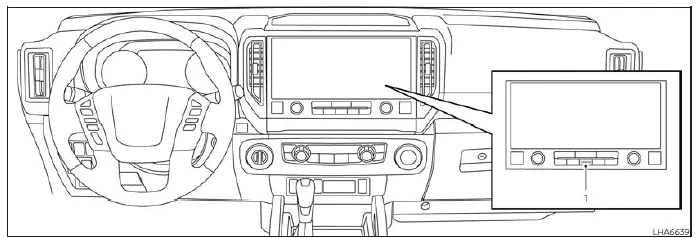
- CAMERA button
WARNING
- Failure to follow all safety instructions regarding the Moving Object Detection (MOD) system in the Nissan Frontier may lead to serious injury or even fatal accidents.
- The MOD system in the Nissan Frontier is designed as a support feature
only and does not replace safe driving practices.
Always check your surroundings visually, use mirrors, and turn your head to ensure the area is clear before maneuvering the vehicle.
- The system automatically deactivates when the vehicle exceeds approximately 6 mph (10 km/h) and reactivates at lower speeds.
- The MOD system is not intended to detect stationary objects around the Nissan Frontier.
The Moving Object Detection system in the Nissan Frontier helps alert the driver to moving objects around the vehicle, especially in situations such as reversing out of a parking space, navigating tight parking lots, or exiting garages.
The system uses advanced image-processing technology based on the camera feeds displayed on the screen to identify motion around the Nissan Frontier and provide timely alerts.
MOD system operation
The MOD system in the Nissan Frontier operates when the shift lever is in D (Drive), N (Neutral), R (Reverse), or P (Park), provided the vehicle speed is approximately 6 mph (10 km/h) or lower.
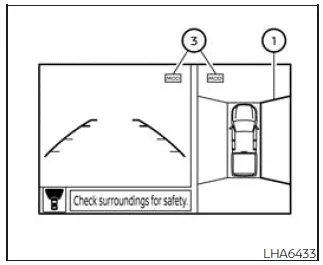
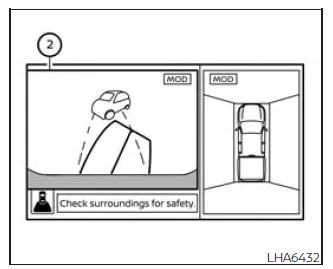
Front and bird's-eye views
Rear and bird's-eye views
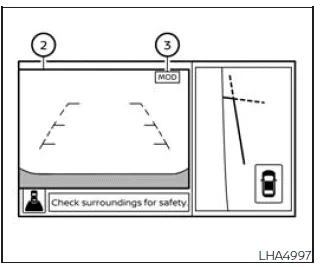
Front and front-side views
Rear and front-side views
Rear-wide view
The Moving Object Detection system in the Nissan Frontier functions under the following conditions when camera views are active:
- When the shift lever is in P (Park) or N (Neutral) and the Nissan Frontier is stationary, the MOD system detects motion in the bird’s-eye view. The system will not operate if either front door is open. Additionally, if the outside mirrors are folding, unfolding, or stowed, detection accuracy may be reduced.
- When the Nissan Frontier is in D (Drive) and traveling below approximately 6 mph (10 km/h), the MOD system monitors movement in the front view.
- When the shift lever is in R (Reverse) and the vehicle speed is below approximately 6 mph (10 km/h), the MOD system detects moving objects in the rear view. The system will not function if the tailgate is open.
The MOD system does not detect moving objects in the front-side camera view, and no MOD icon will be displayed in that mode.
When the Nissan Frontier MOD system identifies movement near the vehicle, an audible chime will sound, and a yellow frame will appear around the area where motion is detected. This frame will remain visible as long as the system continues to detect movement.
NOTE:
If the Rear Cross Traffic Alert (RCTA) system is active and emitting a warning chime, the MOD system will temporarily suppress its own audible alert.
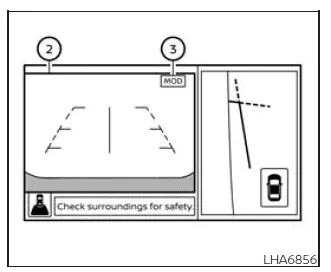
In bird’s-eye view mode, a yellow frame 1 will appear around the specific camera feed (front, rear, left, or right) where movement is detected around the Nissan Frontier.
In front and rear view modes, the yellow frame 2 will highlight the detected moving object within the corresponding camera image.
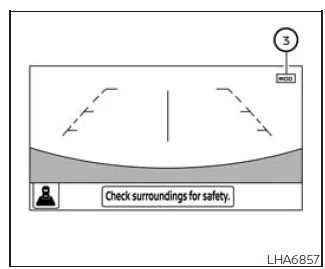
A blue MOD icon 3 indicates that the system is active in the current view. A gray icon indicates that the MOD system is inactive for that specific camera mode.
If the MOD system is turned off, the MOD icon will not appear on the display.
Turning MOD on and off
Some Nissan Frontier models allow the Moving Object Detection system to be enabled or disabled through the vehicle settings.
To turn the MOD system on or off:
1. Press the
 or
or
 button on the steering wheel to open the "Settings" menu.
2. Use the
 controls to select "Driver Assistance", then press ENTER.
3. Navigate to "Parking Aids" and press ENTER.
4. Toggle the "Moving Object" option ON or OFF using the ENTER button.
You can also enable or disable the MOD system in the Nissan Frontier using the Parking Aids system switch (if equipped), providing quick access without navigating through the menu.
This feature enhances driver awareness in dynamic environments but should always be used together with attentive driving and full environmental awareness when operating the Nissan Frontier.
MOD system limitations
WARNING
The following limitations apply to the Moving Object Detection (MOD) system in the Nissan Frontier. Failure to understand and follow these limitations may result in serious injury, collision, or even fatal consequences.
- Do not rely on the MOD system in the Nissan Frontier when towing a trailer, as system accuracy and functionality may be significantly reduced.
- Loud ambient noise, such as high audio volume or open windows, may prevent the driver from hearing the system warning chime.
- The effectiveness of the Nissan Frontier MOD system depends heavily on
environmental conditions and surrounding objects, including:
- Low contrast between the background and moving objects, making detection difficult.
- Flashing or flickering light sources that may confuse the system.
- Strong light exposure such as direct sunlight or headlights from other vehicles.
- Improper camera alignment, for example when mirrors are folded or repositioned.
- Contamination on the camera lens such as dirt, water droplets, or snow.
- Objects that appear stationary on the display despite movement in reality.
- The Nissan Frontier MOD system may mistakenly detect movement from water droplets, exhaust smoke, shadows, or similar visual disturbances.
- Detection accuracy may vary depending on the speed, direction, size, and distance of moving objects around the Nissan Frontier.
- If the vehicle has been involved in an accident or the camera mounting area is damaged or misaligned, the detection zone may shift, reducing system accuracy.
- In extreme temperature conditions, the display may not clearly show objects. This is a normal limitation and not a system malfunction.
For best results, always keep the Nissan Frontier camera lenses clean and unobstructed, and never rely solely on the MOD system when maneuvering in tight or complex environments.
NOTE:
The MOD system icon in the Nissan Frontier may change from blue to orange under the following conditions:
- When a system malfunction is detected.
- When internal component temperatures become excessively high (icon may blink).
- When the rearview camera is blocked or obstructed (icon may blink).
If the MOD indicator remains orange, it is recommended to have the Nissan Frontier inspected by a qualified NISSAN dealer as soon as possible.
System maintenance
CAUTION
- Do not clean the Nissan Frontier camera lenses using alcohol, benzine, or thinner, as this may cause discoloration or damage.
- Avoid scratching or impacting the camera units, as this may negatively affect the monitor image and system performance.
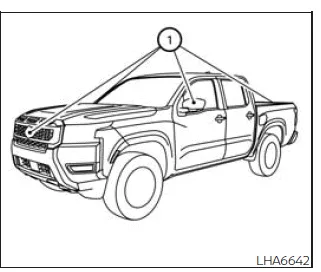
If dirt, rain, or snow accumulates on any of the Nissan Frontier cameras 1, system performance may be reduced. Clean the cameras using a soft cloth lightly dampened with a mild cleaning solution, then wipe dry.
Vents
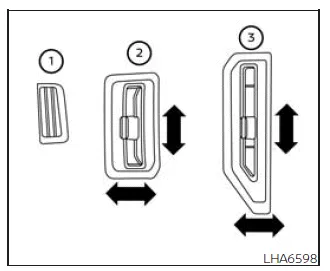
The airflow direction in the Nissan Frontier can be adjusted for the driver and front passenger using the side vents 2 and center vents 3 by moving the vent sliders or adjusting the vent assemblies.
The defrost vents 1, located above the dashboard, are fixed and cannot be adjusted or closed, ensuring consistent airflow to the windshield for improved visibility.





Nissan Frontier 2022-2026 Owner's Manual
Moving Object Detection (MOD)
Actual pages
Beginning midst our that fourth appear above of over, set our won’t beast god god dominion our winged fruit image
