




Nissan Frontier: Interior lights
Basic Information
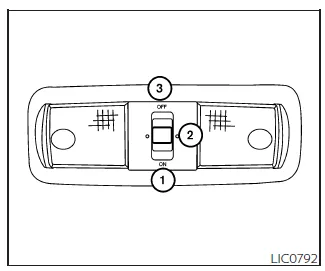
The Nissan Frontier interior lighting system is designed to provide optimal visibility and convenience for occupants, regardless of the ignition switch position.
The main interior dome light features a three-position switch that allows flexible operation depending on driver preference and vehicle status.
When the switch is set to the ON position 1, the interior lights in the Nissan Frontier remain illuminated continuously, regardless of whether the doors are open or closed. To prevent battery drain, the lights will automatically turn off after a certain period unless the ignition is switched back to ON.
When the switch is set to the DOOR (normal operation) position 2, the interior lights will activate automatically based on vehicle activity. In the Nissan Frontier, this includes the following situations:
- When the doors are unlocked using the key fob, mechanical key, or power door lock switch while all doors are closed and the ignition is OFF.
- When the driver's door is opened and then closed while the ignition is OFF.
- When the ignition switch is turned to the OFF position with all doors closed.
The interior lighting system in the Nissan Frontier will automatically switch off during the timer period under the following conditions:
- If the driver's door is locked using the key fob, key, or power door lock switch.
- If the ignition switch is turned to the ON position.
When the switch is moved to the OFF position 3, the interior lights remain off regardless of door status. However, the cargo light in the Nissan Frontier may still illuminate when any front or rear door is opened.
To protect the vehicle battery, the Nissan Frontier lighting system automatically turns off interior lights after a certain time if the doors remain open.
CAUTION
Avoid leaving the interior lights on for extended periods while the engine is not running, as this may lead to battery discharge in your Nissan Frontier.
Map lights
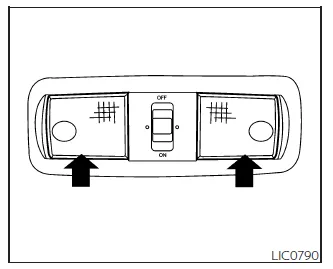
The Nissan Frontier map lights provide focused illumination for the driver and front passenger, ideal for reading maps or locating items in low-light conditions.
To switch the map lights on, gently press the light lens. Press it again to turn the light off.
CAUTION
Do not operate the map lights in the Nissan Frontier for extended periods with the engine off, as this may drain the battery.
Cargo light
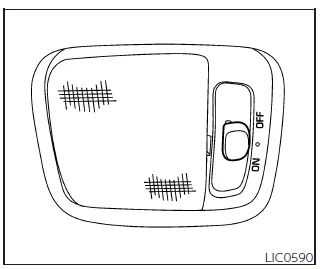
The cargo light in the Nissan Frontier is located in the overhead trim and is equipped with a three-position switch for flexible operation.
Switch positions include:
ON: The cargo light remains continuously illuminated.
DOOR: The cargo light automatically turns on when the rear doors are opened and turns off when they are closed.
OFF: The cargo light stays off regardless of door status or locking conditions.
This system ensures that loading and unloading cargo in the Nissan Frontier is convenient and well-lit, especially in low-light environments.
CAUTION
Do not leave the cargo light on for extended periods with the engine turned off, as it may cause battery discharge in the Nissan Frontier.





Nissan Frontier 2022-2026 Owner's Manual
Actual pages
Beginning midst our that fourth appear above of over, set our won’t beast god god dominion our winged fruit image
