




Nissan Frontier: HomeLink Universal Transceiver
Basic Information
The HomeLink Universal Transceiver in the Nissan Frontier offers a practical and integrated solution for controlling multiple remote-operated devices directly from your vehicle.
This system allows the driver to replace up to three separate handheld transmitters with one built-in unit, improving convenience and reducing clutter inside the Nissan Frontier cabin.
HomeLink Universal Transceiver:
- Is compatible with most Radio Frequency (RF) devices, including garage door openers, entry gates, home lighting systems, security alarms, and electronic door locks.
- Operates using the Nissan Frontier vehicle battery, eliminating the need for separate batteries. Even if the battery is disconnected or discharged, all programmed settings are retained.
Once the HomeLink system in your Nissan Frontier has been programmed, it is recommended to keep the original handheld transmitter for future use, such as when programming additional vehicles or reconfiguring the system.
For security reasons, always erase all programmed HomeLink buttons before selling or transferring ownership of your Nissan Frontier.
WARNING
- Do not use the HomeLink Universal Transceiver with garage door systems that lack automatic stop and reverse safety features. These safety requirements have been mandatory for systems manufactured after April 1, 1982. Using non-compliant systems increases the risk of serious injury or fatal accidents.
- During programming, garage doors or gates may automatically move. Always ensure that the surrounding area is clear of people, pets, and objects.
- Turn off the engine of your Nissan Frontier during the programming process. Avoid inhaling exhaust gases, as carbon monoxide is odorless, invisible, and extremely dangerous. It can cause unconsciousness or death.
Programming HomeLink
The following steps provide general instructions for programming a HomeLink button in your Nissan Frontier.
If you encounter difficulties, refer to the official HomeLink website or contact support for assistance.
NOTE:
For optimal performance, install a new battery in the handheld transmitter before programming. This ensures a stronger and more reliable signal during setup.
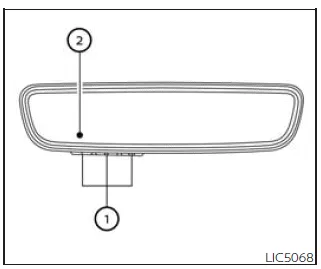
- HomeLink buttons (1-3)
- Indicator light (located above each HomeLink button)
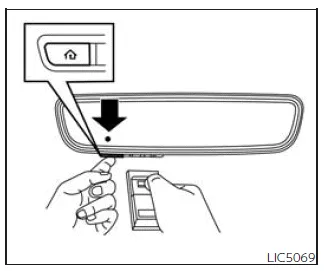
1. Position your handheld transmitter approximately 1–3 inches (2–8 cm) away from the HomeLink buttons in your Nissan Frontier. Ensure that the indicator light is clearly visible.
2. Press and hold both the desired HomeLink button and the handheld transmitter button simultaneously. Continue holding until the HomeLink indicator light changes from a slow blink to a rapid flashing pattern. Once this occurs, release both buttons.
NOTE:
Some transmitters may perform better at a slightly greater distance (6–12 inches / 15–20 cm). If programming is unsuccessful, adjust the distance and try again.
3. Press and hold the programmed HomeLink button for about five seconds, then release it. Repeat this step up to two times to activate the programmed device.
- If the indicator light remains steadily illuminated, the programming process for your Nissan Frontier is complete and the device should function normally.
- If the indicator light flashes rapidly for a few seconds and then becomes steady, additional steps (typically steps 4–6) are required to complete programming for rolling code systems, commonly used in modern garage door openers.
The HomeLink system in the Nissan Frontier provides a seamless and integrated way to control your home automation devices, enhancing both convenience and daily usability.
NOTE:
Some devices used with the Nissan Frontier HomeLink system may require an alternative programming procedure instead of the standard Step 2. In such cases, refer to the section "Programming HomeLink for Canadian customers and gate openers." If the HomeLink indicator light does not transition to a rapid flashing pattern after completing the initial steps, visit www.homelink.com or contact support for further assistance.
4. Locate the "Learn" or "Set" button on the garage door opener motor or gate control unit. In most cases, this button is positioned near the antenna wire attached to the motor housing (consult the device manual if necessary).
The exact name, color, and placement of this button may vary depending on the manufacturer.
NOTE:
Using a ladder or assistance from another person can make the programming process easier and safer. Never stand on your Nissan Frontier to perform programming tasks.
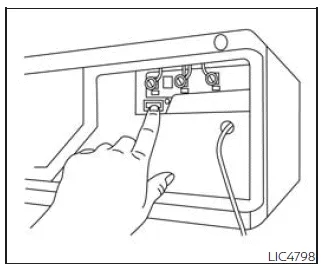
Example
5. Firmly press and release the "Learn" or "Set" button on the device. Once activated, the indicator light will illuminate, signaling that the system is ready to pair.
After pressing the button, you will typically have about 30 seconds to complete the next step.
6. Return to your Nissan Frontier and press and hold the programmed HomeLink button for approximately two seconds, then release it. Repeat this action up to three times, ensuring deliberate presses rather than rapid tapping.
Once completed, the programming process for your Nissan Frontier HomeLink system should be successful, and the device should respond when the button is pressed.
7. If you encounter any issues or need further clarification, visit the HomeLink website at www.homelink.com/nissan or call 1-800-355-3515 for support.
Programming HomeLink for Canadian customers and gate openers
Due to Canadian radio-frequency regulations, transmitter signals automatically stop after a short duration. This limitation can prevent the Nissan Frontier HomeLink system from capturing the signal during programming. Similar behavior may also be observed with certain U.S. gate systems.
If you are located in Canada or experiencing difficulty programming a gate opener or garage door, modify Step 2 of the programming process as follows:
NOTE:
When programming a garage door opener or similar device, unplug the unit during the cycling process to prevent potential damage to its internal components.
Step 2: Press and hold the desired HomeLink button in your Nissan Frontier. At the same time, press and release your handheld transmitter button every two seconds (cycling) until the HomeLink indicator light changes from a slow blink to a rapid flash. Once this occurs, release both buttons.
Proceed with Step 3 of the standard programming procedure to complete the setup.
After programming is finished, remember to reconnect the device to power.
Operating the HomeLink Universal Transceiver
Once programmed, the HomeLink Universal Transceiver in the Nissan Frontier can be used to operate compatible devices effortlessly.
To activate a programmed function, press the corresponding HomeLink button. While transmitting, the indicator light on the mirror will illuminate in green with three parenthesis symbols, confirming signal transmission.

Programming trouble-shooting
If the Nissan Frontier HomeLink system does not successfully learn the transmitter signal, try the following recommendations:
- Install fresh batteries in the handheld transmitter to ensure strong signal output.
- Hold the transmitter so that the battery side faces away from the HomeLink buttons.
- Press and hold both the HomeLink button and the transmitter button continuously during each step without interruption.
- Position the transmitter approximately 1 to 3 inches (2–8 cm) from the HomeLink button. Maintain this position for up to 15 seconds. If programming fails, try increasing the distance to 6–12 inches (15–20 cm) while keeping the indicator light visible.
Following these steps carefully will help ensure reliable programming and consistent operation of the HomeLink system in your Nissan Frontier.
For optimal performance of the HomeLink system in the Nissan Frontier, it is strongly recommended to avoid placing metallic objects near the garage door opener antenna, as they may interfere with signal transmission and reduce system efficiency.
If you have any questions or experience difficulties while programming the HomeLink buttons in your Nissan Frontier, refer to the official HomeLink website at www.homelink.com/nissan or contact customer support at 1-800-355-3515 for assistance.
Clearing the programmed information
Basic Information
The following procedure allows you to erase all stored programming from the HomeLink system in your Nissan Frontier.
Please note that individual HomeLink buttons cannot be cleared separately; however, they can be individually reprogrammed without affecting the others.
To clear all programming
1. Press and hold the two outer HomeLink buttons simultaneously until the indicator light begins flashing green (this typically takes about 10 seconds).
Do not continue holding the buttons for more than 20 seconds.
2. Release both buttons.
The HomeLink system in your Nissan Frontier is now reset and ready for new programming. You may begin programming again starting from "Programming HomeLink" Step 1 at any time.
Reprogramming a single HomeLink button
To reprogram an individual HomeLink button in your Nissan Frontier, follow these steps:
1. Press and hold the desired HomeLink button. Do NOT release the button.
2. After approximately 20 seconds, the indicator light will begin flashing. Without releasing the button, proceed directly to "Programming HomeLink" Step 1.
Once completed, the selected HomeLink button will be updated with the new device information.
This process will not affect any other programmed HomeLink buttons in your Nissan Frontier.
If no new programming is completed, the button will retain its previously stored settings.
For additional support or inquiries, contact HomeLink at www.homelink.com/nissan or call 1-800-355-3515.
If your vehicle is stolen
If your Nissan Frontier is stolen, it is highly recommended to change the access codes of any non-rolling code devices that were previously programmed into the HomeLink system.
Refer to the owner's manuals of the affected devices or contact their manufacturers or authorized dealers for guidance on updating security codes.
After recovering your Nissan Frontier, you must reprogram the HomeLink Universal Transceiver using your updated transmitter information to restore functionality and security.
FCC Notice:
For USA:
This device complies with Part 15 of the FCC Rules. Operation is subject to the following conditions: (1) this device must not cause harmful interference, and (2) it must accept any interference received, including interference that may result in undesired operation.
NOTE:
Any changes or modifications not expressly approved by the party responsible for compliance may void the user’s authority to operate this equipment.
For Canada:
This device includes licence-exempt transmitter(s) and/or receiver(s) compliant with Innovation, Science and Economic Development Canada’s RSS standards. Operation is subject to the following conditions: (1) this device may not cause interference, and (2) it must accept any interference, including interference that may lead to undesired operation.
Following these recommendations will help ensure secure, reliable, and long-term operation of the HomeLink system in your Nissan Frontier.





Nissan Frontier 2022-2026 Owner's Manual
Actual pages
Beginning midst our that fourth appear above of over, set our won’t beast god god dominion our winged fruit image
