




Nissan Frontier: Intelligent Forward Collision Warning (I-FCW)
- Basic Information
- I-FCW system operation
- Turning the I-FCW system on/off
- I-FCW system limitations
- System temporarily unavailable
Basic Information
WARNING
Failure to properly follow the instructions and safety precautions for using the I-FCW system in the Nissan Frontier may result in serious injury or even death.
- The I-FCW system is designed to assist the driver by providing early warnings of potential collisions, but it cannot prevent accidents. The driver of the Nissan Frontier must always remain attentive, maintain full control of the vehicle, and drive responsibly at all times.
The Nissan Frontier Intelligent Forward Collision Warning (I-FCW) system is designed to alert the driver when a second vehicle ahead in the same lane suddenly slows down. This additional layer of awareness can help the driver react earlier to changing traffic conditions.
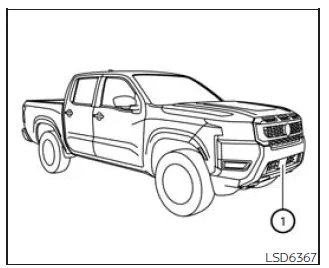
The system uses a front-mounted radar sensor (1) to continuously monitor the distance and relative speed of vehicles ahead in the same lane. By analyzing traffic flow, the Nissan Frontier I-FCW system can detect sudden deceleration beyond the immediately preceding vehicle and provide timely warnings to the driver.
Additional note: The I-FCW system in the Nissan Frontier is most effective in moderate to high-speed traffic where multiple vehicles are traveling in sequence. However, it should always be used as a supplemental safety feature and not as a substitute for attentive driving.
I-FCW system operation
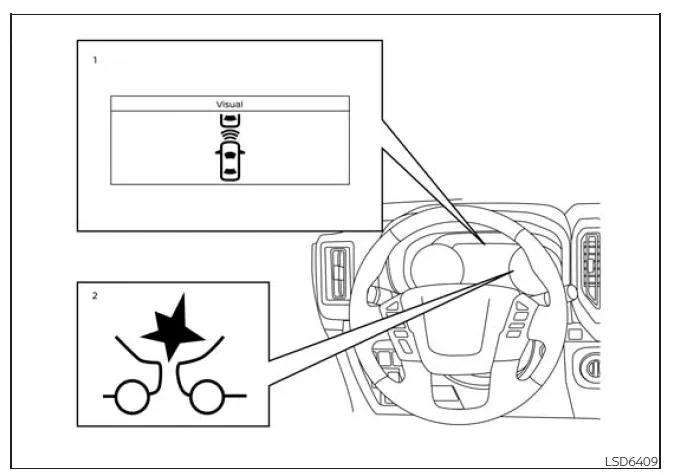
- Vehicle ahead detection indicator
- AEB with Pedestrian Detection system warning light
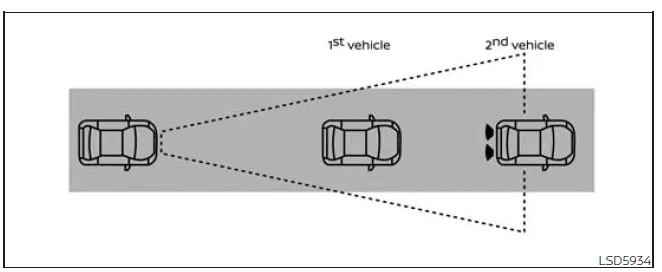
The Intelligent Forward Collision Warning (I-FCW) system in the Nissan Frontier is designed to operate at speeds above approximately 3 mph (5 km/h). It continuously monitors traffic conditions ahead to enhance driver awareness and reaction time.
When the Nissan Frontier detects a potential forward collision risk—especially involving sudden deceleration of vehicles ahead—the system alerts the driver by flashing the vehicle-ahead detection indicator and emitting an audible warning tone. This early warning allows the driver to respond more quickly and safely.
Additional note: The Nissan Frontier I-FCW system is particularly effective in multi-vehicle traffic situations, where it can detect braking beyond the immediately preceding vehicle, offering an extra layer of anticipation for the driver.
Turning the I-FCW system on/off
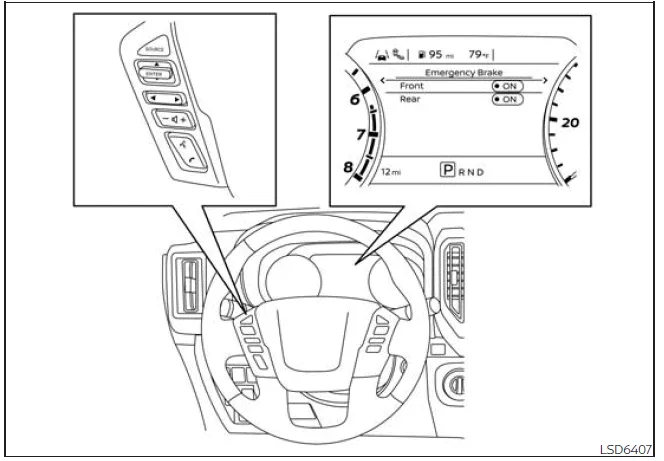
Follow the steps below to enable or disable the I-FCW system in the Nissan Frontier:
1. Press the
 button until "Settings" appears in the vehicle information display.
Use the
 button to select "Driver Assistance," then press the ENTER button.
2. Select "Emergency Brake" and confirm with ENTER.
3. Select "Front" and press ENTER again to turn the system ON or OFF.
When the I-FCW system is deactivated, the AEB with Pedestrian Detection warning light in the Nissan Frontier will illuminate as an indication.
NOTE:
- The I-FCW system in the Nissan Frontier automatically reactivates each time the engine is restarted.
- The I-FCW system is integrated with the AEB with Pedestrian Detection system. There is no separate menu option for I-FCW. If the AEB system is turned off, the I-FCW system will also be disabled.
I-FCW system limitations
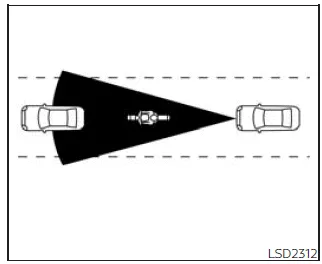
Illustration A
WARNING
The following limitations apply to the Nissan Frontier I-FCW system. Failure to consider these limitations during operation may lead to serious injury or even fatal accidents.
- The Nissan Frontier I-FCW system cannot detect every vehicle or object under all driving conditions.
- The radar sensor does not recognize certain objects, including:
- Pedestrians, animals, or stationary obstacles on the roadway
- Oncoming vehicles traveling in the opposite direction
- Vehicles crossing the path of the Nissan Frontier
- (Illustration A) The system may not operate correctly when the vehicle ahead is narrow, such as a motorcycle or similar vehicle.
- The radar sensor may fail to detect vehicles ahead under certain conditions,
including:
- Heavy rain, snow, or poor weather conditions
- When towing a trailer or heavy load
- When the radar sensor is obstructed by dirt, ice, or snow
- Interference from other radar-emitting devices
- Road spray from surrounding traffic
- Driving inside tunnels or enclosed spaces
- (Illustration B) When the vehicle ahead is being towed
- (Illustration C) When the following distance is too short and the radar beam is partially blocked
- (Illustration D) When driving on steep downhill slopes or sharp curves
- The Nissan Frontier system performs automatic sensor checks within defined limits. However, certain obstructions such as stickers, ice, or accumulated debris may not be detected by the system, which can reduce its ability to warn the driver effectively. Regular inspection and cleaning of the sensor area are essential.
- High ambient noise levels inside or outside the Nissan Frontier may interfere with the audible warning signals, making them difficult to hear.
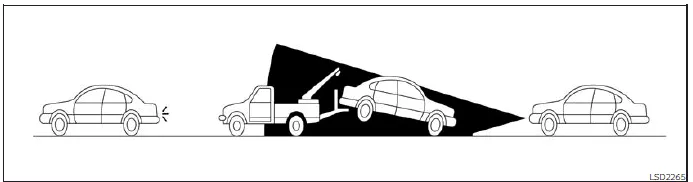
Illustration B
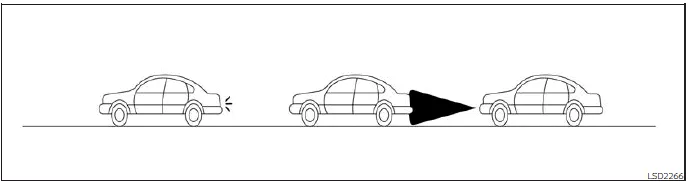
Illustration C
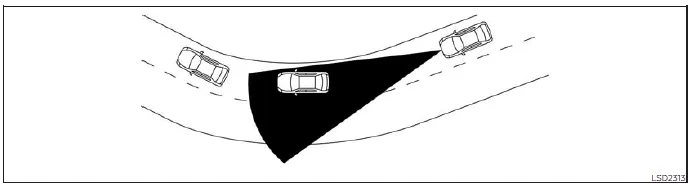
Illustration D
Additional recommendation: The Nissan Frontier I-FCW system should always be considered a supportive safety feature. Drivers must remain attentive, maintain safe following distances, and be prepared to react manually in all traffic situations.
System temporarily unavailable
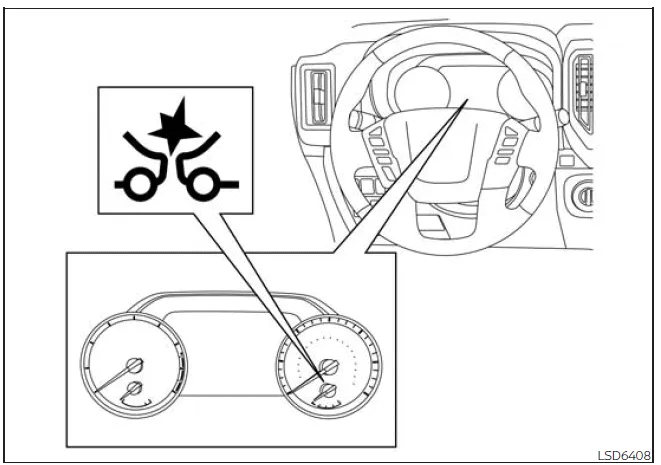
Condition A
In certain situations, the Nissan Frontier Intelligent Forward Collision Warning (I-FCW) system may temporarily deactivate if the front radar sensor detects interference from external radar sources. This interference can prevent the system from accurately identifying vehicles ahead.
When this occurs, the AEB with Pedestrian Detection system warning light (orange) will illuminate, indicating that the Nissan Frontier I-FCW system is not currently available.
Action to take
Once the interfering conditions are no longer present, the Nissan Frontier I-FCW system will automatically resume normal operation without requiring driver input.
Condition B
Adverse weather conditions such as heavy rain, dense fog, or snowfall may obstruct the front radar sensor of the Nissan Frontier. In such cases, the I-FCW system will be automatically disabled, and the warning light will illuminate. Additionally, the message "Forward Driving Aids Temporarily Disabled Front Sensor Blocked See Owner's Manual" will appear in the vehicle information display.
Action to take:
When weather conditions improve and the radar sensor is no longer obstructed, the warning message will disappear, and the Nissan Frontier system will return to normal operation. If the warning persists, it is recommended to have the vehicle inspected by an authorized NISSAN dealer.
Condition C
If the radar sensor located in the front bumper of the Nissan Frontier becomes covered with dirt, snow, ice, or any other obstruction, the I-FCW system will automatically deactivate. The warning light will illuminate and the same sensor blockage message will be displayed.
Action to take:
Safely stop the Nissan Frontier, shift the transmission into P (Park), and turn off the engine. Clean the radar sensor area thoroughly, then restart the engine. If the warning message remains, the system should be inspected by a qualified technician.
Condition D
When driving in environments with minimal surrounding structures—such as long bridges, open desert roads, snow-covered areas, or roads bordered by continuous walls—the Nissan Frontier I-FCW system may temporarily display a sensor blockage warning even if no physical obstruction exists.
Action to take:
Once normal road conditions return, the system can be reactivated automatically or manually if necessary. This behavior is typical and does not indicate a malfunction.
NOTE:
If the AEB with Pedestrian Detection system in the Nissan Frontier becomes inactive, the I-FCW system will also be disabled, as both systems are integrated and share common sensors.
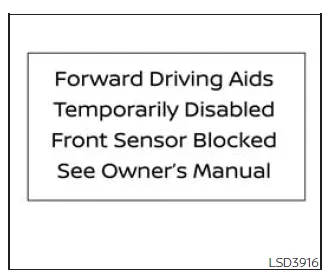
System malfunction
If a malfunction occurs within the Nissan Frontier I-FCW system, it will automatically shut down, and an audible warning will sound. The AEB with Pedestrian Detection warning light (orange) will illuminate, and the message "System fault See Owner's Manual" will be displayed in the vehicle information screen.
Action to take
If this warning appears, immediately stop the Nissan Frontier in a safe location, turn off the engine, and restart it. If the warning light remains illuminated after restarting, the system requires professional diagnosis. It is strongly recommended to visit an authorized NISSAN dealer to ensure proper functionality and safety.
Additional recommendation: Regularly cleaning the radar sensor area and avoiding exposure to extreme environmental conditions will help maintain the reliability and performance of the Nissan Frontier I-FCW system.
System maintenance
Basic Information
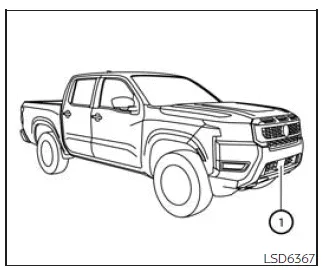
In the Nissan Frontier, the primary radar sensor (1) responsible for forward safety systems is installed at the front section of the vehicle. Proper care of this sensor is essential to ensure consistent and accurate operation of advanced driver assistance features.
To maintain optimal performance of the Nissan Frontier safety systems, always follow these recommendations:
- Keep the sensor area on the front bumper or emblem clean at all times, free from dirt, snow, ice, or debris that may block detection.
- Avoid any physical impact or damage to the area surrounding the sensor, as even minor deformation may affect the system’s accuracy.
- Do not place stickers, films, or any objects (including transparent materials) near the sensor zone, as this may interfere with signal transmission and lead to malfunction.
- Avoid installing metallic accessories such as brush guards or protective bars near the sensor, as they can disrupt radar performance in the Nissan Frontier.
- Do not modify, repaint, or remove the front bumper. If customization or repair is required, it is strongly recommended to consult an authorized NISSAN dealer to ensure system integrity is preserved.
Additional recommendation: Regular inspection and gentle cleaning of the sensor area will help maintain the reliability of the Nissan Frontier driver assistance systems, especially after driving in harsh weather or off-road conditions.
Radio frequency statement
FCC Notice
USA
This device complies with Part 15 of the FCC Rules and Industry Canada licence-exempt RSS standards.
Operation is subject to the following two conditions:
1. This device may not cause harmful interference, and
2. This device must accept any interference received, including interference that may cause undesired operation.
Radio frequency radiation exposure information:
This equipment complies with FCC and IC radiation exposure limits established for an uncontrolled environment.
This equipment must be installed and operated with a minimum distance of 30 cm between the radiator and the body of any person.
This transmitter must not be co-located or used together with any other antenna or transmitter.
FCC Notice
Changes or modifications not expressly approved by the responsible compliance authority may void the user’s authority to operate this equipment.
CANADA
This device complies with Part 15 of the FCC Rules and Industry Canada licence-exempt RSS standards.
Operation is subject to the following two conditions:
1. This device may not cause harmful interference, and
2. This device must accept any interference received, including interference that may cause undesired operation.
Radio frequency radiation exposure information:
This equipment complies with FCC and IC radiation exposure limits established for an uncontrolled environment.
This equipment must be installed and operated with a minimum distance of 30 cm between the radiator and the body of any person.
This transmitter must not be co-located or operated in conjunction with any other antenna or transmitter.
FCC Notice
Unauthorized modifications or changes may void the user’s authority to operate this equipment.





Nissan Frontier 2022-2026 Owner's Manual
Intelligent Forward Collision Warning (I-FCW)
- Basic Information
- I-FCW system operation
- Turning the I-FCW system on/off
- I-FCW system limitations
- System temporarily unavailable
Actual pages
Beginning midst our that fourth appear above of over, set our won’t beast god god dominion our winged fruit image
