




Nissan Frontier: Automatic Emergency Braking (AEB) with Pedestrian Detection
- Basic Information
- AEB with Pedestrian Detection system operation
- Turning the AEB with Pedestrian Detection system ON/OFF
- AEB with Pedestrian Detection system limitations
- System temporarily unavailable
- System maintenance
Basic Information
WARNING
Failure to follow the safety instructions and proper usage guidelines for the Automatic Emergency Braking (AEB) with Pedestrian Detection system in the Nissan Frontier may result in serious injury, severe accidents, or even fatal consequences.
- The AEB with Pedestrian Detection system in the Nissan Frontier is designed
as an advanced driver-assistance feature and should only be considered a supplemental
aid. It does not replace the driver’s responsibility to remain attentive and
maintain full control of the vehicle at all times.
This system cannot compensate for unsafe driving behavior, distraction, or aggressive driving. Always operate your Nissan Frontier with caution and awareness of surrounding traffic conditions.
- The Nissan Frontier AEB with Pedestrian Detection system may not operate effectively in all traffic, weather, or road conditions, including situations with limited visibility or complex driving environments.
The Automatic Emergency Braking (AEB) with Pedestrian Detection system in the Nissan Frontier is engineered to assist the driver in reducing the likelihood or severity of frontal collisions. It detects vehicles ahead in the same lane as well as pedestrians in the vehicle’s path and provides timely warnings and braking assistance.
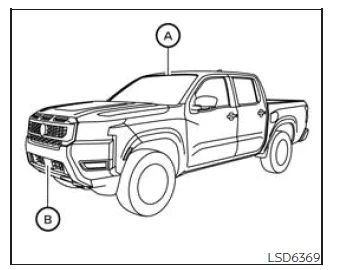
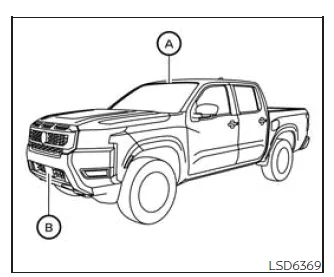
In the Nissan Frontier, the AEB system relies on a forward-facing radar sensor located at the front of the vehicle B to measure the distance to vehicles ahead. For pedestrian detection, the system uses an additional camera mounted behind the windshield A, allowing enhanced recognition of people in the driving path.
AEB with Pedestrian Detection system operation
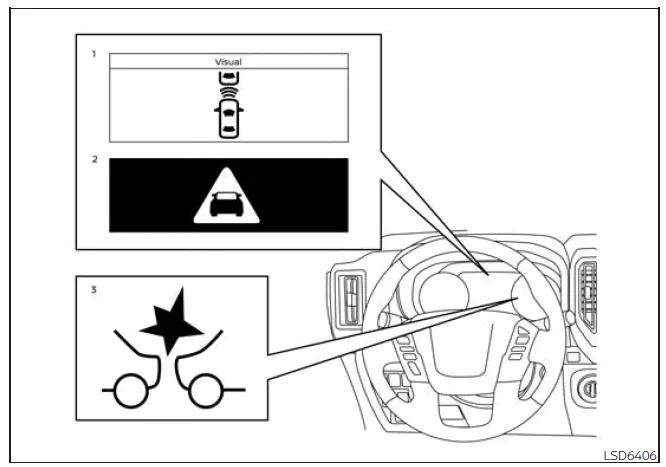
- Vehicle ahead detection indicator
- AEB with Pedestrian Detection emergency warning indicator
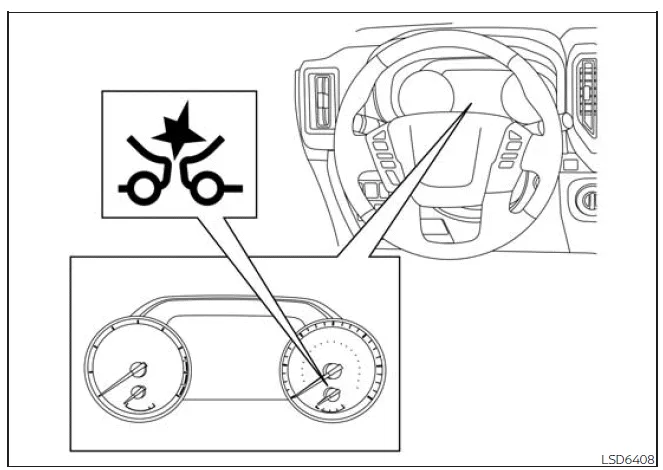
- AEB with Pedestrian Detection system warning light
The Nissan Frontier AEB system activates at speeds above approximately 3 mph (5 km/h). The pedestrian detection function operates within a range of approximately 6 to 37 mph (10 to 60 km/h), providing additional safety in urban and residential driving conditions.
When the Nissan Frontier detects a potential frontal collision, the system initially alerts the driver through visual warnings (yellow indicator) and audible signals. If the driver responds by braking quickly but the system determines that a collision risk remains, the AEB system increases braking force automatically to assist in stopping the vehicle more effectively.
If no driver action is detected, the Nissan Frontier AEB system escalates the warning by issuing a second, more urgent alert (red and white flashing indicators along with a louder chime). If the accelerator pedal is released, the system will apply partial braking. Should the collision risk become imminent, stronger automatic braking is applied to reduce impact severity or potentially avoid the collision entirely.
During operation, you may hear braking-related sounds in your Nissan Frontier. This is normal and confirms that the AEB system is actively functioning.
NOTE:
The brake lights of the Nissan Frontier will illuminate whenever braking is performed by the AEB with Pedestrian Detection system, ensuring that following drivers are alerted.
Depending on the speed of the Nissan Frontier, the distance to the vehicle or pedestrian ahead, and external conditions such as road surface and weather, the system may either help avoid a collision entirely or significantly reduce its severity.
If the driver is actively steering, accelerating, or braking, the Nissan Frontier AEB system may respond later or may not activate at all, as it prioritizes driver input.
Automatic braking intervention will be canceled under the following conditions:
- When the driver turns the steering wheel to avoid the obstacle.
- When the accelerator pedal is pressed.
- When no vehicle or pedestrian is detected ahead.
If the Nissan Frontier AEB system brings the vehicle to a complete stop, it will hold the vehicle stationary for approximately 2 seconds before gradually releasing the brakes, allowing the driver to take over control.
Additional note: For optimal performance of the Nissan Frontier AEB system, always ensure that the front radar sensor and windshield camera area are clean and unobstructed, as dirt or debris can significantly reduce detection accuracy.
Turning the AEB with Pedestrian Detection system ON/OFF
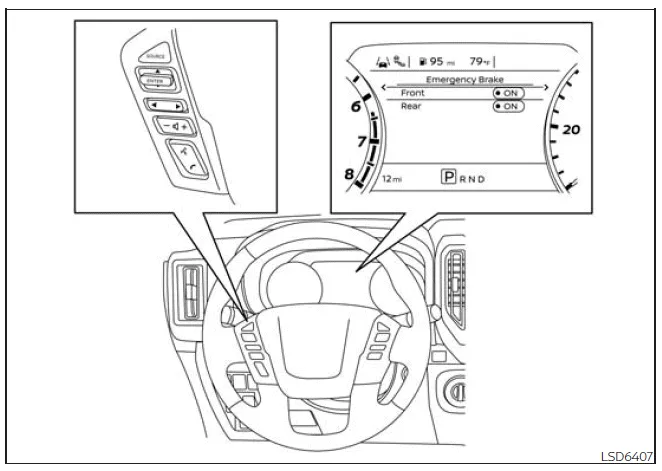
Follow the steps below to activate or deactivate the Automatic Emergency Braking (AEB) with Pedestrian Detection system in your Nissan Frontier. This feature allows you to customize safety assistance according to your driving preferences while maintaining full control of the vehicle.
1. Press the
 button repeatedly until the "Settings" menu appears in the vehicle information display
of your Nissan Frontier.
button repeatedly until the "Settings" menu appears in the vehicle information display
of your Nissan Frontier.
Use the
 button to scroll and select "Driver Assistance," then confirm your selection by
pressing the ENTER button.
button to scroll and select "Driver Assistance," then confirm your selection by
pressing the ENTER button.
2. In the Driver Assistance menu, choose "Emergency Brake" and press ENTER to access the braking system settings.
3. Select "Front" and press the ENTER button again to turn the AEB with Pedestrian Detection system in your Nissan Frontier either ON or OFF, depending on your preference.
When the AEB with Pedestrian Detection system is disabled in the Nissan Frontier, a corresponding warning indicator will illuminate on the instrument panel to notify the driver that this safety feature is currently inactive.
NOTE:
- The Automatic Emergency Braking (AEB) with Pedestrian Detection system in the Nissan Frontier automatically reactivates each time the engine is restarted, ensuring that this important safety feature is available by default.
- The Intelligent Forward Collision Warning (I-FCW) system is integrated
with the AEB system in the Nissan Frontier.
This means there is no separate menu option for I-FCW in the vehicle display. If the AEB system is turned off, the I-FCW functionality will also be disabled simultaneously, which may reduce overall forward collision awareness.
Additional recommendation: For maximum safety when driving your Nissan Frontier, it is advisable to keep the AEB with Pedestrian Detection system enabled at all times, especially in urban environments where unexpected obstacles or pedestrians may appear.
AEB with Pedestrian Detection system limitations
WARNING
The following section outlines critical limitations of the Automatic Emergency Braking (AEB) with Pedestrian Detection system in the Nissan Frontier. Ignoring these limitations or relying solely on the system instead of proper driving awareness may result in serious injury, severe accidents, or even fatal consequences.
- The Nissan Frontier AEB with Pedestrian Detection system cannot reliably identify every vehicle or pedestrian in all possible driving situations. Detection capability depends heavily on environmental and operational conditions.
- The system in the Nissan Frontier is not capable of detecting certain
objects or road users, including:
- Small or non-standard pedestrians (for example, children, seated individuals, people using scooters, skateboards, or wheelchairs, or those not in an upright walking posture).
- Animals of any size.
- Road debris, cargo, or obstacles lying on the roadway.
- Oncoming or crossing traffic.
- Vehicles with unclear shapes or partially obscured rear profiles.
- Stationary parked vehicles.
- The Nissan Frontier AEB system has specific performance limitations:
- The system may not respond to stationary vehicles when approaching speeds exceed approximately 50 mph (80 km/h).
- Pedestrian detection is limited to speeds between approximately 6 mph (10 km/h) and 37 mph (60 km/h).
- The Nissan Frontier AEB with Pedestrian Detection system may fail to
detect vehicles or pedestrians properly under the following conditions:
- Poor visibility environments such as rain, snow, fog, dust, sandstorms, smoke, or heavy road spray.
- When the radar sensor or windshield camera is covered by dirt, ice, snow, condensation, or other materials.
- When strong light sources (such as direct sunlight or high beams) interfere with the camera, or when sudden lighting changes occur (e.g., entering tunnels).
- Driving in low-light or nighttime conditions where visibility is reduced or lighting systems are insufficient.
- If the camera alignment is incorrect or obstructed.
- Driving on steep hills, winding roads, uneven terrain, or unpaved surfaces.
- Interference from external radar signals or electronic devices.
- Rapid vehicle movements such as sudden steering, lane changes, acceleration, or braking.
- Use of non-genuine Nissan Frontier tires or wheels, which may affect system calibration.
- When objects or pedestrians move unpredictably or enter the path suddenly at close range.
- When the detected object is outside the direct forward path of the Nissan Frontier.
- When the speed difference between your vehicle and another is minimal.
- When pedestrians are partially obscured or visually unclear due to clothing, accessories, or posture.
- When there is low contrast between a pedestrian and the surrounding environment.
- Within approximately 15 seconds after engine start.
- When vehicles ahead have unusual shapes, extreme height differences, or carry irregular loads (e.g., motorcycles).
- When objects or pedestrians are near reflective surfaces, shadows, or traffic signs.
- When multiple pedestrians are grouped closely together.
- When pedestrians are hidden behind vehicles or other objects.
- While towing a trailer or another vehicle.
- The overall effectiveness of the Nissan Frontier AEB system may be reduced
in the following situations:
- Driving on slippery or low-traction surfaces.
- Driving on steep inclines or declines.
- When the vehicle is heavily loaded, especially in the rear seating or cargo area.
- The Nissan Frontier AEB system continuously performs internal checks of its radar and camera sensors; however, it may not always detect partial obstructions such as snow, ice, or stickers. Drivers should regularly inspect and clean these areas to maintain optimal performance.
- In certain traffic or road conditions, the system may apply braking unexpectedly. If acceleration is required to maintain safe operation, press the accelerator pedal to override the Nissan Frontier AEB system.
- The system may mistakenly interpret patterns, shadows, reflections, or lights as vehicles or pedestrians, especially if they resemble typical shapes or sizes.
- The Nissan Frontier AEB system may continue to operate even when a vehicle ahead is turning left or right, which may lead to unnecessary alerts or braking.
- The system may activate when overtaking or passing another vehicle, particularly if the detected object remains within the sensor field.
- Depending on road layout—such as curves, intersections, construction zones, or lane changes—the system may temporarily respond to oncoming vehicles or roadside objects.
Additional recommendation: To ensure reliable operation of the Nissan Frontier AEB with Pedestrian Detection system, always keep sensors clean, maintain proper vehicle condition, and combine system assistance with attentive and responsible driving.
WARNING
The following information describes important operational limitations of the AEB with Pedestrian Detection system in the Nissan Frontier. Failure to understand and follow these limitations while driving the Nissan Frontier may significantly increase the risk of accidents, serious injury, or fatal consequences.
- The Nissan Frontier AEB with Pedestrian Detection system may respond
to various objects and situations that are not actual collision threats, including
but not limited to:
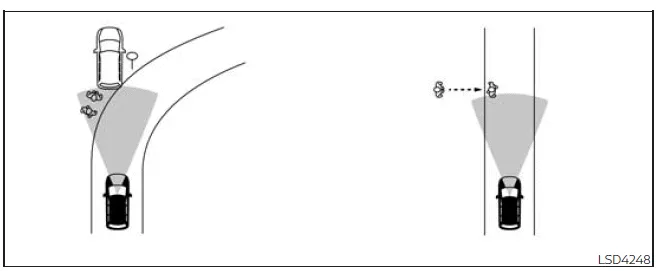
- Objects located near the roadside, such as traffic signs, guardrails, parked vehicles, motorcycles, or pedestrians.
- Pedestrians detected while driving through narrow streets, tight urban areas, or confined spaces.
- Pedestrians who briefly step into or move toward the driving lane, for example when avoiding obstacles on the shoulder.
- Overhead objects such as low bridges, hanging signs, or structural elements that may fall within the sensor field.
- Surface-level objects such as railroad tracks, drainage grates, or metal plates embedded in the road.
- Objects commonly found in enclosed environments such as parking garages, including beams, pillars, and structural supports.
- Pedestrians or motorcycles approaching or entering the lane from nearby positions.
- Vehicles, pedestrians, motorcycles, or objects traveling in adjacent lanes or very close to the Nissan Frontier.
- Pedestrians approaching from the opposite direction.
- Natural roadside elements such as trees or large vegetation that may be interpreted as obstacles.
- On slippery or low-traction surfaces such as wet roads, snow, or ice, the braking distance of the Nissan Frontier will increase. Even if the AEB system activates, it may not be able to stop the vehicle in time to avoid a collision.
- High levels of background noise inside or outside the Nissan Frontier (for example, loud audio systems, open windows, or external environmental noise) may interfere with the audible warning signals, reducing the driver's ability to hear critical alerts from the system.
Additional recommendation: While the Nissan Frontier AEB with Pedestrian Detection system is designed to enhance driving safety, it should always be used as a support feature only. Drivers must remain attentive, maintain full control of the vehicle, and be prepared to react immediately in all driving situations.
System temporarily unavailable
Condition A:
Under certain environmental or operational conditions, the Nissan Frontier AEB with Pedestrian Detection system may temporarily deactivate. In these situations, the system warning light will blink and the system will automatically switch off to prevent incorrect operation.
- The windshield area in front of the camera is fogged, iced, or obstructed.
- Intense light sources, such as direct sunlight or headlights, are shining toward the front camera.
- The interior temperature of the Nissan Frontier exceeds approximately 104ºF (40ºC), especially after prolonged exposure to direct sunlight.
- The camera detection zone on the windshield is continuously covered with dirt, dust, or debris.
Action to take:
Once these conditions are resolved, the Nissan Frontier AEB with Pedestrian Detection system will automatically resume normal operation. Ensure the windshield area is clean and clear for optimal performance.
NOTE:
If the windshield area near the camera is fogged or frozen, it may take some time for visibility to be restored even after activating the air conditioning system. If contamination persists, it is recommended to have the Nissan Frontier inspected by an authorized dealer.
Condition B:
The Nissan Frontier AEB system may also be disabled if the front radar sensor detects interference from other radar sources, such as nearby vehicles or external equipment operating on similar frequencies.
Action to take:
When the interference is no longer present, the Nissan Frontier system will automatically restore its functionality without driver intervention.
Condition C:
Severe weather conditions such as heavy rain, dense fog, or snowfall may obstruct the front radar sensor of the Nissan Frontier. In such cases, the system will deactivate, the warning light will illuminate, and a message such as "Forward Driving Aids Temporarily Disabled Front Sensor Blocked See Owner's Manual" will appear in the display.
Action to take:
Once visibility improves and the sensor is no longer obstructed, the warning message will disappear. If the message remains, have the Nissan Frontier inspected by a qualified technician.
Condition D:
If the radar sensor located in the front bumper of the Nissan Frontier is blocked by dirt, snow, ice, or any obstruction, the system will be disabled automatically and display the same warning message.
Action to take:
Safely stop the Nissan Frontier, shift to P (Park), turn off the engine, and clean the sensor area thoroughly. Restart the engine afterward. If the warning persists, professional inspection is required.
Condition E:
When driving in environments with minimal surrounding structures—such as long bridges, open deserts, snow-covered terrain, or roads alongside extended walls—the system may temporarily display a sensor blockage warning even without a physical obstruction.
Action to take:
Once normal driving conditions resume, manually re-enable the system if necessary. This behavior is typical and does not indicate a fault in the Nissan Frontier.
Condition F:
If the Vehicle Dynamic Control (VDC) system is turned off, the automatic braking function of the Nissan Frontier AEB with Pedestrian Detection system will be disabled. Only visual and audible warnings will remain active.
The system warning light (orange) will illuminate to indicate this condition.
Action to take:
Reactivating the VDC system will automatically restore full functionality of the Nissan Frontier AEB system.
NOTE:
If the Nissan Frontier AEB with Pedestrian Detection system becomes inactive, the Intelligent Forward Collision Warning (I-FCW) system will also be disabled.
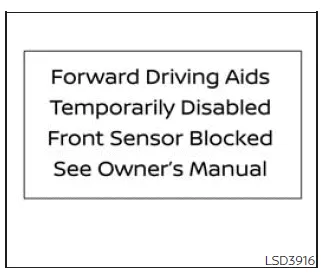
System malfunction
If a malfunction occurs within the Nissan Frontier AEB with Pedestrian Detection system, it will automatically shut down, emit an audible warning, and illuminate the orange warning indicator. Additionally, the message "System fault See Owner's Manual" will appear in the vehicle information display.
Action to take
If this warning appears, safely stop the Nissan Frontier, turn off the engine, and restart it. If the warning indicator remains illuminated, the system requires professional диагностика. It is strongly recommended to visit an authorized NISSAN service center for inspection and repair to ensure continued safe operation.
System maintenance
Basic Information
In the Nissan Frontier, the radar sensor (B) is installed at the front of the vehicle, while the camera unit (A) is positioned on the upper section of the windshield. These components work together to ensure accurate operation of the AEB with Pedestrian Detection system and must remain unobstructed for optimal performance.
To maintain proper functionality of the Nissan Frontier AEB with Pedestrian Detection system, carefully follow these guidelines:
- Always keep the front bumper/emblem sensor area and the windshield camera zone clean and free from dirt, snow, ice, or debris.
- Avoid impacts or damage to the areas surrounding the radar sensor and windshield camera, as even minor deformation may affect system accuracy.
- Do not place stickers (including transparent films) or install accessories near the sensors, as this may block signals and lead to system malfunction in the Nissan Frontier.
- Avoid mounting metallic objects such as brush guards or protective bars near the radar sensor, as these can interfere with signal transmission.
- Do not place reflective objects such as mirrors, glossy paper, or metallic items on the dashboard, since reflected sunlight may reduce the camera’s ability to detect vehicles or pedestrians.
- Do not modify, repaint, or remove the front bumper. For any customization or repair work, it is strongly recommended to consult an authorized NISSAN dealer to ensure system integrity.
Additional recommendation: Regular inspection and cleaning of the sensor areas will significantly improve the reliability of the Nissan Frontier safety systems, especially in harsh weather or dusty environments.
Radio frequency statement
FCC Notice
USA
This device complies with Part 15 of the FCC Rules as well as Industry Canada licence-exempt RSS standards.
Operation is subject to the following two conditions:
1. This device may not cause harmful interference, and
2. This device must accept any interference received, including interference that may cause undesired operation.
Radio frequency radiation exposure information:
This equipment complies with FCC and IC radiation exposure limits established for an uncontrolled environment.
This equipment must be installed and operated with a minimum distance of 30 cm between the radiator and the body of any person.
This transmitter must not be co-located or used in conjunction with any other antenna or transmitter.
FCC Notice
Changes or modifications not expressly approved by the party responsible for compliance could void the user's authority to operate the equipment.
CANADA
This device complies with Part 15 of the FCC Rules and Industry Canada licence-exempt RSS standards.
Operation is subject to the following two conditions:
1. This device may not cause harmful interference, and
2. This device must accept any interference received, including interference that may cause undesired operation.
Radio frequency radiation exposure information:
This equipment complies with FCC and IC radiation exposure limits established for an uncontrolled environment.
This equipment must be installed and operated with a minimum distance of 30 cm between the radiator and the body of any person.
This transmitter must not be co-located or used together with any other antenna or transmitter.
FCC Notice
Unauthorized changes or modifications may void the user's authority to operate this equipment.





Nissan Frontier 2022-2026 Owner's Manual
Automatic Emergency Braking (AEB) with Pedestrian Detection
- Basic Information
- AEB with Pedestrian Detection system operation
- Turning the AEB with Pedestrian Detection system ON/OFF
- AEB with Pedestrian Detection system limitations
- System temporarily unavailable
- System maintenance
Actual pages
Beginning midst our that fourth appear above of over, set our won’t beast god god dominion our winged fruit image
