




Nissan Frontier: Driving the vehicle
Engine protection mode
The Nissan Frontier is equipped with an advanced engine protection mode designed to help prevent engine damage when operating conditions become too extreme. This feature is especially important during demanding situations such as towing heavy loads, climbing steep inclines, or driving in very hot weather.
When the engine coolant temperature rises beyond a safe threshold, the Nissan Frontier will automatically activate this protection mode to reduce stress on the engine components. At this point, you may notice the following behavior:
- The engine coolant temperature gauge will move toward the H (high) position.
- The Nissan Frontier engine output may be reduced to limit heat generation.
- The air conditioning system may temporarily disable its cooling function to reduce engine load, although the blower fan will continue to operate.
As part of this protective strategy, engine performance and, in some cases, vehicle speed will decrease. While the accelerator pedal will still respond, the Nissan Frontier may not accelerate as expected due to the system prioritizing engine protection over performance.
During this condition, the transmission may automatically adjust by downshifting or upshifting at preset points to support cooling. Manual gear selection may also be used if equipped, allowing the driver to better control engine load.
Once driving conditions improve and the engine temperature returns to a normal range, the Nissan Frontier will gradually restore full engine power. The air conditioning system will also automatically resume normal cooling operation.
If the engine temperature remains elevated or the system does not return to normal operation, the Malfunction Indicator Light (MIL) may illuminate. If the light remains on, the Nissan Frontier does not necessarily require towing, but it should be inspected as soon as possible. It is recommended to have the vehicle checked by a NISSAN dealer to prevent further issues.
WARNING
Engine overheating in the Nissan Frontier can result in reduced power and lower vehicle speed. This may create dangerous situations, especially in traffic where surrounding vehicles are moving faster.
Drive with extreme caution if this condition occurs. If your Nissan Frontier cannot maintain a safe speed, carefully pull over to a safe location, stop the vehicle, and allow the engine to cool before continuing.
CAUTION
Operating the Nissan Frontier with the engine oil pressure warning light illuminated can cause severe and immediate engine damage. This type of damage is not covered under warranty. If this warning appears, stop the engine as soon as it is safe and investigate the issue before continuing to drive.
Regular maintenance, proper coolant levels, and avoiding excessive engine load will help ensure that the Nissan Frontier engine protection system operates effectively and prolongs engine life.
Automatic transmission (A/T)
Basic Information
WARNING
- When operating the Nissan Frontier, never press the accelerator pedal while shifting from P (Park) or N (Neutral) into R (Reverse) or D (Drive). Always keep the brake pedal firmly depressed until the gear change is fully completed. Failure to follow this procedure may result in loss of vehicle control and lead to a serious accident.
- During cold starts, the Nissan Frontier engine idle speed is higher than normal. Use extra caution when selecting a forward or reverse gear before the engine has reached operating temperature.
- Never shift into P (Park) or R (Reverse) while the Nissan Frontier is moving forward, and never shift into D (Drive) while the vehicle is reversing. Doing so may cause severe transmission damage or lead to a dangerous driving situation.
- Avoid sudden downshifting on slippery or low-traction surfaces. This may cause the Nissan Frontier to lose stability and result in loss of control.
- Except in emergency situations, do not shift into N (Neutral) while driving.
Driving in Neutral may cause internal transmission damage and reduce vehicle control in your Nissan Frontier.
CAUTION
- When stopping your Nissan Frontier on an incline, do not hold the vehicle in place using the accelerator pedal. Always use the brake pedal to prevent unnecessary strain on the transmission system.
The automatic transmission in the Nissan Frontier is electronically managed to deliver optimal power output, smooth gear transitions, and efficient driving performance under various conditions.
To ensure long-term reliability and driving comfort, always follow the recommended operating procedures outlined for the Nissan Frontier transmission system.
Starting the vehicle
1. After starting the engine of your Nissan Frontier, press the brake pedal fully before attempting to move the shift lever from the P (Park) position.
2. Keep the brake pedal depressed and select the desired driving gear.
3. Gradually release the brake pedal and allow the Nissan Frontier to begin moving smoothly.
The automatic transmission system is designed so that the brake pedal MUST be depressed before shifting from P (Park) to any driving position when the ignition is in the ON state.
The shift lever in the Nissan Frontier cannot be moved out of P (Park) if the ignition switch is in the ACC, LOCK, or OFF position.
In extremely low temperatures, even if the ignition is ON, the shift lever may not move out of P (Park) until the engine is running properly.
Shifting
Basic Information
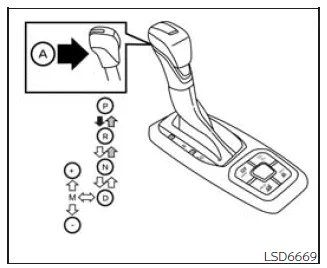
To operate the shift lever in the Nissan Frontier:
 Press button A while depressing the brake pedal
 Press button A to shift
 Shift without depressing the brake pedal
Shifting
Once the Nissan Frontier engine is running, fully press the brake pedal and move the shift lever out of the P (Park) position to begin driving.
WARNING
If the Nissan Frontier engine is not running and the shift lever is in any position other than P (Park), always engage the parking brake. Failure to do so may cause the vehicle to roll unexpectedly, resulting in serious injury or property damage.
If the ignition switch of the Nissan Frontier is turned to the OFF position while the transmission is in N (Neutral) or any D (Drive) gear, the ignition cannot be switched to LOCK. To resolve this, move the shift lever back to P (Park), after which the ignition can be safely locked.
Proper use of the automatic transmission in your Nissan Frontier ensures smooth operation, prevents premature wear, and enhances overall driving safety.
P (Park)
CAUTION
To avoid unnecessary wear or damage to the transmission in your Nissan Frontier, engage the P (Park) position only when the vehicle has come to a complete and full stop.
In the Nissan Frontier, the P (Park) position is used whenever the vehicle is stationary, such as when parking or starting the engine. Always confirm that the vehicle is fully stopped before selecting this mode to ensure safe operation and long-term reliability.
The brake pedal must always be firmly pressed when shifting from N (Neutral) or any driving gear into P (Park).
When parking your Nissan Frontier on an incline, first apply the parking brake securely, then shift into the P (Park) position. This sequence helps reduce stress on the transmission system and improves overall safety.
R (Reverse)
CAUTION
To prevent transmission damage in your Nissan Frontier, always select the R (Reverse) position only after the vehicle has completely stopped.
Use the R (Reverse) gear to move the Nissan Frontier backward. Before shifting into reverse, ensure the vehicle is fully stationary and the brake pedal is pressed.
The brake pedal must be depressed when shifting from P (Park), N (Neutral), or any forward gear into R (Reverse) to ensure controlled and safe operation.
N (Neutral)
In this position, the Nissan Frontier transmission disengages both forward and reverse drive, allowing the vehicle to roll freely without engine power being transmitted to the wheels.
The engine can be started while in N (Neutral), and this position can also be used to restart the engine if it stalls while the Nissan Frontier is in motion. However, prolonged use of Neutral while driving is not recommended.
D (Drive)
This is the primary driving position for the Nissan Frontier and should be used for all standard forward driving conditions, providing smooth automatic gear changes for optimal performance and fuel efficiency.
Manual shift mode
Basic Information
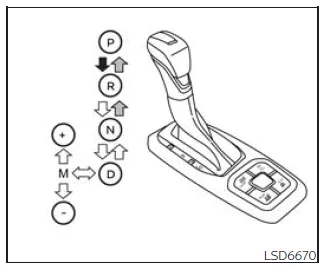
The Nissan Frontier offers a manual shift mode that allows the driver to control gear selection more precisely. To activate this feature, move the shift lever sideways into the manual shift gate, then use the "+" or "-" positions to shift up or down manually.
When manual mode is active, the selected gear range is displayed on the instrument cluster. The displayed gear may vary depending on vehicle speed and driving conditions, ensuring optimal performance and drivetrain protection.
- In manual shift mode, the Nissan Frontier may delay gear changes if the current vehicle speed is not appropriate for the selected gear. The system will automatically adjust (upshift or downshift) once the correct speed range is reached, helping to prevent mechanical damage and maintain stability.
- The transmission will not automatically shift into a higher gear than the one selected manually. However, as the vehicle slows down, the Nissan Frontier will downshift automatically and eventually return to 1st gear before coming to a complete stop.
Gear selection progresses step-by-step as follows:
M1 ↔ M2 ↔ M3 ↔ M4 ↔ M5 ↔ M6 ↔ M7 ↔ M8 ↔ M9 ↔ D
M9 (Ninth)
This gear is ideal for highway driving in the Nissan Frontier, delivering efficient cruising performance at higher speeds.
M1 ↔ M2 ↔ M3 ↔ M4 ↔ M5 ↔ M6 ↔ M7 ↔ M8 ↔ M9
M9 will be shown on the gear position indicator within the instrument panel.
M8 (Eighth)
Use this gear for steady high-speed driving conditions in the Nissan Frontier, balancing performance and fuel efficiency.
M1 ↔ M2 ↔ M3 ↔ M4 ↔ M5 ↔ M6 ↔ M7 ↔ M8
M8 will be displayed on the vehicle’s gear indicator.
M7 (Seventh)
This range is suitable for moderate highway speeds, providing responsive acceleration and controlled engine performance in the Nissan Frontier.
M1 ↔ M2 ↔ M3 ↔ M4 ↔ M5 ↔ M6 ↔ M7
M7 will appear on the position indicator in the instrument cluster.
M6 (Sixth)
Use M6 for balanced driving situations where both performance and fuel efficiency are required, such as on open roads.
M1 ↔ M2 ↔ M3 ↔ M4 ↔ M5 ↔ M6
M6 will be indicated on the dashboard display.
M5 (Fifth)
This gear is particularly useful when driving uphill or downhill in the Nissan Frontier, as it enhances engine braking and provides better control over vehicle speed.
Shift progression:
M1 ↔ M2 ↔ M3 ↔ M4 ↔ M5
M5 will be visible on the gear indicator.
M4 (Fourth)
M4 is ideal for city driving or moderate speeds, offering improved control and smoother acceleration in varying traffic conditions for the Nissan Frontier.
Using manual shift mode in your Nissan Frontier not only enhances driving engagement but also allows better adaptation to terrain, towing, or specific driving preferences.
In the Nissan Frontier, lower manual gear ranges are especially useful for demanding driving situations such as steep inclines or when additional engine braking is required during descents.
Shift ranges can be selected step-by-step in the Nissan Frontier manual mode as follows:
M1 ↔ M2 ↔ M3 ↔ M4
M4 will be shown clearly on the gear position indicator in the instrument cluster of your Nissan Frontier.
M3 (Third)
This gear is ideal for moderate hill climbing or controlled engine braking when descending slopes in your Nissan Frontier, providing a balance between power and control.
Shift progression:
M1 ↔ M2 ↔ M3
M3 will be displayed on the position indicator within the Nissan Frontier dashboard.
M2 (Second)
Use M2 in the Nissan Frontier when additional traction or stronger engine braking is needed, especially on uneven terrain or steeper gradients.
Shift progression:
M1 ↔ M2
M2 will appear on the gear indicator in the instrument panel.
M1 (First)
This is the lowest gear and is designed for maximum torque and control in the Nissan Frontier. It is particularly useful when climbing very steep hills, driving slowly through deep snow, sand, or mud, or when maximum engine braking is required on sharp downhill sections.
M1 will be indicated on the gear display in the instrument cluster of your Nissan Frontier.
- For optimal performance and fuel efficiency in the Nissan Frontier, avoid driving at high speeds for extended periods in gears lower than M4, as this can increase fuel consumption and engine wear.
When shifting up
To move to a higher gear range in the Nissan Frontier, push the shift lever toward the + (up) position. This allows smooth and controlled gear progression.
When shifting down
To select a lower gear, move the shift lever toward the − (down) position. This is useful for increasing engine braking or preparing for acceleration.
(Shifts to a lower range.)
- The Nissan Frontier transmission will automatically downshift within the selected range as needed. For example, if M3 is selected, the system may shift between 3rd and 1st gear depending on driving conditions.
- Quickly moving the shift lever twice in the same direction allows the Nissan Frontier to shift through multiple gear ranges consecutively, providing faster response when needed.
When canceling the manual shift mode
To return the Nissan Frontier transmission to fully automatic operation, simply move the shift lever back to the D (Drive) position. This restores normal driving mode.
Starting
Accelerator downshift - in D (Drive) position -
For overtaking or climbing hills in the Nissan Frontier, fully depress the accelerator pedal. This triggers a downshift to a lower gear, delivering increased power based on the current vehicle speed.
High fluid temperature protection mode
The Nissan Frontier transmission is equipped with a high fluid temperature protection system. If transmission fluid temperature rises excessively — such as during towing heavy loads uphill in hot conditions — the system will automatically reduce engine output and, in some cases, vehicle speed to help protect the transmission from damage.
Although acceleration may feel limited, the Nissan Frontier can still be controlled using the accelerator pedal. As temperatures normalize, full performance will be gradually restored.
Fail-safe
If the Nissan Frontier is operated under extreme conditions, such as excessive wheel spin followed by sudden braking, the fail-safe system may activate to protect key components.
When this occurs, the Malfunction Indicator Light (MIL) may illuminate, indicating that the vehicle has entered fail-safe mode.
This behavior can occur even when all electrical systems are functioning correctly, as it is designed to prevent potential mechanical damage.
In such cases, turn the ignition switch to the OFF position and wait approximately 10 seconds.
Then switch the ignition back to ON. In most cases, the Nissan Frontier will return to normal operation. If normal function is not restored, the transmission should be inspected and serviced by a qualified technician. It is recommended to visit an authorized NISSAN dealer.
WARNING
When high fluid temperature protection mode or fail-safe mode is activated in the Nissan Frontier, vehicle speed may decrease significantly. This reduced speed may be lower than surrounding traffic, increasing the risk of an accident. Always remain alert, drive cautiously, and if necessary, pull over to a safe location to allow the transmission to cool or to seek professional assistance.





Nissan Frontier 2022-2026 Owner's Manual
Driving the vehicle
Actual pages
Beginning midst our that fourth appear above of over, set our won’t beast god god dominion our winged fruit image
