




Nissan Frontier: Push-button ignition switch
Basic Information
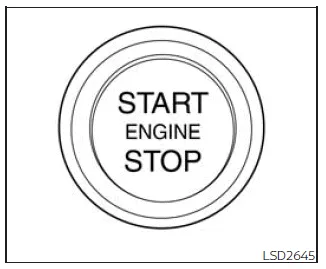
WARNING
Never operate the push-button ignition switch of your Nissan Frontier while the vehicle is in motion, except in a true emergency. (The engine can be forced to stop if the ignition switch is pressed three times rapidly or pressed and held for more than 2 seconds.) If the engine shuts off while driving, you may lose control of the Nissan Frontier, which can result in a serious accident and severe injury.
In the Nissan Frontier, when the ignition switch is pressed without depressing the brake pedal, the system cycles through different ignition modes. Each press changes the vehicle status as follows:
- First press: switches to ACC (accessory mode).
- Second press: switches to ON (full electrical system activation).
- Third press: returns to OFF.
The ignition system of the Nissan Frontier is designed with automatic safety logic. When the ignition is in the OFF position, opening or closing any door will cause the system to automatically return to the LOCK position.
If the ignition switch cannot be turned to the OFF position, follow this safe recovery procedure for your Nissan Frontier:
1. Move the shift lever securely into the P (Park) position.
2. Press the ignition switch once — the system will change to the ON position.
3. Press the ignition switch again to switch the system to OFF.
The shift lever in the Nissan Frontier can only be moved out of the P (Park) position when the ignition is in the ON position and the brake pedal is firmly depressed.
If the vehicle battery is discharged, the ignition switch of the Nissan Frontier may remain locked in the LOCK position and cannot be changed.
Various system indicators and warning messages related to ignition operation may appear in the instrument cluster display of the Nissan Frontier to guide the driver.
Operating range
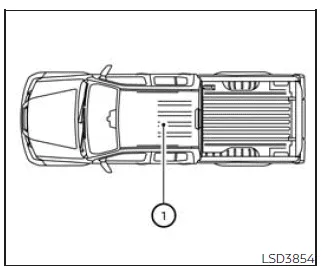
The Intelligent Key system in the Nissan Frontier operates only when the key is within the defined operating range. This ensures both convenience and security when starting the engine.
If the Intelligent Key battery becomes weak or if strong electromagnetic interference is present, the effective operating range may be reduced, and the Nissan Frontier may not recognize the key properly.
When the Intelligent Key is inside the vehicle, even if it is not held by the driver, the engine of the Nissan Frontier can still be started by pressing the ignition button.
The valid operating range for engine start functionality is generally limited to the interior cabin area of the Nissan Frontier 1.
- The luggage compartment is typically outside the official detection zone, although in some cases the Intelligent Key may still function.
- If the Intelligent Key is placed on the dashboard, inside the glove box, door pockets, or storage compartments, signal detection may be inconsistent and the Nissan Frontier may not start reliably.
- If the Intelligent Key is located very close to the vehicle exterior, such as near a window or door, the system may still detect it and allow ignition operation.
For optimal reliability and safety, always keep the Intelligent Key within the passenger compartment and avoid placing it near electronic interference sources when operating your Nissan Frontier.
Push-button ignition switch positions
LOCK (Normal parking position)
In the Nissan Frontier, the LOCK position represents the standard parking mode, where the ignition system is fully secured and the vehicle cannot be operated. The ignition switch can only be locked in this position.
When carrying the Intelligent Key, pressing the ignition switch will unlock the system and allow it to transition to the ON position.
For added safety, the Nissan Frontier automatically returns the ignition switch to the LOCK state when any door is opened or closed while the ignition is in the OFF position, helping prevent unintended vehicle operation.
ACC (Accessories)
The ACC (Accessory) mode in the Nissan Frontier enables the use of electrical components such as the audio system, infotainment features, and power outlets without starting the engine.
To protect the battery, the Nissan Frontier is equipped with a battery saver function. This system automatically switches the ignition from ACC to OFF after a period of inactivity when the following conditions are met:
- All doors are fully closed.
- The shift lever is positioned in P (Park).
- Hazard warning lights are turned off.
- Turn signals are not active.
The battery saver feature will be interrupted if any of the following actions occur:
- Any door is opened.
- The shift lever is moved out of the P (Park) position.
- The ignition mode is changed manually.
- The hazard lights are activated.
ON (Normal operating position)
In the ON position, all electrical systems of the Nissan Frontier are fully activated, including engine control systems and onboard electronics. This is the standard mode used for normal vehicle operation.
Similar to ACC mode, the Nissan Frontier also includes a battery protection feature in ON mode when the engine is not running. After a certain period, the system will automatically switch to OFF if the following conditions are present:
- All doors are closed.
- The transmission is in P (Park).
- Hazard lights are off.
- Turn signals are not in use.
The battery saver system will be canceled if any of the following occur:
- A door is opened.
- The shift lever is moved out of P (Park).
- The ignition switch position is changed.
- The hazard lights are turned on.
- The turn signals are activated.
CAUTION
Do not leave your Nissan Frontier with the ignition switch in the ACC or ON position while the engine is off for extended periods. This can lead to battery discharge and may prevent the vehicle from starting.
OFF
The OFF position indicates that the engine of the Nissan Frontier has been turned off and the ignition system is no longer active. In this state, most electrical systems are disabled to preserve battery life.
Emergency engine shut off
In emergency situations while driving your Nissan Frontier, the engine can be shut down using the push-button ignition system by performing one of the following actions:
- Press the ignition switch rapidly three times within approximately 1.5 seconds, or
- Press and hold the ignition switch continuously for more than 2 seconds.
This function should only be used in critical situations, as shutting off the engine while driving can affect steering and braking performance.
Automatic engine shut-off
The Nissan Frontier is equipped with an automatic engine shut-off system designed to prevent unnecessary idling and reduce fuel consumption. If the engine is left running for an extended period while the vehicle is stationary, the system will automatically turn the engine off.
This function operates when:
- The shift lever is in P (Park) for automatic transmission models, or
- The transmission is in N (Neutral) with the parking brake engaged for manual transmission models.
During the final 30 seconds before shutdown, a notification will appear in the vehicle information display of the Nissan Frontier.
At this stage, the driver can choose one of the following options using the steering wheel controls:
- Select "OK" to confirm shutdown. If no selection is made, the system will automatically turn off the engine.
- Select "Disable" to temporarily prevent engine shutdown for the current driving session. This setting will reset after the engine is restarted.
NOTE:
- The idle timer will reset if the brake or accelerator pedal is pressed, delaying the automatic shut-off of the Nissan Frontier engine.
- The automatic engine shut-off feature will reactivate each time the engine is restarted.
NISSAN Intelligent Key battery discharge
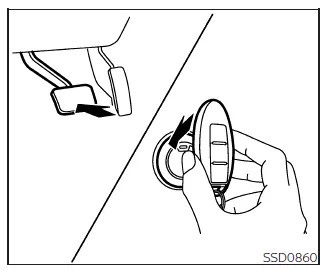
If the battery in the NISSAN Intelligent Key of your Nissan Frontier becomes depleted, or if external conditions interfere with signal transmission, the engine can still be started by following the procedure below. This backup method ensures reliable operation of the Nissan Frontier even when the key battery is weak.
1. Place the shift lever securely in the P (Park) position.
2. Firmly press and hold the brake pedal.
3. Touch the ignition switch directly with the Intelligent Key as illustrated. (A confirmation chime will sound.)
After completing step 3, pressing the ignition switch without depressing the brake pedal will switch the system to the ON position.
4. Within 10 seconds after the chime sounds, press the ignition switch while continuing to depress the brake pedal. The engine of your Nissan Frontier will start.
NOTE:
- When the Nissan Frontier is started using this emergency method or when
the ignition is switched to ON, an Intelligent Key battery discharge warning
may appear in the vehicle information display, even if the key is inside the
vehicle. This is normal and does not indicate a malfunction.
To clear the warning message, touch the ignition switch again with the Intelligent Key.
- If the Intelligent Key battery warning appears, replace the battery as soon as possible to ensure proper operation of your Nissan Frontier.
NISSAN Vehicle Immobilizer System
The Nissan Frontier is equipped with an advanced NISSAN Vehicle Immobilizer System designed to prevent unauthorized engine start. The engine will only start when a properly registered Intelligent Key is detected.
If the engine does not start even with a registered key — for example, due to signal interference from another key, electronic device, or payment transponder — follow this reset procedure:
1. Leave the ignition switch in the ON position for approximately 5 seconds.
2. Turn the ignition switch to the OFF or LOCK position and wait about 10 seconds.
3. Repeat steps 1 and 2.
4. Attempt to start the Nissan Frontier again, ensuring that any interfering device is kept separate from the Intelligent Key.
If the issue persists, it is recommended to keep the Intelligent Key on a separate key ring to minimize interference and ensure consistent recognition by the Nissan Frontier system.
Before starting the engine
- Ensure the area around your Nissan Frontier is clear of obstacles, people, and hazards.
- Regularly check fluid levels including engine oil, coolant, brake fluid, and windshield washer fluid — especially before long trips or refueling.
- Confirm that all windows, mirrors, and lighting elements are clean and unobstructed for optimal visibility.
- Inspect the tires for proper condition, wear, and correct inflation pressure to maintain safe handling of your Nissan Frontier.
- Verify that all doors are completely closed and securely latched.
- Adjust the driver’s seat, steering position, and head restraints for maximum comfort and control.
- Set the interior and exterior mirrors correctly to eliminate blind spots.
- Fasten your seat belt and ensure that all passengers in the Nissan Frontier are properly restrained.
- Check that all warning lights illuminate correctly when the ignition is switched to the ON position, confirming proper system operation.
Performing these checks before starting your Nissan Frontier enhances safety, improves vehicle reliability, and helps prevent unexpected issues during driving.





Nissan Frontier 2022-2026 Owner's Manual
Push-button ignition switch
Actual pages
Beginning midst our that fourth appear above of over, set our won’t beast god god dominion our winged fruit image
