




Nissan Frontier: Headlight and turn signal switch
Headlight control switch
Basic Information
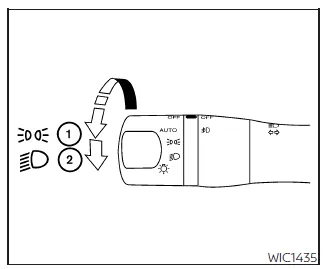
Type A (if so equipped)
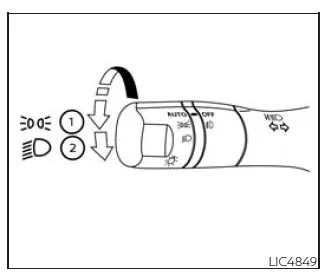
Type B (if so equipped)
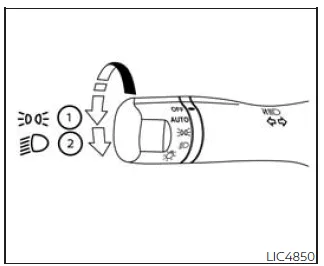
Type C (if so equipped)
The Nissan Frontier headlight control system allows precise management of exterior lighting, ensuring optimal visibility and safety in all driving conditions.
Depending on the equipment level, your Nissan Frontier may feature different switch designs, but all operate using the same fundamental principles.
Lighting
- Rotate the switch to the
 position to activate the front parking lights, tail lights, license plate illumination,
and instrument panel lighting.
position to activate the front parking lights, tail lights, license plate illumination,
and instrument panel lighting. - Rotate the switch to the
 position to switch on the headlights while keeping all other exterior and interior
lights illuminated.
position to switch on the headlights while keeping all other exterior and interior
lights illuminated.
This intuitive lighting control in the Nissan Frontier ensures that the driver can quickly adapt to changing visibility conditions.
Autolight system
The Nissan Frontier autolight system automatically manages headlight operation based on ambient light conditions, providing convenience and enhancing driving safety.
The system is capable of:
- Automatically activating headlights, parking lights, tail lights, license plate lights, and instrument illumination in low-light conditions.
- Turning off lighting systems when sufficient daylight is detected.
- Keeping lights on for a preset duration after the ignition is turned OFF and all doors are closed, improving visibility when exiting the Nissan Frontier.
To activate the autolight system in the Nissan Frontier:
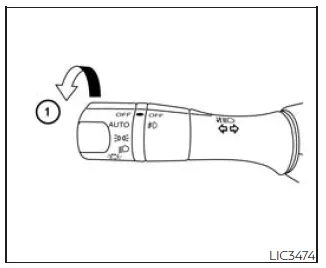
- For USA models: Turn the headlight switch to the AUTO position 1.
For Canadian models: Turn the switch to AUTO 1 or
 position.
 - Turn the ignition switch to the ON position.
- The Nissan Frontier will now automatically control headlight operation based on surrounding light conditions.
If the ignition is switched OFF and a door is opened, the headlights remain on temporarily. Opening another door will reset the timer.
To deactivate the autolight system:
For USA models: Turn the switch to OFF,
 ,
or
,
or
 .
.
For Canadian models: Turn the switch to
 .
.
The Nissan Frontier headlights may also automatically activate during twilight conditions or when the windshield wipers are continuously operating, further enhancing safety in low-visibility environments.
If a door remains open after the ignition is turned OFF, the headlights will stay illuminated for approximately 5 minutes before turning off automatically.
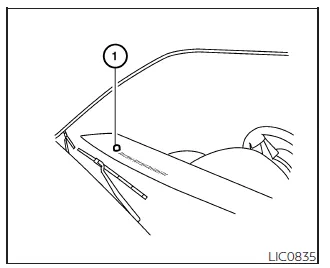
Be sure you do not place any objects on top of the autolight sensor 1 located on the upper instrument panel of the Nissan Frontier. Covering this sensor may cause the system to interpret conditions as dark, turning on the headlights unnecessarily and potentially discharging the battery.
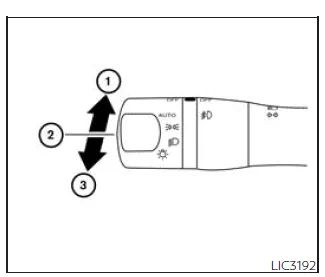
Headlight beam select
- To activate high beams in the Nissan Frontier, ensure the headlights are ON and push the lever forward. The high beam indicator will illuminate.
- Pull the lever back to return to low beam operation.
- Pulling and releasing the lever will flash the high beams momentarily, even if the headlights are off.
High Beam Assist
Basic Information
The High Beam Assist system in the Nissan Frontier enhances nighttime driving by automatically switching between high and low beams when appropriate.
The system becomes active when driving at speeds above approximately 25 mph (40 km/h).
If the system detects an oncoming vehicle or a vehicle ahead, it will automatically switch from high beam to low beam to prevent glare.
WARNING
- The High Beam Assist system in the Nissan Frontier is a convenience feature and does not replace attentive driving. Always monitor road conditions and manually adjust headlights when necessary.
- The system may not function correctly under certain conditions. In such
cases, manual control of high and low beams is required.
- During adverse weather conditions such as rain, fog, snow, or strong winds.
- When nearby light sources resemble headlights or tail lights.
- When other vehicles’ lights are partially obscured, dirty, or misaligned.
- When lighting conditions change suddenly.
- When driving on uneven terrain, hills, or winding roads.
- When reflective surfaces or objects cause intense light reflection.
- When towing objects that reflect light toward the Nissan Frontier.
- When your vehicle’s headlights are dirty or damaged.
- When the vehicle is tilted due to load imbalance, tire issues, or towing.
- The timing of switching between high and low beams may vary depending
on factors such as:
- Brightness and position of other vehicles’ lights.
- Movement and direction of surrounding vehicles.
- Presence of motorcycles or single-light vehicles.
- Road layout, curves, and surface conditions.
- Vehicle load, including passengers and cargo.
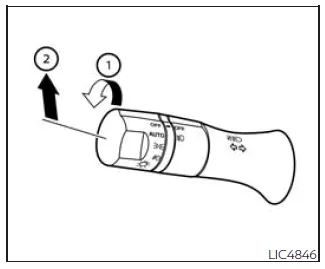
High Beam Assist operation
The High Beam Assist system in the Nissan Frontier is designed to automatically manage headlight intensity, improving nighttime visibility while reducing glare for other road users.
To activate High Beam Assist in the Nissan Frontier:
Turn the headlight switch to the AUTO position 1, then push the control lever forward 2 into the high beam position. When properly activated, the High Beam Assist indicator light will illuminate in the instrument cluster while the headlights are on.
If the indicator light does not appear under these conditions, this may indicate a malfunction in the Nissan Frontier system. In such cases, have the system inspected by a qualified technician. It is recommended to visit a NISSAN dealer.
When vehicle speed drops below approximately 16 mph (25 km/h), the Nissan Frontier automatically switches to low beam operation to ensure appropriate lighting for lower-speed conditions.
To deactivate the High Beam Assist system, rotate the headlight switch to the
 position or return the lever to the neutral position to manually select low beams.
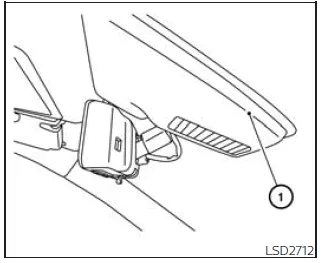
Ambient image sensor maintenance
The Nissan Frontier High Beam Assist system relies on an ambient image sensor located near the inside rearview mirror to detect surrounding light conditions and traffic.
To ensure optimal performance and prevent system malfunction, follow these guidelines:
- Keep the windshield of your Nissan Frontier clean at all times, especially around the sensor area.
- Do not place stickers, films, or accessories (including transparent materials) near the sensor location.
- Avoid impacts or damage to the area surrounding the ambient image sensor.
- Do not touch or contaminate the sensor lens, as this may affect its ability to detect light accurately.
If the ambient image sensor in the Nissan Frontier is damaged due to an accident or external impact, have it inspected and serviced by a NISSAN dealer to restore proper functionality.
Battery saver system
The Nissan Frontier is equipped with a battery saver system that helps prevent unnecessary battery discharge by automatically turning off certain electrical components when the vehicle is not in use.
When the ignition switch is placed in the OFF position and all doors are closed, the system will automatically deactivate the following:
- Headlights, when the headlight switch is in the
 or
or
 position.
 - Interior lights, if they have been left in the ON position (if equipped).
After the headlights are automatically switched off in the Nissan Frontier, they
can be reactivated by turning the headlight switch to the OFF position and then
back to the
 or
or
 position.
This intelligent feature in the Nissan Frontier helps extend battery life, especially when lights are accidentally left on.
CAUTION
Although the Nissan Frontier battery saver system automatically turns off the headlights after a certain period, it is strongly recommended to manually switch the headlights to the OFF position when the engine is not running. This helps prevent unnecessary battery drain and ensures reliable vehicle startup.
LED Daytime Running Lights (DRL) system
The LED Daytime Running Lights (DRL) system in the Nissan Frontier automatically enhances daytime visibility by illuminating at full brightness as soon as the engine is started and the parking brake is released.
In the Nissan Frontier, the LED DRL operate when the headlight switch is in the
OFF position, in the
 position, or in AUTO mode when ambient lighting conditions are sufficiently bright.
When the headlight switch is turned to the
 position for full lighting, the LED DRL automatically transition from daytime running
lights to standard parking light functionality.
position for full lighting, the LED DRL automatically transition from daytime running
lights to standard parking light functionality.
If the parking brake is engaged before starting the engine, the LED DRL in the Nissan Frontier will remain off. Once the parking brake is released, the system activates automatically.
The LED DRL remain illuminated until the ignition switch is turned OFF, ensuring consistent daytime visibility.
At dusk or in low-light environments, it is important to manually turn on the headlights in the Nissan Frontier, as interior controls and switch illumination do not activate while the switch remains in the OFF position.
WARNING
When the LED DRL system is active, the tail lights of the Nissan Frontier are not illuminated. Always switch on the headlights at dusk or in poor visibility conditions. Failure to do so may result in reduced visibility to other drivers and increase the risk of an accident.
Instrument brightness control
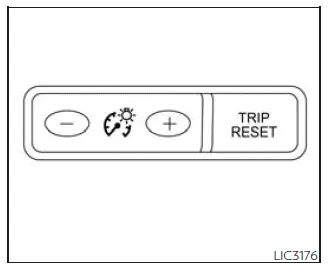
Use the "+" button to increase the brightness of the instrument panel lighting in the Nissan Frontier.
Use the "-" button to decrease brightness for improved comfort during nighttime driving.
Turn signal switch
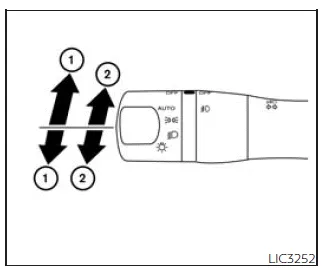
Turn signal:
- Move the lever upward or downward to indicate the intended turning direction. Once the turn is completed, the Nissan Frontier automatically cancels the signal.
Lane change signal:
- Move the lever slightly up or down until the turn signal begins flashing without locking into position. Hold the lever until the lane change maneuver is complete.
Fog light switch
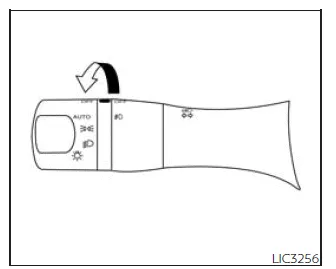
To activate the fog lights in the Nissan Frontier, first turn the headlight switch
to the
 position, then rotate the fog light switch to the
 position.
When the headlight switch is in AUTO mode (if equipped), the headlights must
already be on before the fog lights can be activated. Then turn the fog light switch
to the
 position.
To switch the fog lights off, rotate the fog light control to the OFF position.
Fog lights in the Nissan Frontier operate only when the low beam headlights are active and will automatically turn off when the high beams are selected.





Nissan Frontier 2022-2026 Owner's Manual
Headlight and turn signal switch
Actual pages
Beginning midst our that fourth appear above of over, set our won’t beast god god dominion our winged fruit image
