




Nissan Frontier: Keys
NISSAN Intelligent Key
Basic information
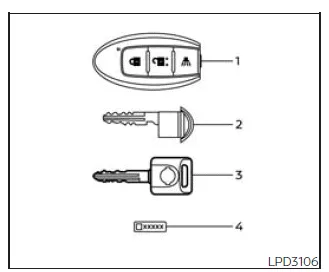
Type A (if so equipped)
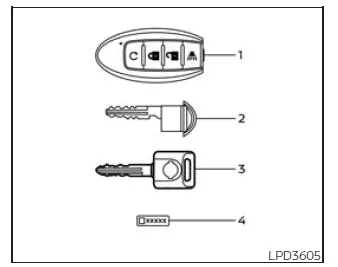
Type B (if so equipped)
- Two Intelligent Keys
- Mechanical key
- Master key
- Key number plate
The Nissan Frontier is equipped with the advanced Intelligent Key system, which allows secure and convenient vehicle access and operation without the need for traditional key insertion.
Your Nissan Frontier can only be operated using Intelligent Keys that are properly registered to its Intelligent Key system and the NISSAN Vehicle Immobilizer System. These systems work together to provide enhanced theft protection and ensure that only authorized keys can start the vehicle.
Never leave these keys inside the Nissan Frontier.
Up to four Intelligent Keys can be registered to a single Nissan Frontier. When adding new keys, all existing keys must be presented to a NISSAN dealer, as the system will erase previously stored data during registration and reprogram all keys simultaneously.
A key number plate is included with your Nissan Frontier keys. Record this number and store it in a safe place, such as your wallet — never inside the vehicle. This number is essential if all keys are lost and replacements are required.
NISSAN does not retain records of key numbers, so it is critical to keep your key number plate secure and accessible.
If at least one key remains available, duplication can be performed without the key number. However, if all keys are lost, the key number becomes necessary to create replacements.
CAUTION
The following conditions may damage the Intelligent Key used with your Nissan Frontier:
- Avoid exposing the Intelligent Key to water or saltwater, as moisture can damage internal electronic components.
- Do not drop the Intelligent Key or subject it to strong impacts.
- Do not strike the key against hard surfaces.
- Do not attempt to modify or alter the Intelligent Key.
- If the Intelligent Key becomes wet, dry it immediately and thoroughly.
- Do not leave the Intelligent Key in areas exceeding 140ºF (60ºC), such as inside a parked vehicle in hot weather.
- Avoid attaching the Intelligent Key to magnetic key holders.
- Keep the Intelligent Key away from strong electromagnetic sources such
as televisions, audio systems, or personal computers.
If an Intelligent Key for your Nissan Frontier is lost or stolen, it is strongly recommended to have its ID erased from the vehicle system by a NISSAN dealer to prevent unauthorized use.
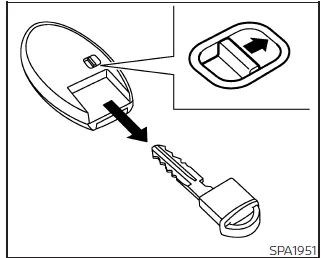
Mechanical key
The Nissan Frontier Intelligent Key also includes a built-in mechanical key for emergency use.
To remove the mechanical key, release the lock knob located on the back of the Intelligent Key.
To reinstall it, insert the key fully until the lock mechanism clicks securely into place.
The mechanical key can be used to manually lock or unlock the driver’s door, tailgate, and glove box (if equipped) in situations where electronic access is unavailable.
CAUTION
Always ensure that the mechanical key is properly secured inside the Intelligent Key housing when not in use.
Valet hand-off (if so equipped)
When handing over your Nissan Frontier to a valet, it is important to protect your personal belongings by limiting access to certain compartments.
Provide the valet with the Intelligent Key only, while retaining the mechanical key and master key for yourself.
To secure the glove box during valet service, follow these steps:
1. Remove the mechanical key from the Intelligent Key.
2. Lock the glove box using the mechanical key or master key.
3. Hand over only the Intelligent Key to the valet and keep the remaining keys with you.
NISSAN Vehicle Immobilizer System keys
Additional or replacement keys for the Nissan Frontier Immobilizer System can be obtained as follows:
If you still have an existing key, duplication is possible without the key number. However, all keys must be presented to a NISSAN dealer for proper registration.
The Nissan Frontier Immobilizer System supports up to four keys. During registration, all previously stored key codes are erased, and only the keys present during the process will remain valid.
Any virtual key accessories (if equipped) must also be re-registered during this process.
Any key not included during registration will no longer be able to start your Nissan Frontier.
CAUTION
Do not expose immobilizer system keys to water or saltwater. The embedded transponder is sensitive to moisture and may fail if damaged.
Proper care and handling of your Nissan Frontier keys will ensure long-term reliability, security, and seamless vehicle operation.





Nissan Frontier 2022-2026 Owner's Manual
Actual pages
Beginning midst our that fourth appear above of over, set our won’t beast god god dominion our winged fruit image
