




Nissan Frontier: Intelligent Key battery replacement
Basic information
WARNING
- Ingestion hazard: Swallowing a battery can result in severe injury or death when using or servicing your Nissan Frontier Intelligent Key.
- Button cell or coin batteries can cause dangerous internal chemical burns within as little as two hours if ingested.
- Always keep both new and used batteries for your Nissan Frontier out of the reach of children.
- Ensure that removed parts and batteries are not accessible to children or pets.
- If a battery is suspected to be swallowed or inserted into the body, seek immediate medical assistance.
- For emergency assistance, contact the National Battery Ingestion Hotline at 1-800-498-8666.
- There is a risk of explosion if the battery is replaced incorrectly. Always use the same type or an equivalent battery recommended for your Nissan Frontier.
- Do not crush, puncture, or disassemble the battery.
- Avoid exposing the battery to extremely low pressure environments, such as high altitudes.
- Keep the battery away from excessive heat sources including direct sunlight, fire, or other high-temperature environments.
CAUTION
- Improper disposal of batteries from your Nissan Frontier may harm the environment. Always follow local regulations for safe disposal.
- When replacing the battery, ensure that no dust, oil, or contaminants enter the Intelligent Key housing.
NISSAN Intelligent Key
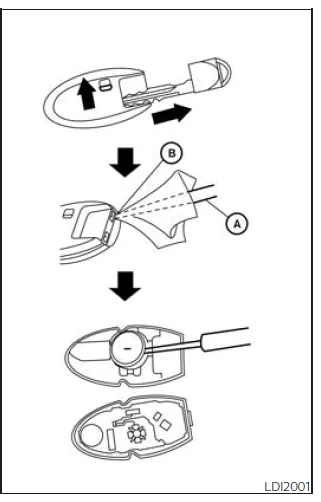
To maintain reliable operation of your Nissan Frontier Intelligent Key, replace the battery using the following procedure:
1. Remove the mechanical key from the Nissan Frontier Intelligent Key unit.
2. Insert a small flathead screwdriver A into the slit B at the corner of the key casing and gently twist to separate the upper and lower halves. To avoid damage, place a soft cloth between the screwdriver and the casing.
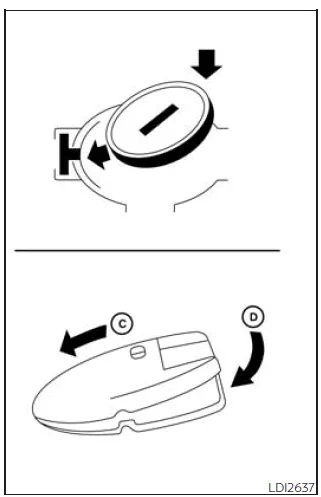
3. Replace the old battery with a new one of the recommended type.
Recommended battery: CR2032 or equivalent.
- Do not touch the internal electronic circuit or terminals of the Nissan Frontier Intelligent Key, as this may cause malfunction.
- Always handle the battery by its edges. Touching both contact surfaces simultaneously may reduce battery life.
- Ensure that the positive (+) side of the battery is correctly oriented toward the bottom of the housing.
4. Carefully reassemble the Intelligent Key casing by aligning and pressing the halves together until they securely snap into place (positions C and D).
5. Test all buttons on the Nissan Frontier Intelligent Key to confirm proper operation.
If assistance is required or if the key does not function correctly after replacement, it is recommended to consult an authorized NISSAN dealer.
Replacing the Intelligent Key battery in your Nissan Frontier at regular intervals helps ensure reliable remote operation, keyless entry, and vehicle starting functions.
FCC Notice:
For USA:
This device complies with Part 15 of the FCC Rules. Operation is subject to the following conditions: (1) this device may not cause harmful interference, and (2) it must accept any interference received, including interference that may cause undesired operation.
Note:
Any changes or modifications not expressly approved by the responsible party may void the user’s authority to operate the equipment.
For Canada:
This device contains licence-exempt transmitters/receivers that comply with Innovation, Science and Economic Development Canada RSS standards. Operation is subject to the following conditions: (1) this device may not cause interference, and (2) it must accept any interference, including interference that may cause undesired operation.





Nissan Frontier 2022-2026 Owner's Manual
Actual pages
Beginning midst our that fourth appear above of over, set our won’t beast god god dominion our winged fruit image
